Effective financial management requires a clear understanding of your company's liquidity. Two of the most critical tools for this are the Aged Receivable and Aged Payable reports. Simply put, these reports act as a timeline for your money. They don't just tell you how much you are owed or how much you owe; they tell you how long those amounts have been outstanding.
The primary use of these reports is to prioritize action. For receivables, they help you identify which customers are late so you can start collections before the debt becomes unrecoverable. For payables, they allow you to manage your own outgoing cash to ensure you pay suppliers on time, avoid late fees, and maintain a strong professional reputation. By categorizing transactions into specific time "buckets," Odoo 19 transforms a static list of invoices into a dynamic roadmap for cash flow stability.
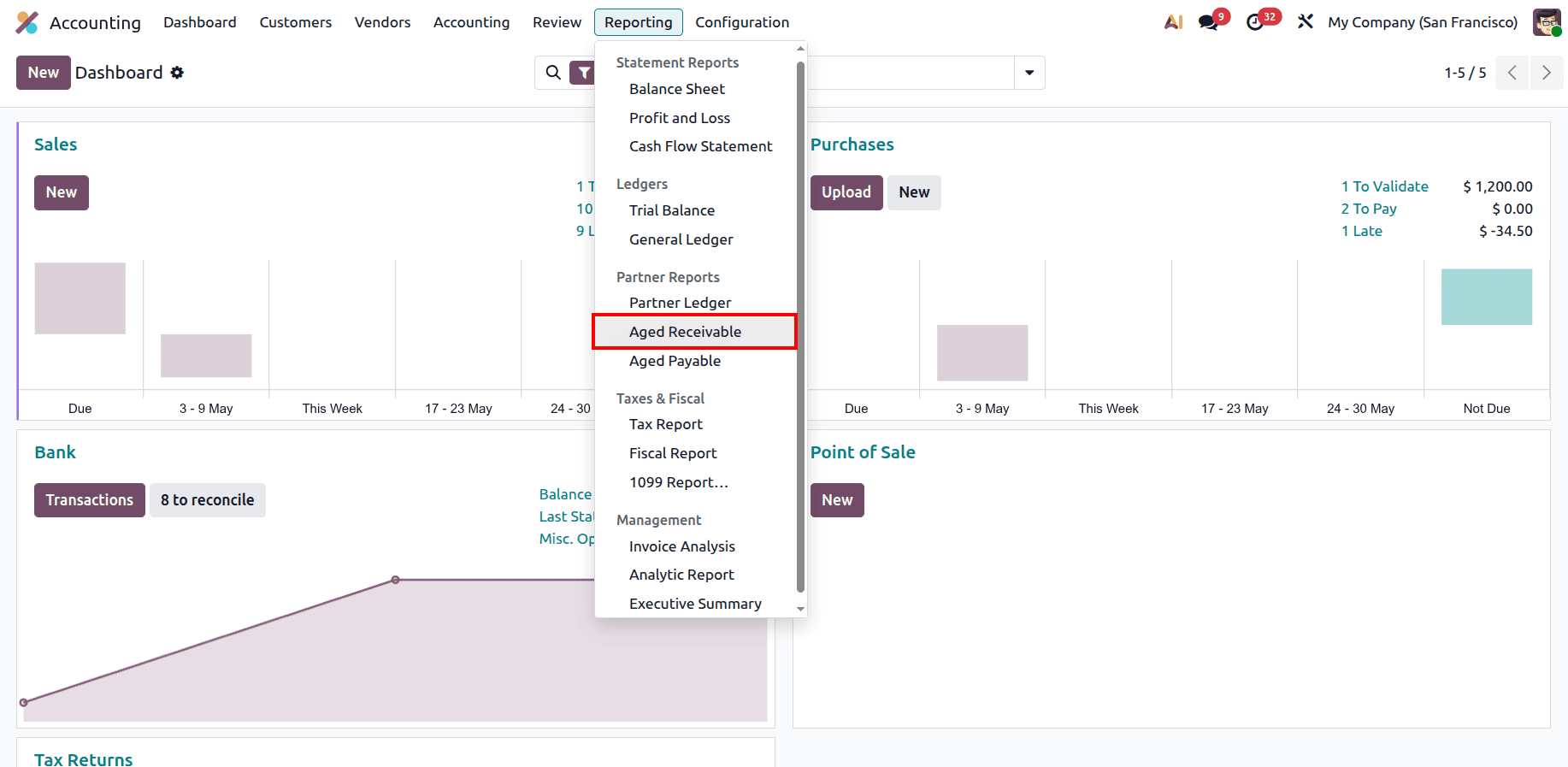
To access the aged receivable report, go to the accounting module and, under the Reporting menu, in the Partner report section, you can find the Aged Receivable report.
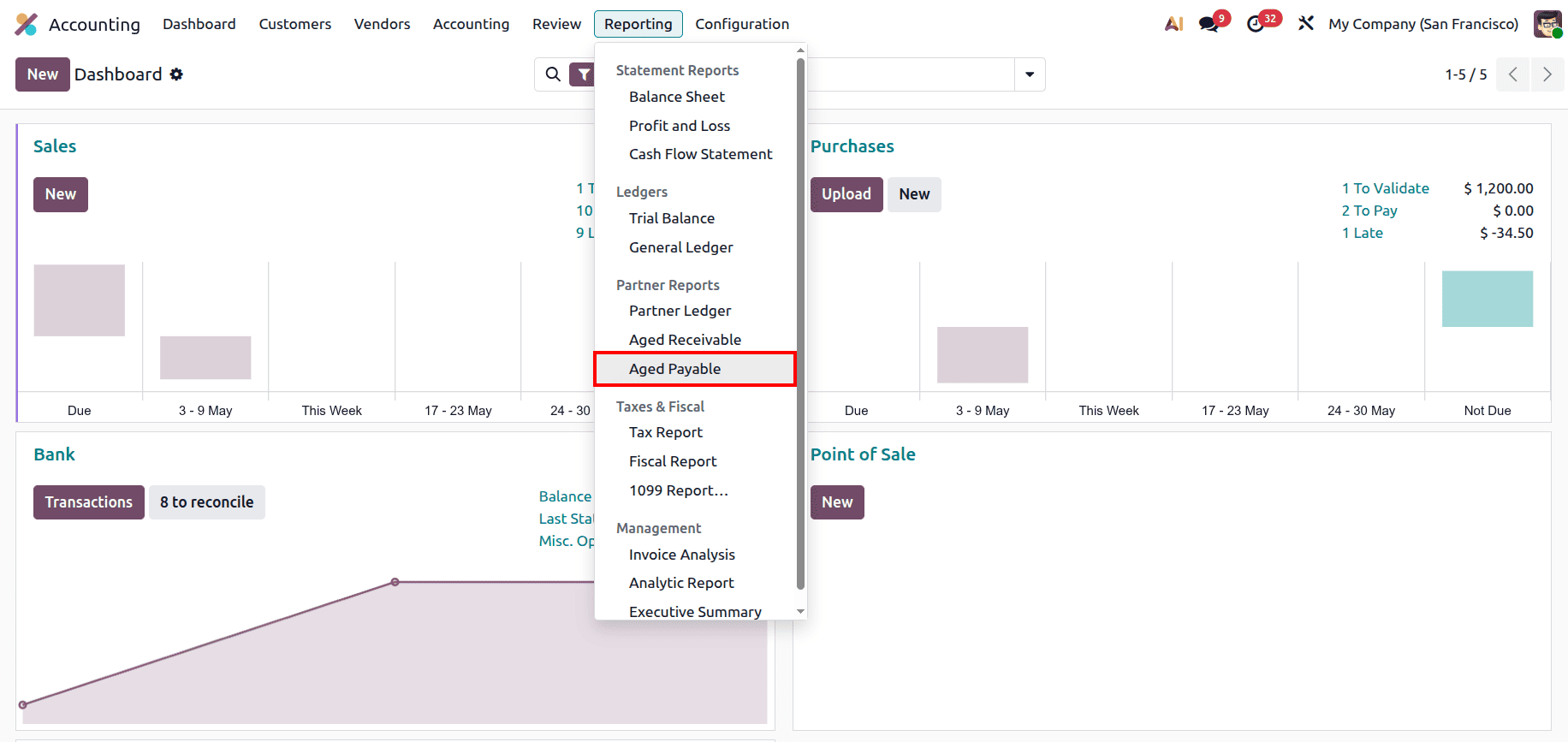
And to access the aged payable report, go to the accounting module and under the Reporting menu, under the Partner report section, you can find the Aged payable report.
Understanding the Aged Receivable Report
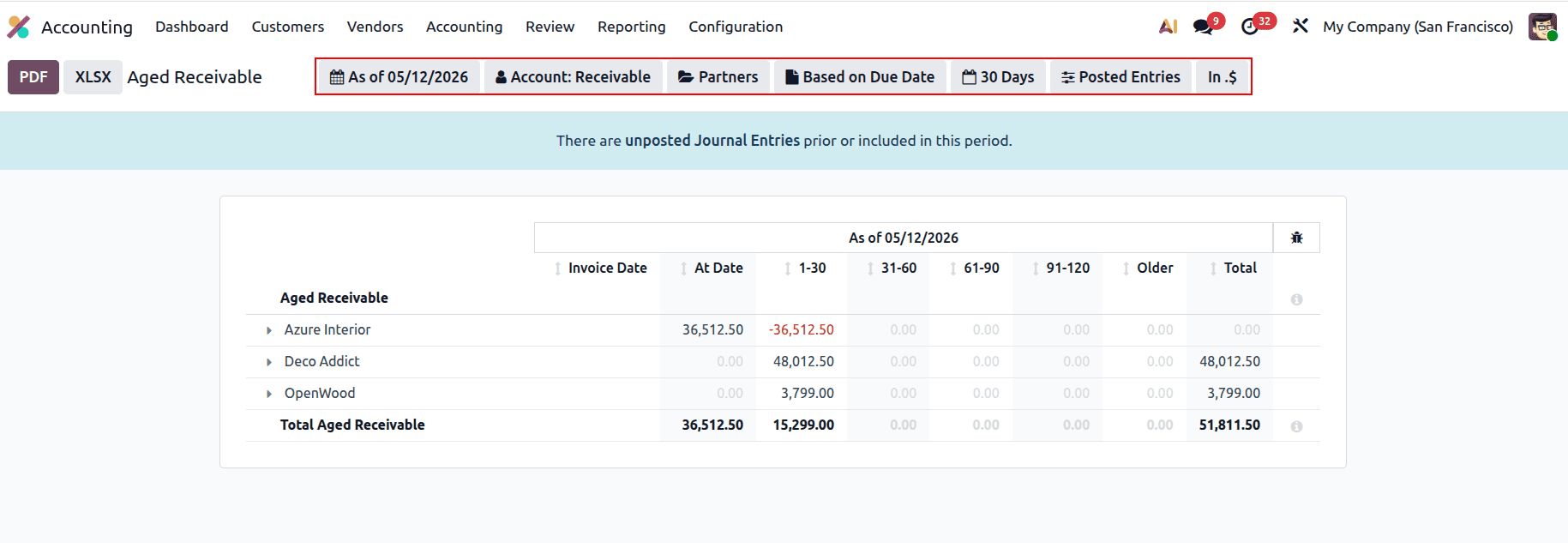
The Aged Receivable report is the primary dashboard for tracking customer debt. It categorizes outstanding customer invoices based on the number of days they have remained unpaid past their due date. This visibility is essential for maintaining a healthy "Days Sales Outstanding" (DSO) ratio and ensuring the business has enough incoming cash to fund operations.
The Structure of Aging Buckets
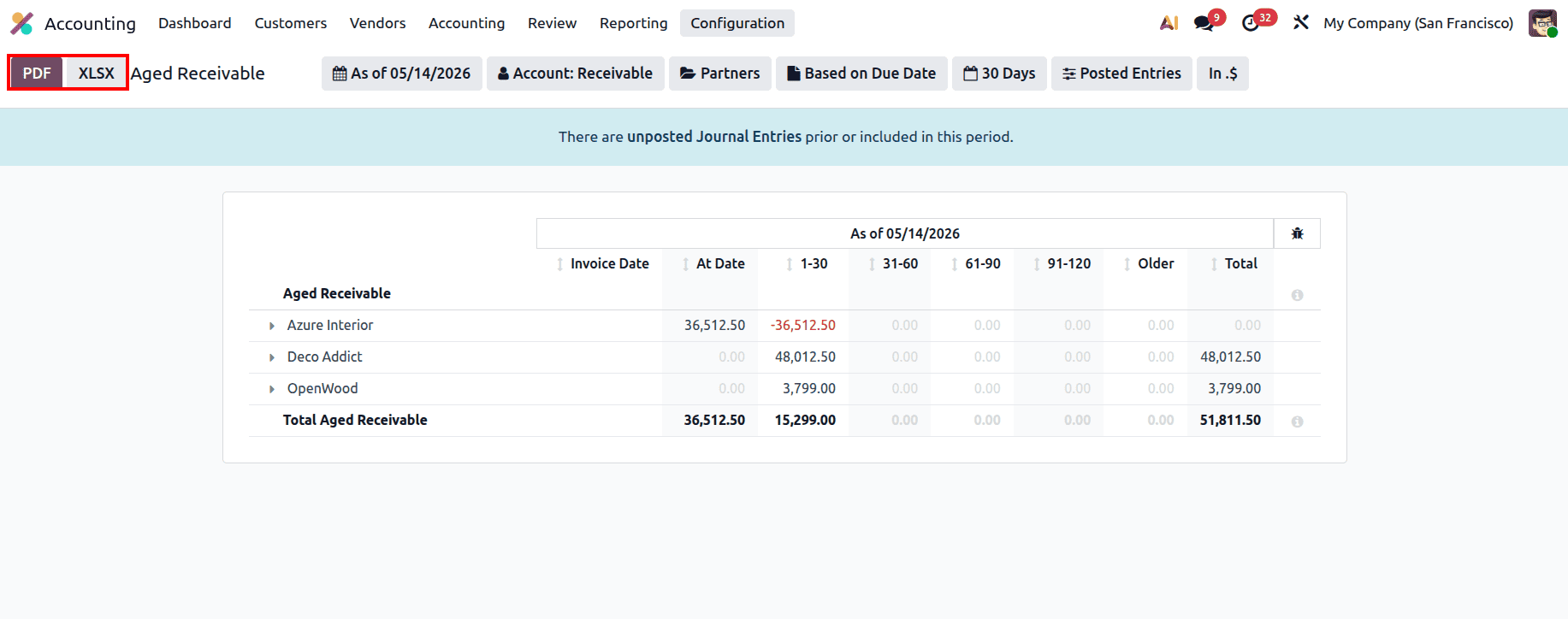
The report is organized into columns that represent specific time intervals. The At Date column shows amounts that are currently due or not yet due. Once an invoice passes its deadline, it moves into the 1 - 30 Days bucket, signifying the start of the overdue period. As time progresses, amounts shift into the 31 - 60, 61 - 90, and 91 - 120 Days buckets. These later stages indicate high-risk debt where the probability of collection decreases. Any balance in the Older category represents long-term outstanding debt that may eventually require a bad debt write-off.
Navigating Detailed Filters
To manage these receivables effectively, Odoo 19 offers several powerful filtering options:
- As of Date: This allows you to view the report as it stood at any point in time. You can select "Today" for a live view or "End of Quarter" to audit past performance.
- Account Selection: While it defaults to "Receivable," you can isolate specific accounts if you use different ledgers for trade customers versus internal staff advances. For this report, ensure the filter is set specifically to your Accounts receivable.
- Partners and Tags: This filter lets you narrow the view to a single customer or a group of partners tagged with specific identifiers, such as "Wholesale" or "International."
- Aging Logic: You can toggle the report to be "Based on Due Date" or "Based on Invoice Date." Using the Due Date is standard for collections, as it reflects the actual breach of payment terms.
- Bucket Interval: You can customize the 30-day default. If your business requires weekly tracking, you can set this to "7" days to create more frequent buckets.
- Posted vs. Draft Entries: By including "Draft Entries," you can see upcoming receivables that haven't been finalized yet, providing a "pro-forma" look at your future cash.
- Currency Scaling: This scales the values to thousands (K$) or millions (M$), which is helpful for high-level executive summaries where individual cents are not the focus.
Understanding the Aged Payable Report
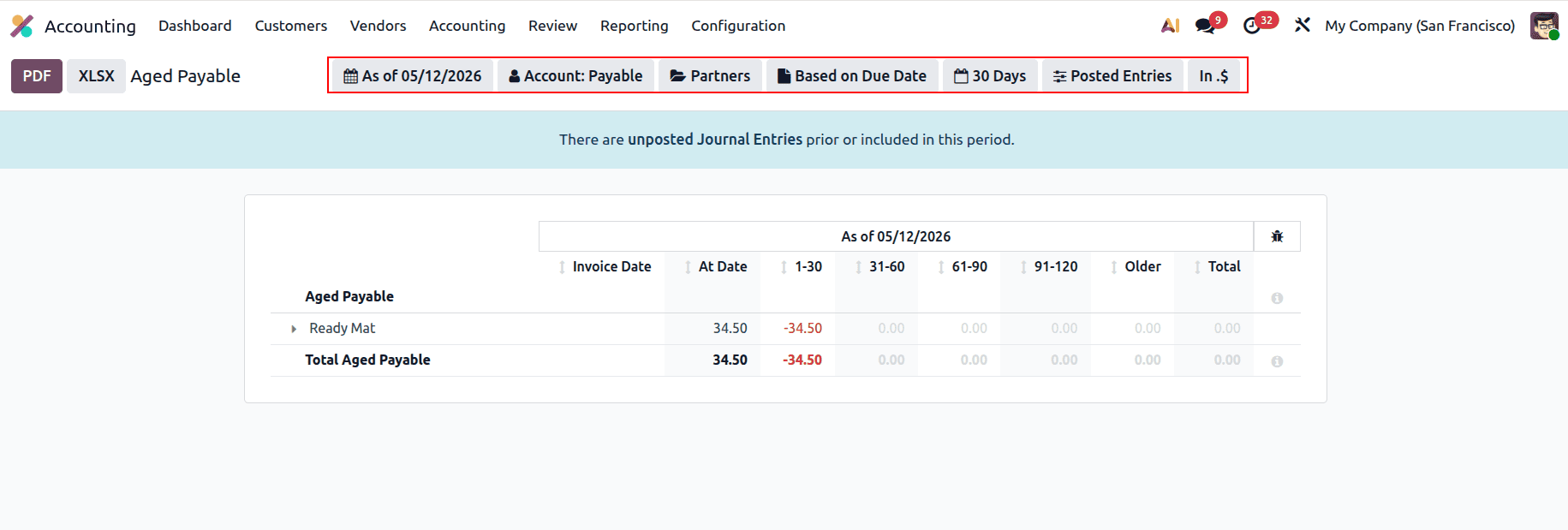
The Aged Payable report is the mirror image of the receivable report, focusing instead on what your business owes to its vendors. It is the core tool used by finance teams to schedule payment runs, manage vendor relationships, and ensure that the company does not face service interruptions due to unpaid bills.
Organizing Outgoing Obligations
Similar to receivables, payables are categorized by age. The At Date column represents bills that are current. Paying these on time ensures you can take advantage of early-payment discounts. Bills in the 1 - 30 Days bucket are slightly late, while those in the 31 - 60 or 61 - 90 Days buckets represent a risk to your supply chain. If essential vendors are not paid by the time they reach these later buckets, they may stop delivering goods or services, directly impacting your business operations.
Leveraging Advanced Filtering
The Aged Payable report uses a detailed set of sub-menus to help you control outgoing cash with precision:
- As of Date: Essential for planning. By selecting a future "End of Month" date, you can see exactly how much cash you will need to have on hand to clear your upcoming obligations.
- Account Selection: This should be set to Account Payable. It allows you to separate your trade creditors from other types of liabilities like tax payables or short-term loans.
- Partners and Tags: This is useful for analyzing your relationship with a specific supplier. Before negotiating new terms, you can pull a filtered report to see your historical payment punctuality.
- Aging Logic: Toggling "Based on Due Date" ensures your aging reflects the credit terms you negotiated (e.g., Net 45).
- Bucket Interval: You can shorten the interval to match your payment cycles, such as bi-weekly (14 days) or monthly.
- Posted vs. Draft Entries: Including "Draft Entries" is critical here because it shows bills that have arrived in the office but haven't been "Validated" yet, preventing surprises in your bank balance.
- Currency Scaling: Allows you to view the total debt in a rounded, simplified format (K$ or M$), which is ideal for a quick glance at the company's total liability.
To maintain accurate reports in Odoo 19, there are two technical signals you must monitor. First is the Blue Banner at the top of the report. This appears when there are "unposted Journal Entries," warning you that your data is incomplete. Always ensure your entries are posted before making major financial decisions. Second, watch for Negative Red Numbers. These often indicate a payment or credit note that has not been "reconciled" or linked to an invoice. Regular reconciliation ensures that your buckets correctly reflect your true financial position. Also, the report can be printed and exported in both XLSX and PDF formats.
In conclusion, the Aged Receivable and Aged Payable reports are much more than simple lists; they are the pulse of your business. By mastering the filters, from specific date snapshots to currency scaling, you gain the ability to predict cash shortages and surpluses well in advance. Consistently reviewing these reports ensures that you collect what is owed to you and pay what you owe in a way that supports the long-term stability and growth of your company.
To read more about An Overview of Aged Reports in Odoo 18 Accounting, refer to our blog An Overview of Aged Reports in Odoo 18 Accounting.