While profitability reports like the Profit and Loss statement tell you how much income your business has earned on paper, they do not tell you if you actually have currency sitting in the bank to fund operations. A business can be highly profitable yet run out of liquid cash due to timing differences between invoicing and collection. To bridge this gap, businesses rely on the Cash Flow Statement. It acts as a financial camera, tracking the actual physical inflows and outflows of cash over a duration of time to reveal your true liquidity.
In Odoo 19, the Cash Flow Statement is fully automated and dynamic. Because it tracks actual movements through your bank and cash journals, it eliminates manual reconciliation worksheets. It offers an instantaneous view of how your operational decisions, investments, and financing structures impact your liquid funds.
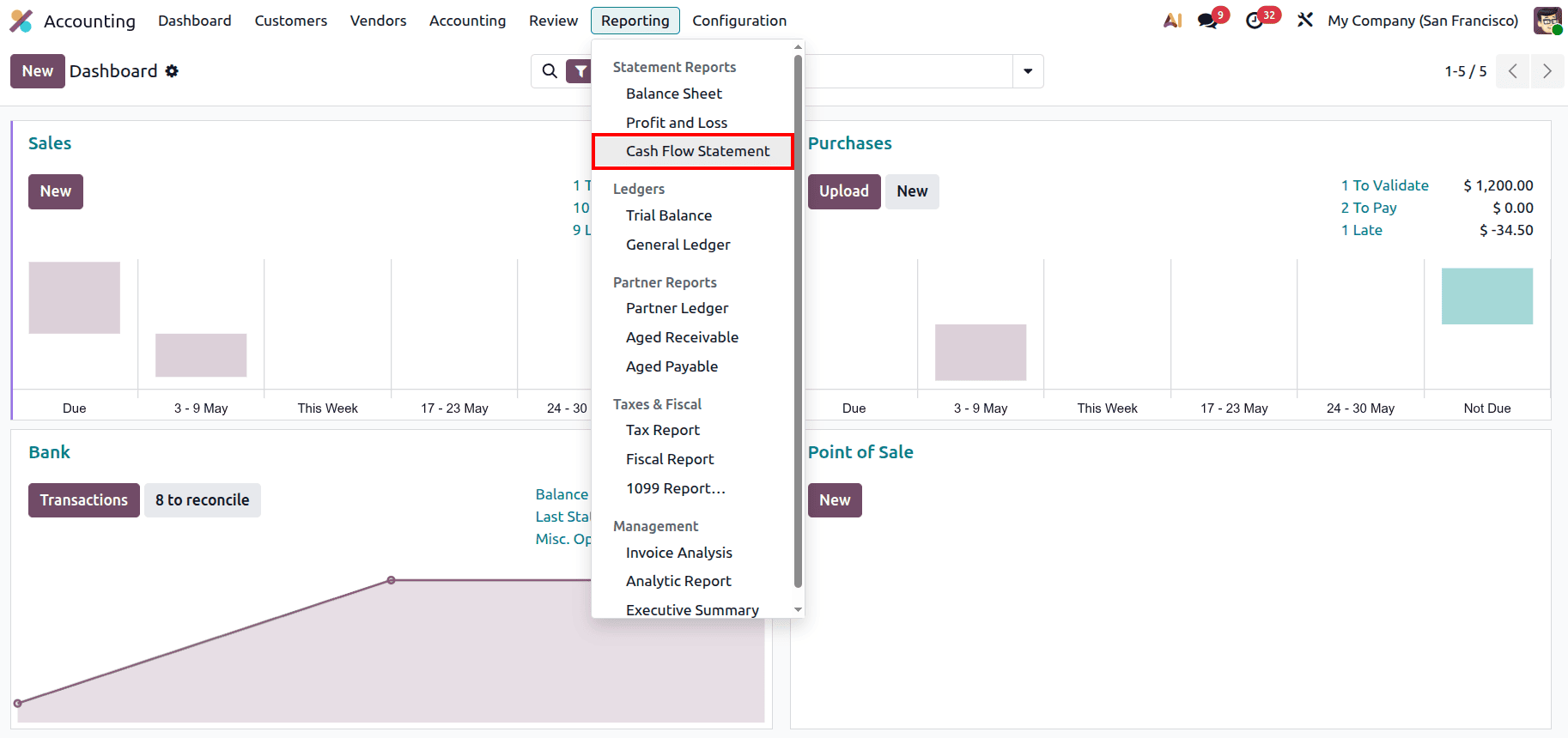
Accessing your real-time liquidity data is designed to be a straightforward process within the Odoo platform. To view this report, you begin by opening the Accounting Module from your central applications dashboard. Once you are inside the module, locate the Reporting tab in the main navigation header at the top of your screen, move down to the Statements category, and select the Cash Flow Statement link. Clicking this option immediately builds a live view of your cash positions, ready for executive analysis, period-closing reviews, or deeper filtering.
The Cash Flow Statement in Odoo 19 is meticulously organized into three standard financial pillars, bookended by your opening and closing cash balances. This structure isolates exactly where cash is being generated and where it is being consumed.
1. Cash Flows from Operating Activities
This first section represents the cash engine of your business. It calculates the net increase or decrease in liquid funds resulting directly from your primary revenue-producing operations.
- Advance Payments Received from Customers: This monitors cash collected upfront from clients before products are delivered or services are fully rendered, which provides an immediate influx of operating capital.
- Cash Received from Operating Activities: This line tracks the standard day-to-day cash inflows from cleared customer invoices, project settlements, and daily retail takings.
- Advance Payments Made to Suppliers & Cash Paid for Operating Activities: These items display the direct cash outflows paid to vendors for inventory or basic raw operational materials. If operating cash flow is consistently positive, it proves that the core business is highly self-sustaining.
2. Cash Flows from Investing & Extraordinary Activities
This section reflects long-term capital deployments aimed at expanding or securing the business's structural foundation.
- Cash In: This records cash inflows stemming from the liquidation or sale of company assets, such as selling an old company vehicle, clearing out real estate holdings, or collecting principal payouts from matured corporate investments.
- Cash Out: This ledger records the cash spent to acquire fixed assets, such as purchasing specialized machinery, upgraded office equipment, or structural technology systems. High cash-out values here indicate that the business is actively investing in its future capacity.
3. Cash Flows from Financing Activities
The third pillar highlights how your business funds its structure and returns value to its stakeholders or financial partners.
- Cash In: This records funds flowing into the business accounts from external financing sources, such as securing a bank mortgage loan or receiving capital infusions from company shareholders.
- Cash Out: This tracks cash exiting the business to pay down financing debts, including principal repayments on commercial loans, vehicle lease buyouts, or paying out cash dividends directly to investors.
The interface options at the top of the report allow you to customize how your liquidity data is calculated and presented. The report can be printed and exported in both XLSX and PDF formats.
- Date Range (e.g., Apr 2026): This filter sets the precise window of time for your cash movement analysis. Users can toggle quickly between standard operational intervals like Today, End of Month, End of Quarter, or End of Year, as well as define a Specific Date range to pinpoint cash behaviors during a seasonal rush.
- All Journals: While the report defaults to scanning all corporate transactions, this sub-menu allows you to isolate or filter out specific data flows. This ensures that only relevant operational accounting entries are affecting the visible cash totals.
- Posted Entries: This data control menu dictates the verification level of the report figures. Users can include Draft Entries to create a pro-forma forecast of upcoming cash impacts, toggle Unfold All to see individual general ledger account details, or use Hide lines at 0 to remove dormant cash rows for a more streamlined presentation.
- Currency Scaling (In .$): For mid-sized or enterprise operations handling significant transaction volumes, this tool allows you to simplify data fields by rounding off individual cents, scaling by thousands (In K$), or scaling by millions (In M$) to facilitate rapid executive reviews.
To get the highest strategic value out of your Odoo 19 cash reporting, it is important to check the top status indicators before analyzing numbers. Always look out for the unposted Journal Entries banner displayed across the top of your screen. If this alert is visible, it means bank lines, vendor payments, or sales receipts remain unvalidated. Evaluating cash flow while this alert is present means you are relying on incomplete data, which can result in inaccurate assessments of your true cash runway.
Furthermore, ensure that your bank feeds are reconciled daily. Because the Cash Flow Statement depends heavily on cleared transactions, delayed or unlinked bank statements will skew the timeline of your cash buckets. Utilizing Odoo’s analytic tags alongside your entries will allow you to see exactly which product lines or service teams are consuming the most cash, providing your management team with a sharp tool for fiscal discipline.
The Odoo 19 Cash Flow Statement is an essential window into your business’s actual financial capacity. By separating your cash movements into clear Operating, Investing, and Financing frameworks, Odoo translates complex double-entry bookkeeping into an easy-to-read liquidity blueprint. Combining this structural clarity with filters like historical date comparisons and currency scaling gives you the foresight needed to predict cash shortages and deploy surplus capital safely. Reviewing this document alongside your Profit and Loss report ensures that your business stays both solvent and structurally secure over the long term.
To read more about How to Generate a Cash Flow Statement in Odoo 19 Accounting, refer to our blog How to Generate a Cash Flow Statement in Odoo 19 Accounting.