Recruitment is an important process in every organization, as finding and selecting the right candidates directly influences business growth. The Odoo 20 Recruitment module includes several activities, from receiving applications to interviewing candidates and selecting suitable candidates. Recruitment reports help the HR team analyse the recruitment process and understand candidate performance. The Recruitment module also has reporting capabilities that enable businesses to review applications, their current status, and the overall results of the hiring process.
In this blog, we will explore how to analyse recruitment performance using Odoo 20 reports.
Analysing Recruitment Reports
Open your Recruitment module from the Odoo 20 Dashboard and click on the Reporting menu as shown below.
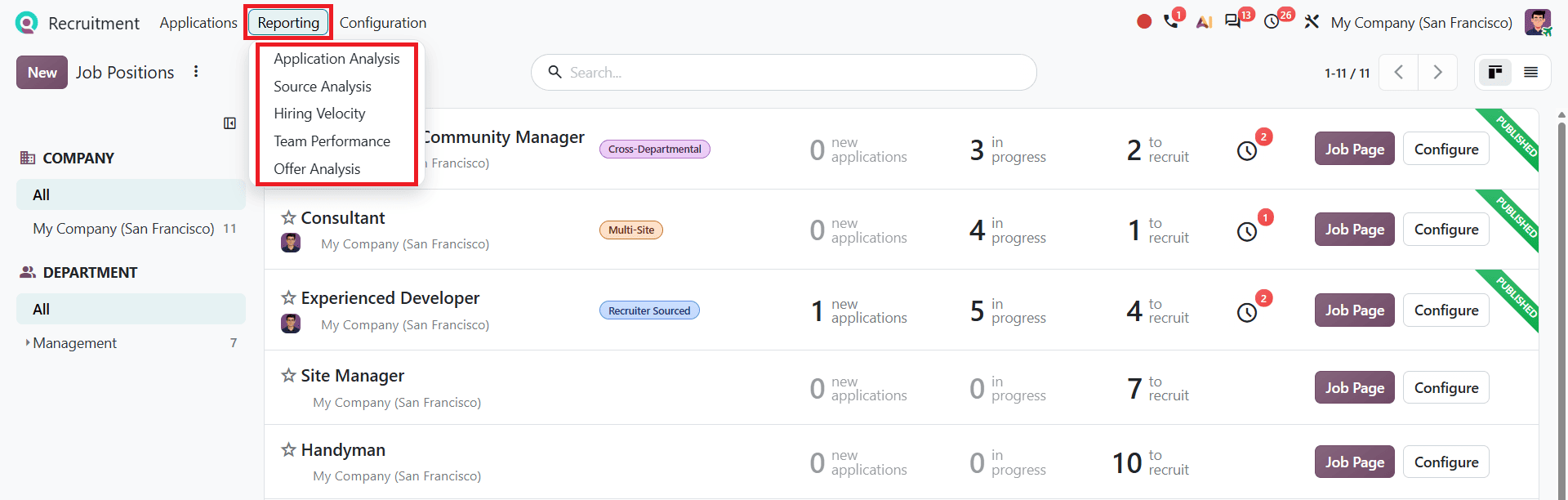
The reporting section includes Application Analysis, Source Analysis, Hiring Velocity, Team Performance, and Offer Analysis.
By using these reports, HR teams can track the number of hired and refused applicants, measure how long the recruitment process takes, and understand which sources bring in candidates. This can help your business improve its recruitment performance by identifying areas that need improvement and making better hiring decisions.
Application Analysis
Select Application Analysis from the Reporting menu. This report displays recruitment application data, such as how many applicants are in progress, hired, and refused. The Graph view helps HR teams compare recruitment progress over different months.
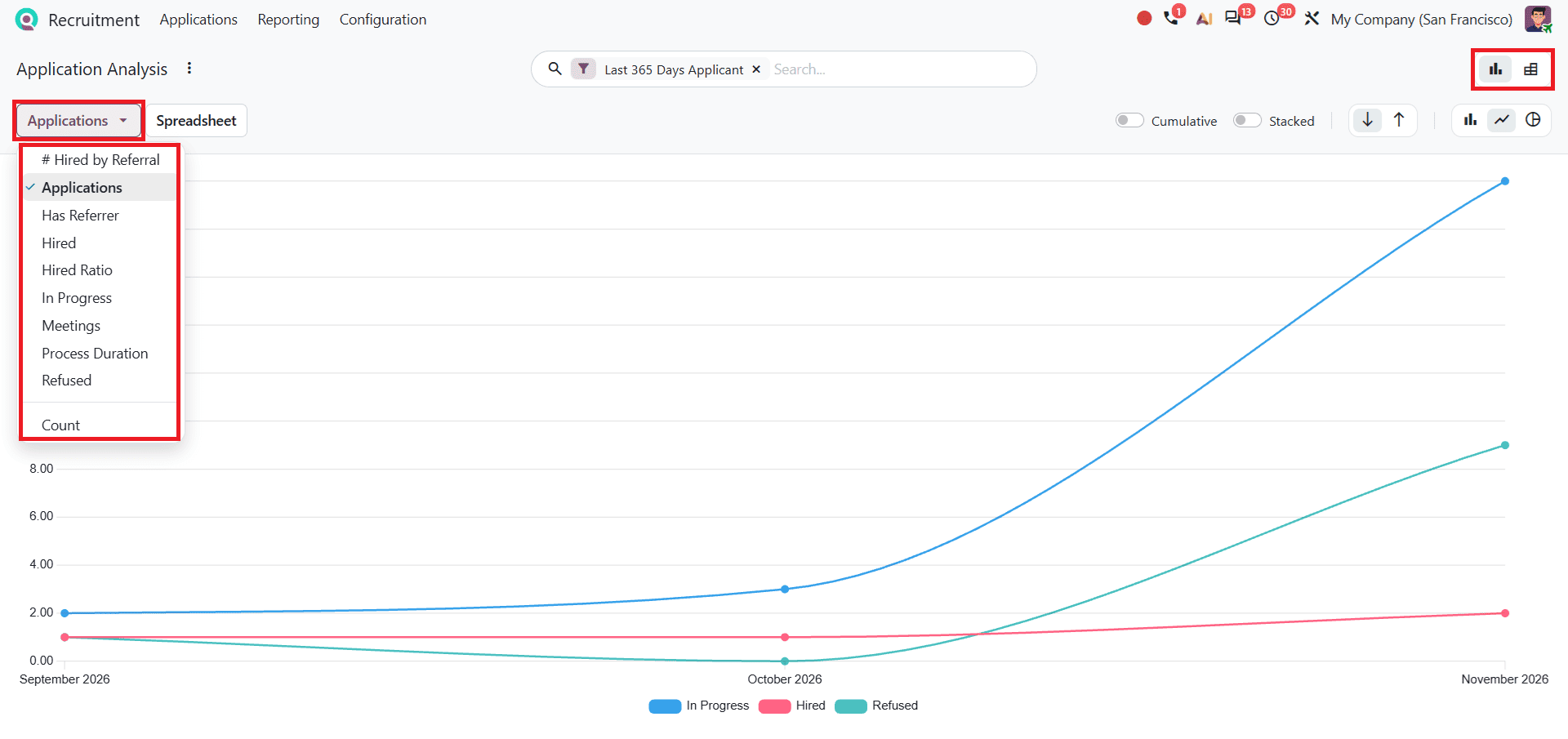
Users can also switch between different measures, including Applications, Has Referrer, Hired, Hired Ratio, In Progress, Meetings, and Process Duration.
Switch to Pivot view to get a more detailed view of the applications.
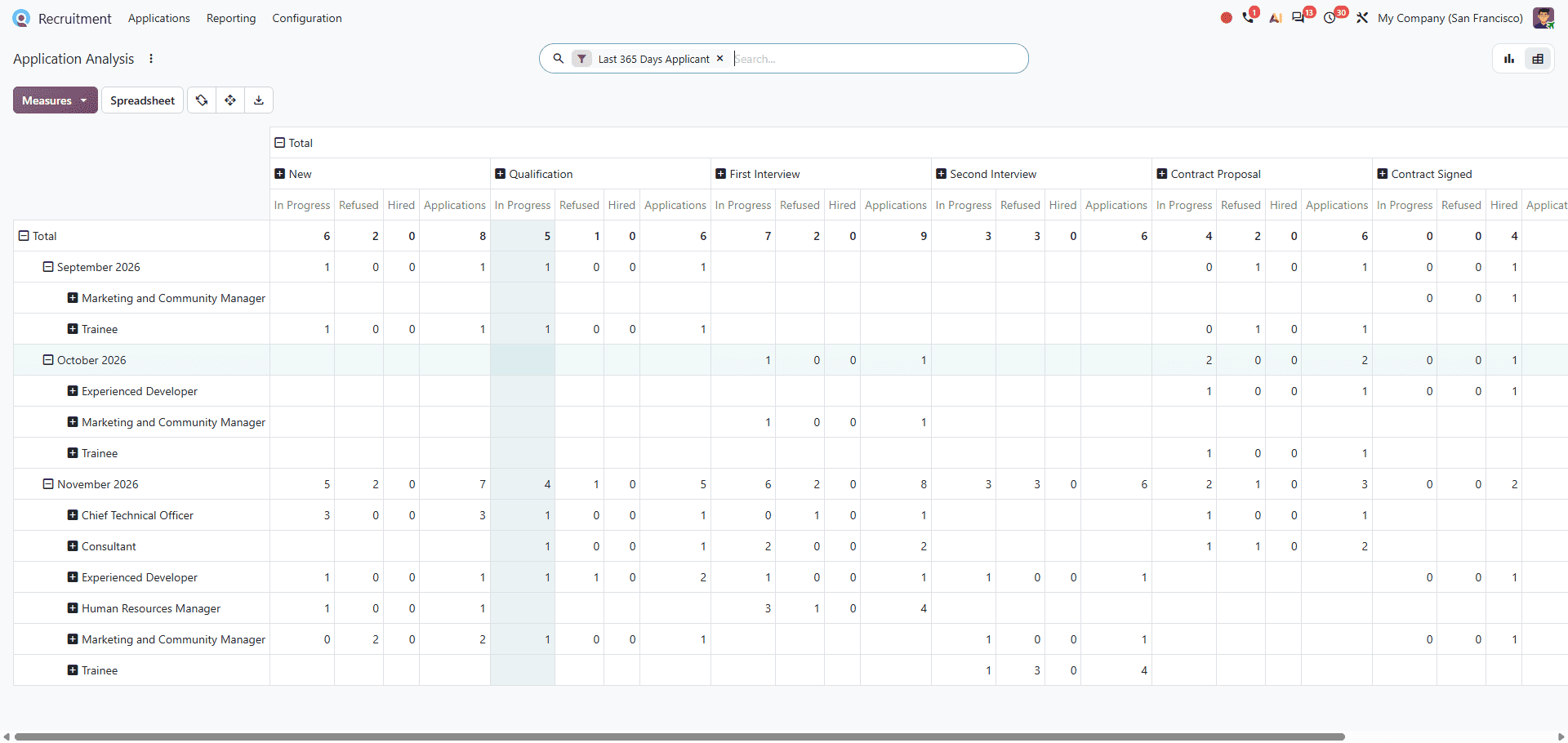
This view provides a breakdown based on job positions and months. It also shows the different stages of applications, making it easier to review recruitment data.
Understanding Recruitment Report Measures
The Odoo 20 Recruitment report includes different measures that help HR teams review application details and recruitment performance. Each measure provides information about a particular part of the hiring process. Let's look at what these measures indicate.
- Applications: Total number of applications received.
- Hired: Number of applicants who were successfully hired.
- Refused: Number of applicants whose applications were rejected.
- In Progress: Applications that are still being processed.
- Hired Ratio: Indicates how successful the recruitment process is in converting applications into hires.
- Has Referrer: Shows applications associated with a referrer.
- Hired by Referral: Number of successful hires associated with a referral.
- Meetings: Number of meetings linked to applicants.
- Process Duration: Shows the duration associated with the recruitment process.
Source Analysis
Select Source Analysis from the Reporting menu. This report shows where recruitment applications come from. The Graph view helps compare different recruitment sources, as shown below.
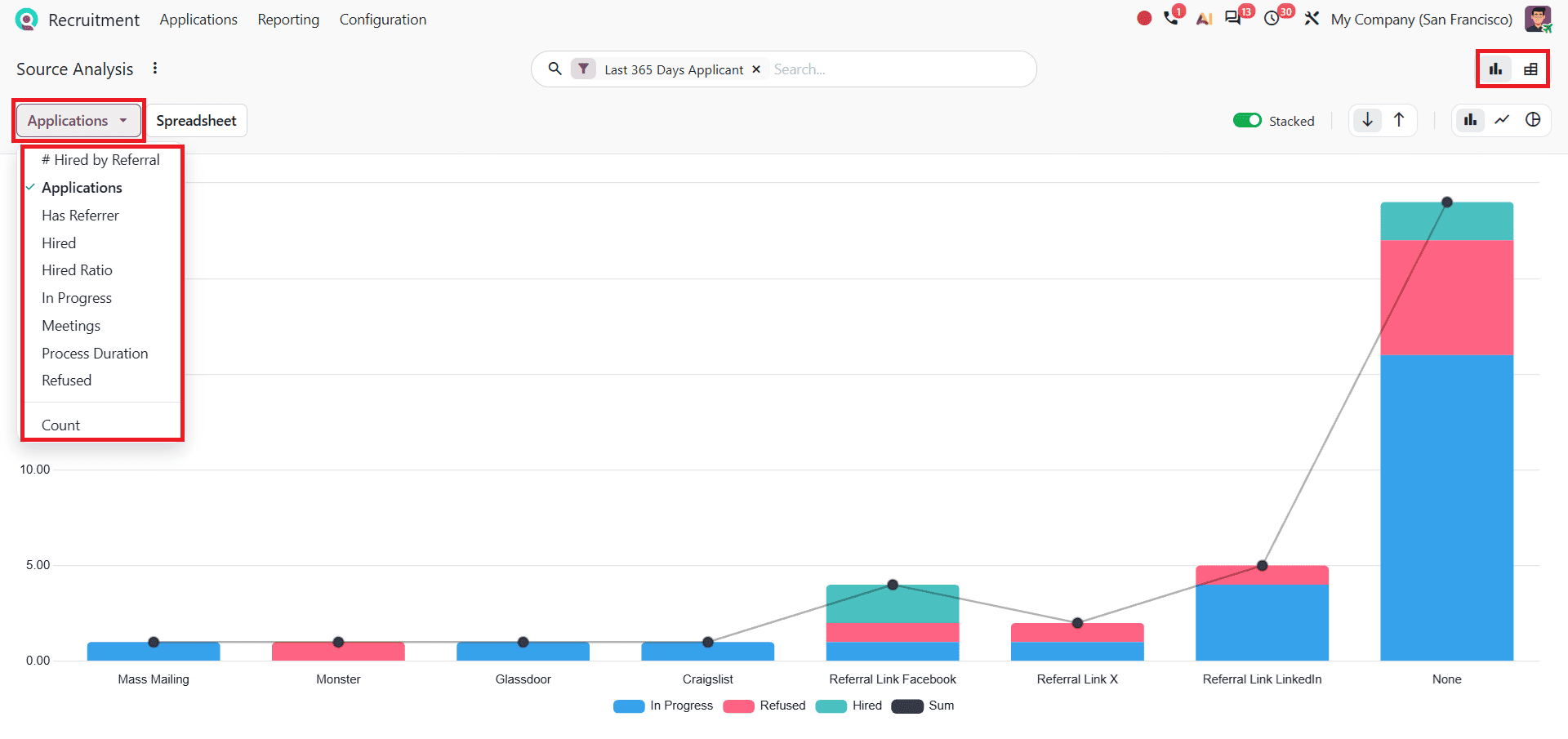
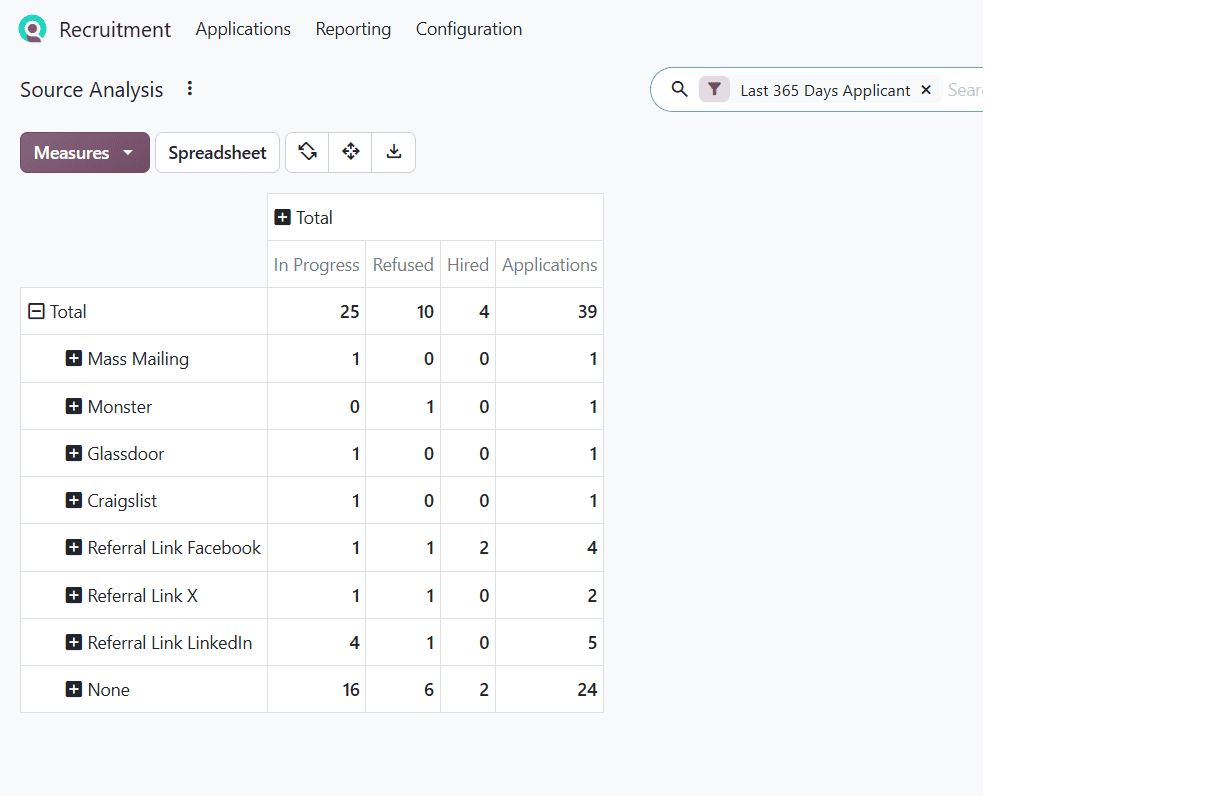
These sources include Mass Mailing, Monster, Glassdoor, and others. The Graph also displays the number of applications along with their statuses, including In Progress, Hired, and Refused.
However, receiving a large number of applications from a particular source does not always mean that it produces the best hiring result. HR teams can also compare the number of hired, refused, and in-progress applicants from each source. This helps HR teams identify which recruitment sources result in more successful hires. These findings can help businesses review their recruitment sources and improve their sourcing strategy.
Users can switch to Pivot view to see a numerical breakdown of applications from each source. You can also change the measures by clicking the Measures option to view different recruitment figures. The Pivot view is shown below.
Hiring Velocity
After selecting Hiring Velocity from the Reporting menu, you can see the Graph view as shown below.
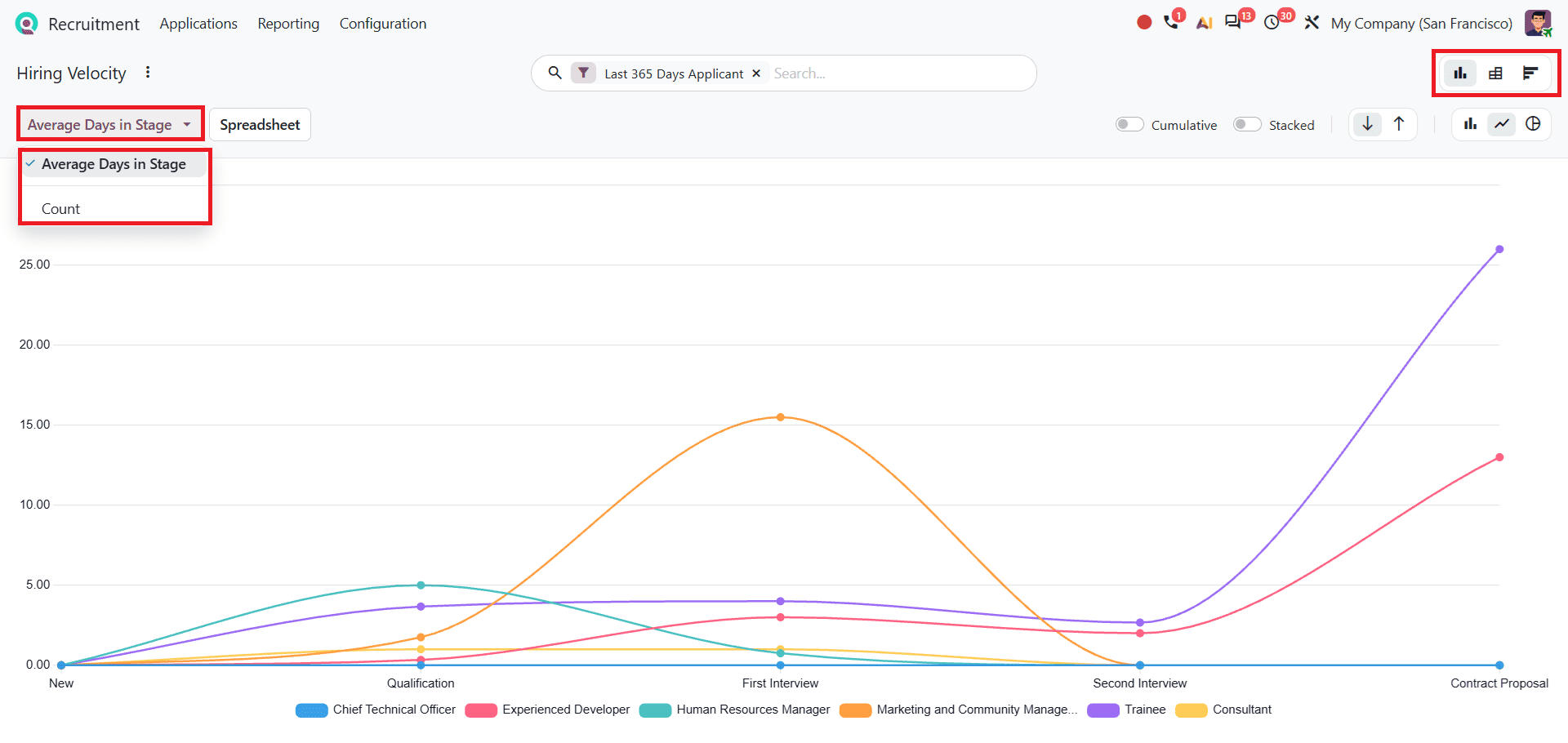
This report displays the average number of days applicants spent at each recruitment stage. These stages include New, Qualification, First Interview, Second Interview, and Contract Proposal.
You can also change the measure from Average Days in Stage to Count by clicking on Measures. The Count measure displays the number of applicants at each stage, while Average Days in Stage shows the time spent by applicants in each stage.
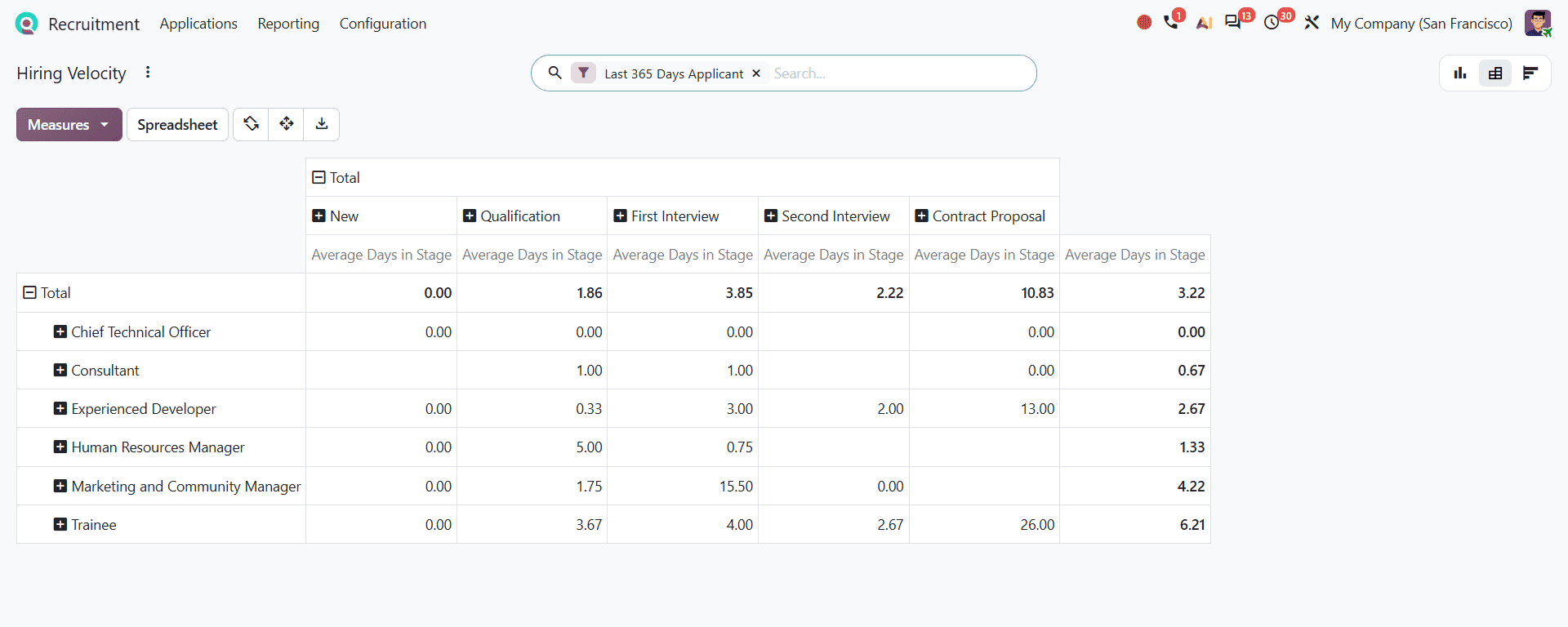
Pivot view displays the average days spent at each stage. You can compare the figures across different job positions. It also provides a more detailed breakdown than the Graph view.
By comparing the average time spent at different recruitment stages, HR teams can identify stages where applicants take longer to complete. From the displayed report, we can see that the Contract Proposal stage took more time. This information can help HR teams to find delays and improve the hiring process.
Cohort view:
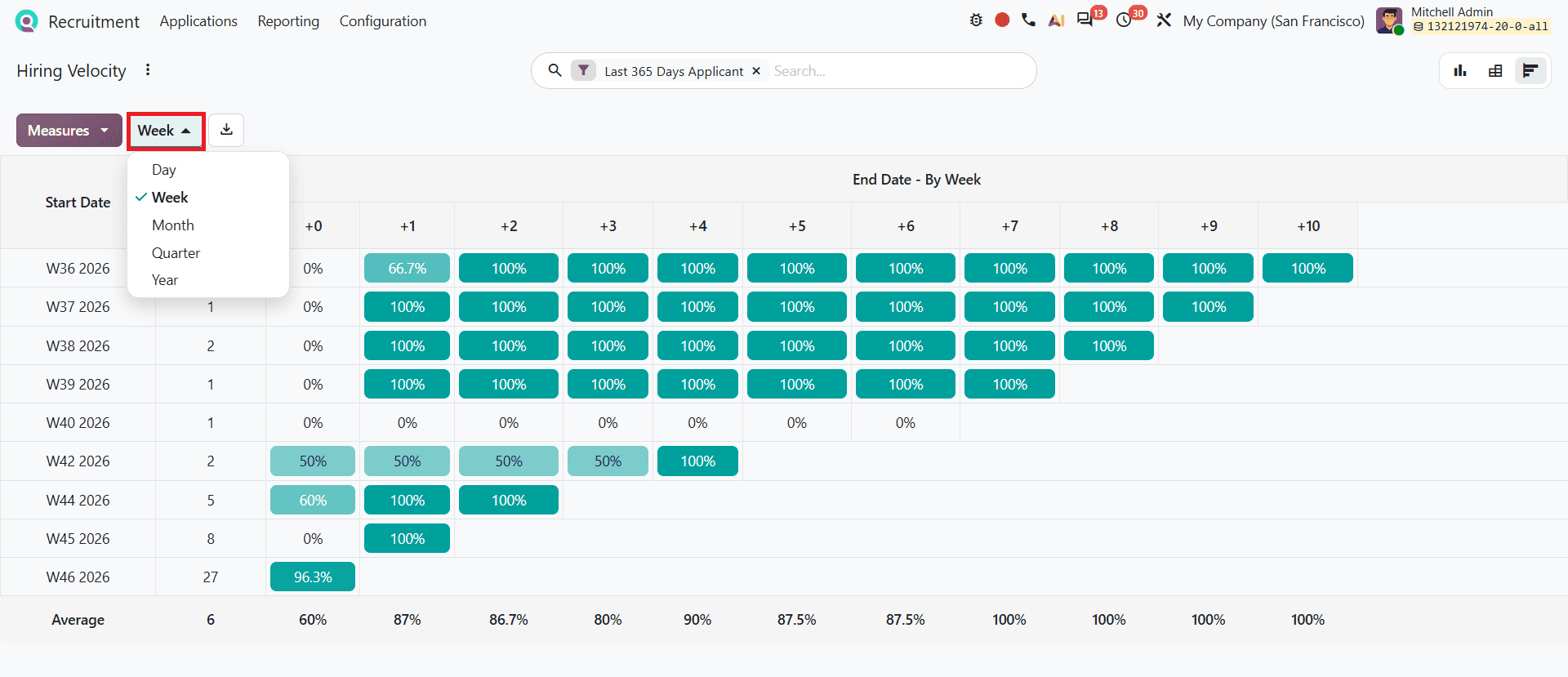
Cohort view displays recruitment data based on applicants' start dates. You can group the data by Day, Week, Month, Quarter, or Year. It allows users to analyse how each group of applicants progresses over subsequent periods.
Team Performance
Next, select Team Performance from the Reporting menu. In Graph view, the report displays the number of applicants who are In Progress, Hired, and Refused. To view other available measures, click on Count, as shown below.
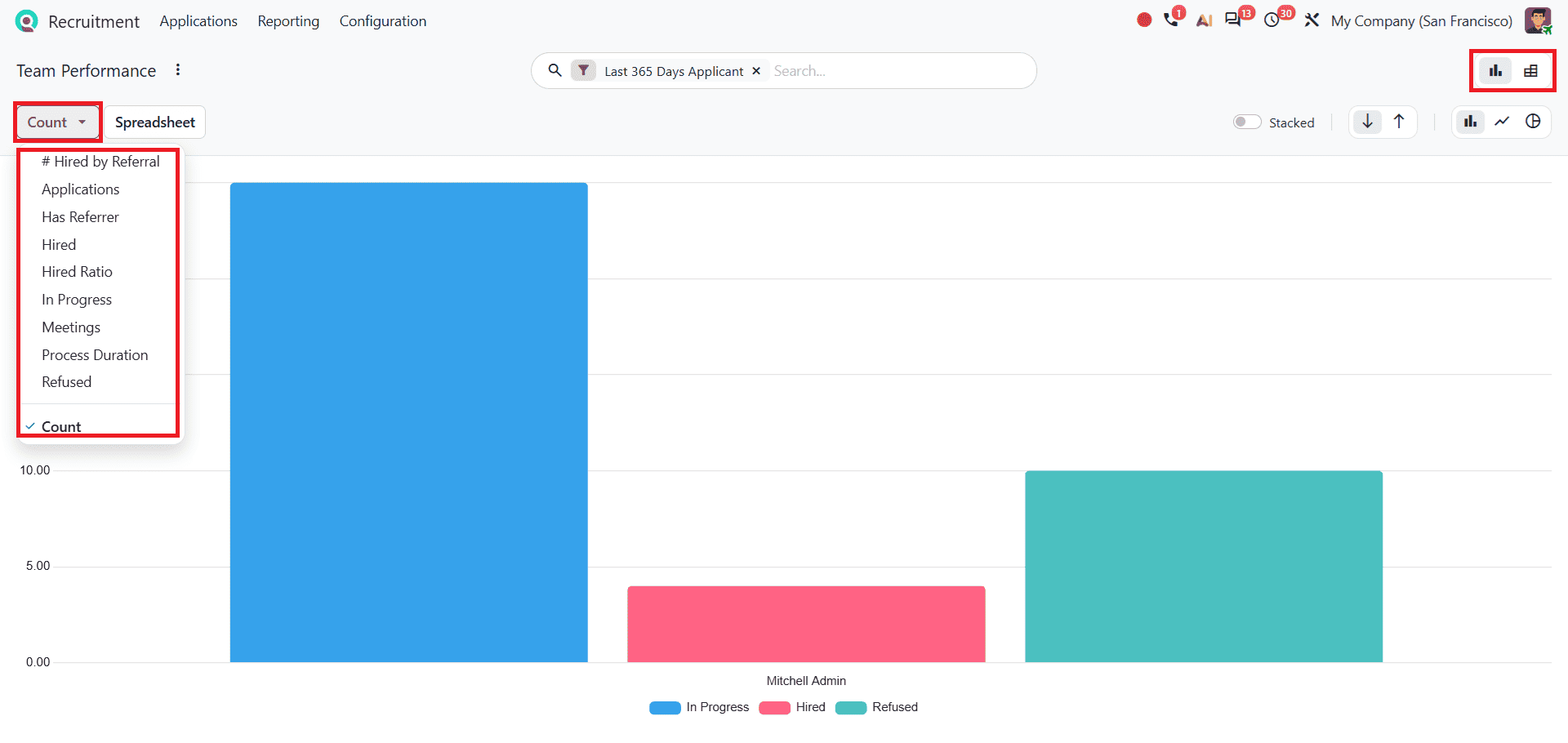
The available measures include Application, Has Referrer, Hired, Hired Ratio, In Progress, Meetings, Process Duration, Refused, and Hired by Referral. The report also displays recruiter names, allowing users to analyse recruitment activities handled by each recruiter. By comparing the number of applications handled by each recruiter and their respective hiring outcomes, the HR team can understand how recruitment activities differ across the team.
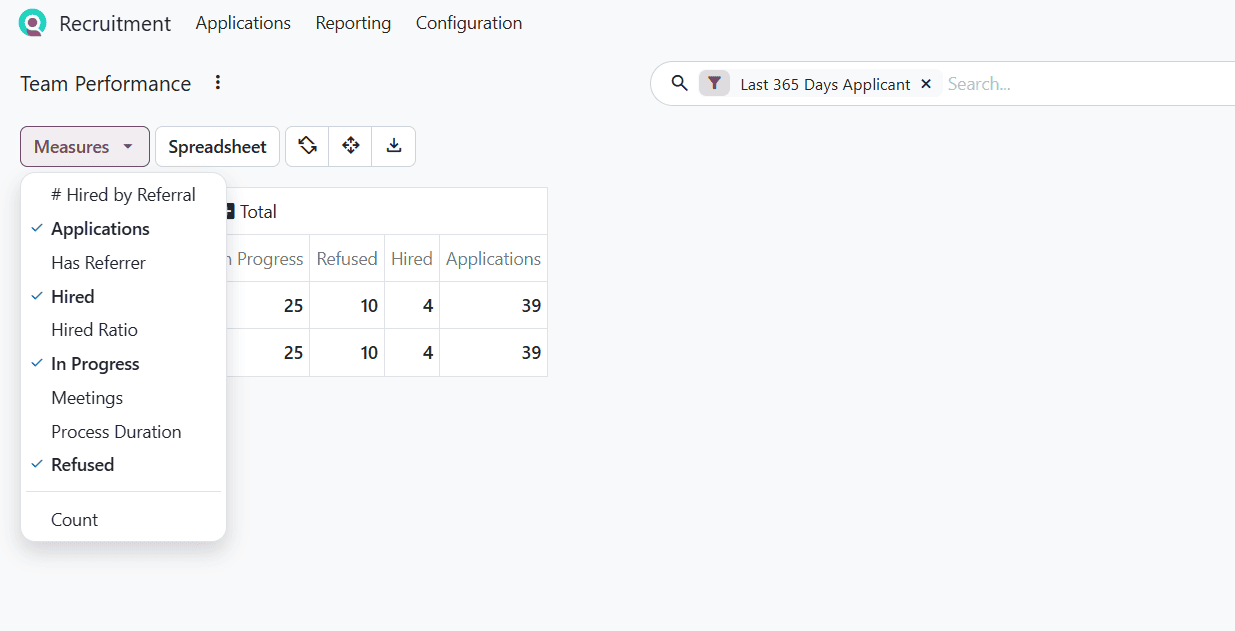
Pivot view provides numerical data of applications, which includes In Progress, Hired, Refused, and the total number of applications.
Offer Analysis
To navigate Offer Analysis, open Recruitment > Reporting > Offer Analysis. The default Graph view displays offer status for different job positions over the last 365 days. The available measures include Cancelled, Expired, Fully Signed, In Progress, Partially Signed, and Refused.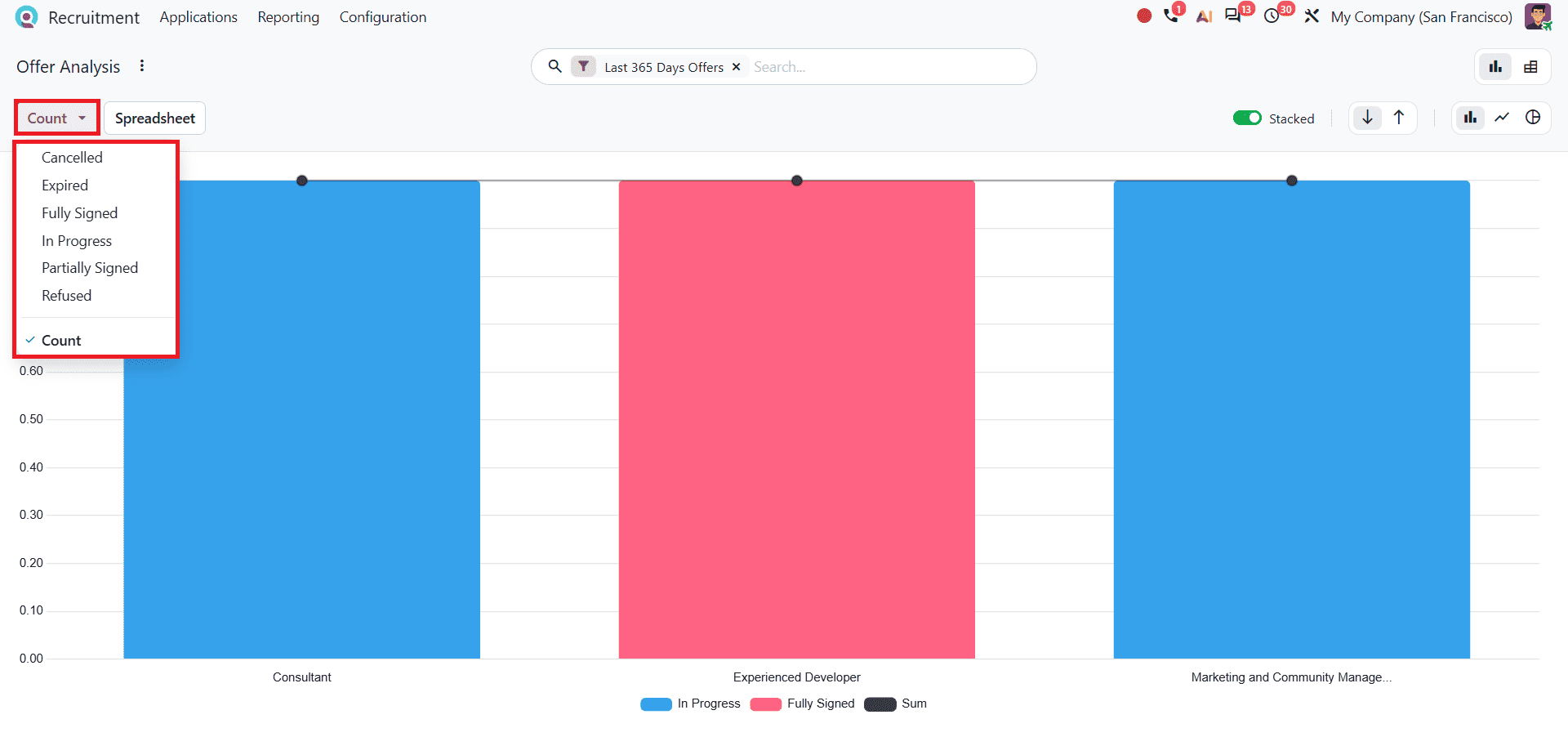
The chart compares these offer statuses across job positions, helping users understand the progress of job offers.
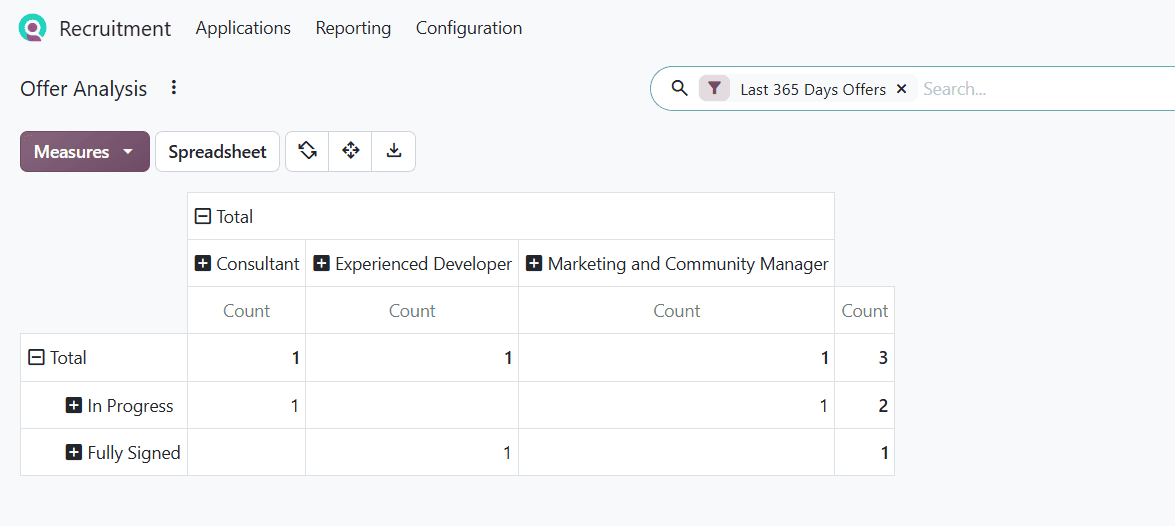
The Pivot view provides a numerical breakdown of offer activities based on the job positions and their respective status. Users can change the measures to view different offer-related figures.
- Cancelled: Tracks offers that were called off before reaching a final resolution.
- Expired: Tracks offers that have passed their expiration date without being completed.
- Fully Signed: Measures successful offers where all required parties have completed signing.
- In Progress: Highlights active offers that have been sent out but remain unsigned.
- Partially Signed: Captures offers where some signatures have been collected, while others remain pending.
- Refused: Displays offers formally rejected by candidates.
Analysing recruitment activities helps organisations understand how well they are managing their hiring process. The Odoo 20 Recruitment module offers several reports designed to support this kind of analysis. Application Analysis allows users to review the status of applications and the outcomes of hiring efforts. Source Analysis makes it possible to compare different recruitment channels and determine which ones are bringing more applicants and successful hires. Hiring Velocity helps track how much time is being spent at each stage of the recruitment process. Team performance and offer analysis provide a broader view of recruiter efficiency and how offers are progressing.
By using these insights, businesses can spot weaknesses in their recruitment process, refine their hiring strategies, and make more informed decisions when selecting candidates.
To read more about Overview of Reporting Features in Odoo 19 Recruitment Module, refer to our blog, Overview of Reporting Features in Odoo 19 Recruitment Module.