In Odoo, constraints are rules that ensure that data is accurate and reliable. They prevent users from creating or updating records with information that does not meet certain conditions, preventing the system from resulting in data that is incomplete or inconsistent. This protects the database against issues such as corrupted data or misleading reports.
For example, constraints can check that a start date always comes before an end date in scheduling processes. They can also ensure that certain fields—such as email addresses or product codes—remain unique so duplicates are not allowed.
Odoo mainly supports two categories of constraints:
1. SQL Constraints
Sql constraints work directly at the level of the database and help in maintaining the accuracy of the data. They are declared in a model using the attribute models.Constraint. If any record does not satisfy one of the rules, the system blocks that save operation and raises an error, thus avoiding storing invalid data.
_unique_name = models.Constraint(sql_def ,message)
_unique_name : This will be a unique name given to the constraint. It is used in referring to the constraint in error messages and while debugging; it has to be unique on the model so that the system can easily tell it apart from others.
sql_def : This is the text expression for the actual SQL rule applied. Normally, this contains the SQL statement to enforce the condition, such as UNIQUE(column_name) or other forms of validity checks.
Message : The text is displayed to the user when the constraint has failed. Its purpose is to explain the nature of the problem in plain text so the user knows what to do differently.
For example, in a custom model you can define it like this:
class ClassTeacher(models.Model):
   _name = 'class.teacher'
   _description = 'Class Teacher'
   _unique_email = models.Constraint('UNIQUE(email)', 'Email must be unique!')
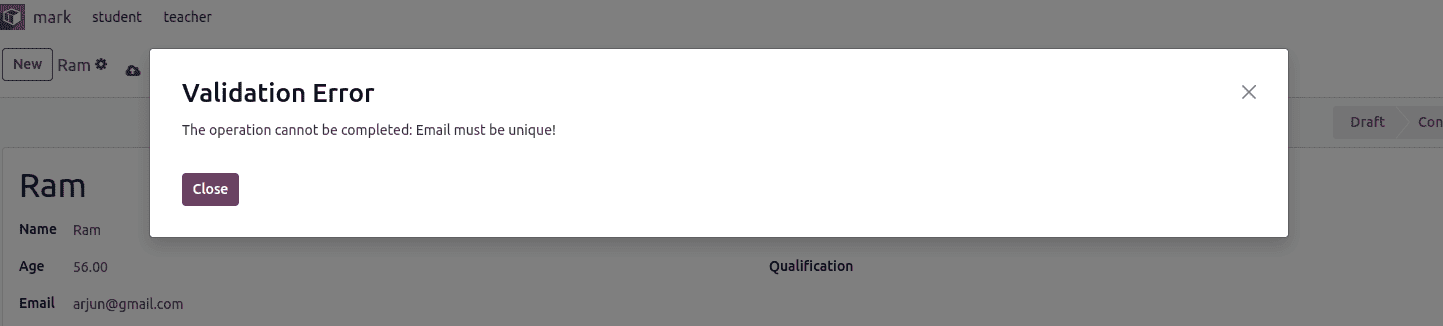
This SQL rule ensures that the email field cannot contain duplicate entries. If a user tries to save a record with an email address that already exists, the system blocks the action and displays an error indicating that the email is already in use.
2. Python Constraints
Python constraints are defined using the @api.constrains decorator and allow you to implement more advanced validation logic based on the model’s fields. Whenever a record is created or updated, these conditions are checked, and an exception is raised if the data does not satisfy the defined rules.
# -*- coding: utf-8 -*-
from odoo import api, fields, models, _
from odoo.exceptions import ValidationError
class ClassTeacher(models.Model):
   _name = 'class.teacher'
   _description = 'Class Teacher'
   name = fields.Char(string='Name')
   age = fields.Float(string='Age')
   email = fields.Char(string='Email')
   subject = fields.Char(string='Subject')
   qualification = fields.Char(string='Qualification')
   experience = fields.Float(string='Experience (Years)')
   state = fields.Selection([('draft', 'Draft'),
       ('confirm', 'Confirmed')], string='State')
   joining_date = fields.Date(string='Joining Date')
   @api.constrains('joining_date')
   def _check_joining_date(self):
       for rec in self:
           if rec.joining_date and rec.joining_date <
                  fields.Date.today():
               raise ValidationError(
                   _("The joining date must be greater than today's
                       date."))
The @api.constrains decorator works only with direct fields, such as partner_id, and does not evaluate related fields like partner_id.phone, as those are ignored during validation.
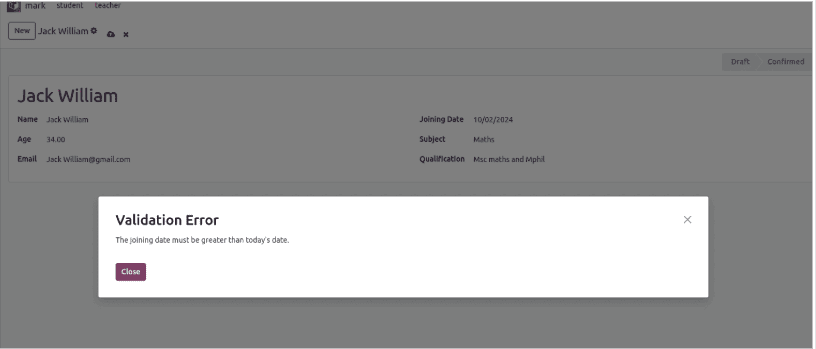
If the specified conditions are violated, the system raises an error message accordingly.
SQL constraints are faster because they run directly at the database level, making them ideal for straightforward checks like uniqueness. Python-based constraints, on the other hand, offer greater flexibility since they can incorporate complex logic and evaluate multiple fields together.
3. Relational Constraints
Relational constraints in Odoo are rules that enforce the consistency of relationships between different models (tables). They ensure that records linked through relational fields—like Many2one, One2many, or Many2many—follow certain integrity rules.
Key points:
These constraints prevent the creation of orphaned or inconsistent records.
Examples include ensuring that a Many2one field always points to an existing record or that a One2many relationship maintains proper references.
Example:
# -*- coding: utf-8 -*-
from odoo import fields, models

class ProductSelection(models.Model):
   _name = 'product.selection'
   _description = 'Product Selection'
   name = fields.Char(string='Name', required=True)
   selection_line_ids = fields.One2many(
       'product.selection.line',
       'selection_id',
       string='Selection Lines'
   )
class ProductSelectionLine(models.Model):
   _name = 'product.selection.line'
   _description = 'Product Selection Line'
   _uniq = models.Constraint("UNIQUE(selection_id, product_id)", "Product should be unique")
   selection_id = fields.Many2one(
       'product.selection',
       string='Selection',
       required=True,
       ondelete='cascade'
   )
   product_id = fields.Many2one(
       'product.product',
       string='Product',
       required=True
   )
Here, the unique(order_id, product_id) constraint ensures relational integrity between the order and its lines.
4. Conditional constraints
Conditional constraints in Odoo are SQL CHECK constraints defined in the model's _sql_constraints attribute, enforcing field conditions at the database level with a triplet format: (name, SQL CHECK expression, error message). They validate data during inserts or updates, preventing invalid states like non-positive values or missing required fields under specific conditions.
Common Examples
Positive age validation: Ensures student age exceeds zero.
positive_age = models.Constraint('CHECK(age > 0)', 'The age should be greater than 0.')- Confirmed order date requirement: Requires date_order for sale orders in 'sale' or 'done' states.
_date_order_conditional_required =  models.Constraint("CHECK((state IN ('sale', 'done') AND date_order IS NOT NULL) OR state NOT IN ('sale', 'done'))",
     "A confirmed sales order requires a confirmation date.")
These operate independently of Python code, providing fast, reliable enforcement even for direct database access.
In summary, constraints in Odoo 19 play a vital role in maintaining the reliability and accuracy of business data. By combining SQL constraints for direct database-level validation and Python constraints for complex, logic-based checks, Odoo ensures that only consistent and meaningful information is stored. Relational and conditional constraints further strengthen data integrity by enforcing proper links between records and validating context-dependent conditions. Together, these mechanisms help developers build robust applications and protect businesses from errors, inconsistencies, and data corruption.
To read more about
How to Configure Python & SQL Constraints in Odoo 18, refer to our blog How to Configure Python & SQL Constraints in Odoo 18.