In Odoo 19, error logs are system-generated documents that record technical problems, warnings, exceptions, and unexpected behaviours that arise in the Odoo application.
They assist administrators and developers in locating, evaluating, and fixing issues with server performance, database operations, modules, and custom developments.
What Do Error Logs Contain in Odoo 19?
Error logs record detailed technical information whenever an issue occurs in the system.
1. Python Tracebacks
- Shows the exact file and line number where the error occurred
- Displays the method and model involved
- Helps developers debug custom modules
2026-03-18 10:20:15,432 ERROR db_name odoo.http: Exception during request handling
Traceback (most recent call last):
 File "/odoo/odoo/http.py", line 2040, in _dispatch
   result = request.dispatch()
 File "/odoo/addons/web/controllers/main.py", line 1350, in call_button
   action = self._call_kw(model, method, args, kwargs)
 File "/odoo/addons/sale/models/sale_order.py", line 250, in action_confirm
   raise ValueError("Invalid order amount")
ValueError: Invalid order amount
Common error types:
- ValueError
- AccessError
- ValidationError
- UserError
2. Database Errors
- PostgreSQL query failures
- Constraint violations
- Missing required fields
- Foreign key errors
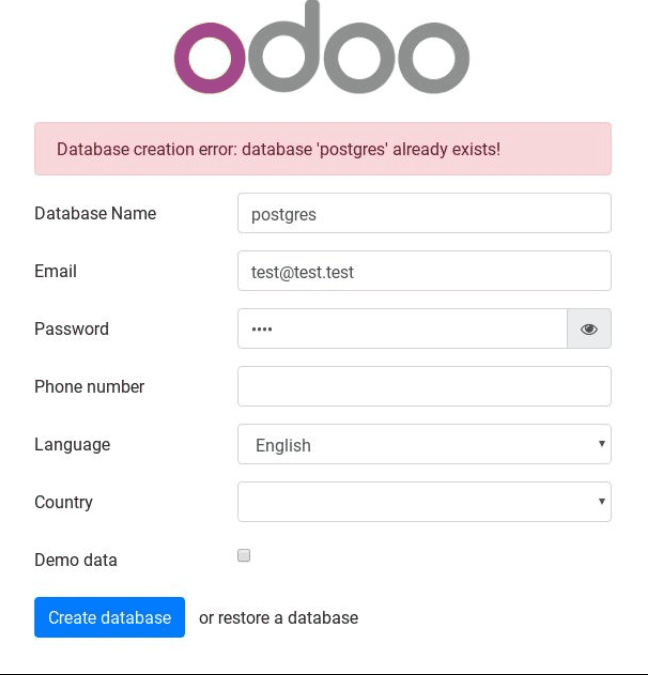
These errors usually occur during:
- Record creation
- Module installation
- Data import
3. Module Loading Errors
- Missing dependencies
- Incorrect XML syntax
- View validation errors
- Security rule conflicts
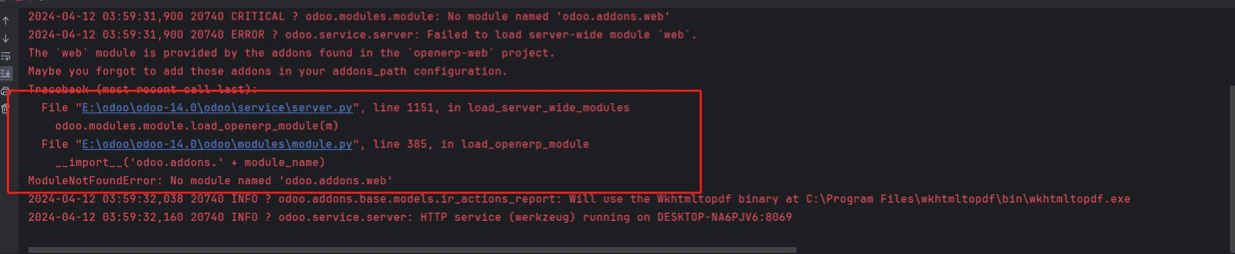
These are common during:
- Module upgrades
- New module installations
- Custom development testing
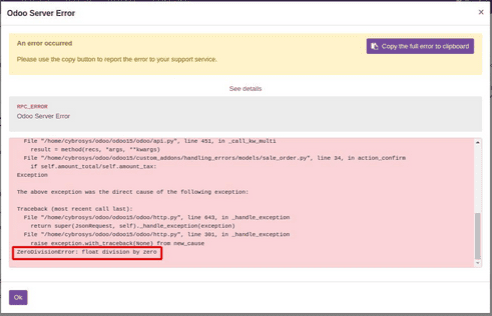
4. Server Errors (HTTP 500)
- Internal server crashes
- Unhandled exceptions
- Controller failures
These errors are fully detailed in the log file, but they frequently show up in the browser.
Where Are Error Logs Stored in Odoo 19?
The deployment type determines where the log file is located.
- Linux Server Installation :
- /var/log/odoo/odoo-server.log or odoo.conf
- Windows Installation :
- C:\Program Files\Odoo 19.0\server\odoo.log
- Odoo.sh Platform :
- Logs are accessible from the project dashboard
- Real-time logs available per branch
- Separate logs for build and runtime
Log Levels in Odoo 19
Odoo uses severity levels to classify logs:
DEBUG – Detailed technical information
Example: 2026-03-18 10:15:22,123 DEBUG db_name odoo.models: Fetching records from model res.partner
INFO – General system activity
- Monitoring module loading
- Tracking scheduled jobs
- Observing system startup
Example:2026-03-18 10:16:10,456 INFO db_name odoo.modules.loading: Module sale loaded successfully
WARNING – Potential issues
- Detecting data inconsistencies
- Identifying deprecated features
- Configuration issues
Example:2026-03-18 10:17:05,789 WARNING db_name odoo.models: Field 'email' is missing for some records
ERROR – Functional failures
- Fixing failed operations
- Debugging backend errors
- Resolving custom module issues
Example:2026-03-18 10:18:30,321 ERROR db_name odoo.http: Exception during request handling
Traceback (most recent call last):
- File "/odoo/odoo/models.py", line 1234, in create
- ValueError: Invalid field 'code_store'
CRITICAL – System-level crash
- Server crash analysis
- Database connection failures
- Emergency troubleshooting
Example:2026-03-18 10:19:55,999 CRITICAL db_name odoo.service.server: Failed to start database `db_name`
Example of an Odoo 19 Error Log
Traceback (most recent call last):
 File "/odoo/odoo/http.py", line 1788, in _serve_db
   return service_model.retrying(self._serve_ir_http, self.env)
 File "/odoo/odoo/service/model.py", line 133, in retrying
   result = func()
ValueError: Invalid field 'code_store' on model 'account.account'
What This Means:
- The model involved: account.account
- The issue: Invalid field
- The exact failure type: ValueError
Why Are Error Logs Important in Odoo 19?
Error logs help in:
- Identifying the root cause of issues
- Debugging custom modules
- Tracking failed imports
- Monitoring system health
- Improving system performance
Without logs, troubleshooting becomes time-consuming and inaccurate.
Odoo 19 error logs are essential diagnostic tools that document technical exceptions, tracebacks, and system failures. They facilitate stable ERP performance, quicker debugging, and precise problem solving.
Every Odoo developer and system administrator must be able to read and configure error logs.
To read more about Overview of Error Management in Odoo 19, refer to our blog Overview of Error Management in Odoo 19.