Odoo 18's Helpdesk module helps businesses optimize their support operations by providing strong tools for managing Service Level Agreements (SLAs) and receiving client feedback. SLA Success Rate and Average Rating are two essential indicators that provide useful insights into your helpdesk team's performance and customer happiness. The SLA Success Rate calculates the percentage of tickets that fulfil their stated SLA deadlines, resulting in timely answers and resolutions. The Average Rating, based on customer feedback, measures the quality of service offered on a scale of 1 (dissatisfied) to 5 (satisfied). Businesses may use these KPIs in Odoo 18 to monitor performance, identify bottlenecks, and continually improve their customer support operations.
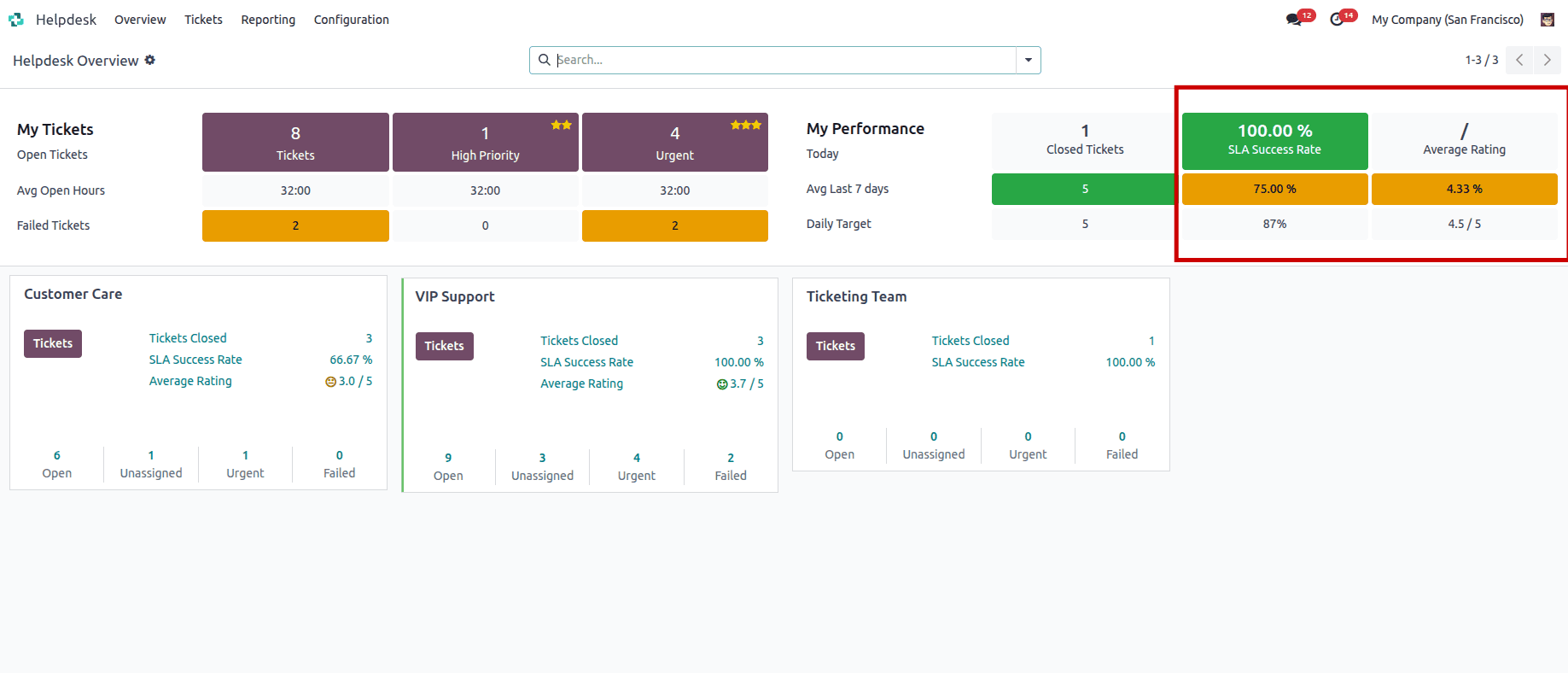
This blog explores how Odoo 18’s Helpdesk module enables businesses to track and optimize SLA Success Rate and Average Rating, offering practical steps to configure these features and actionable insights to enhance service quality.
What is SLA Success Rate?
The SLA Success Rate is a critical performance indicator that measures the percentage of support tickets that meet the deadlines set by SLA policies. These policies define the timeframes for responding to or resolving tickets based on criteria such as ticket priority, team, or customer type. A high SLA Success Rate indicates that your team is efficiently meeting customer expectations, while a lower rate may highlight areas for improvement, such as staffing issues or process inefficiencies.
Configuring SLA Policies in Odoo 18
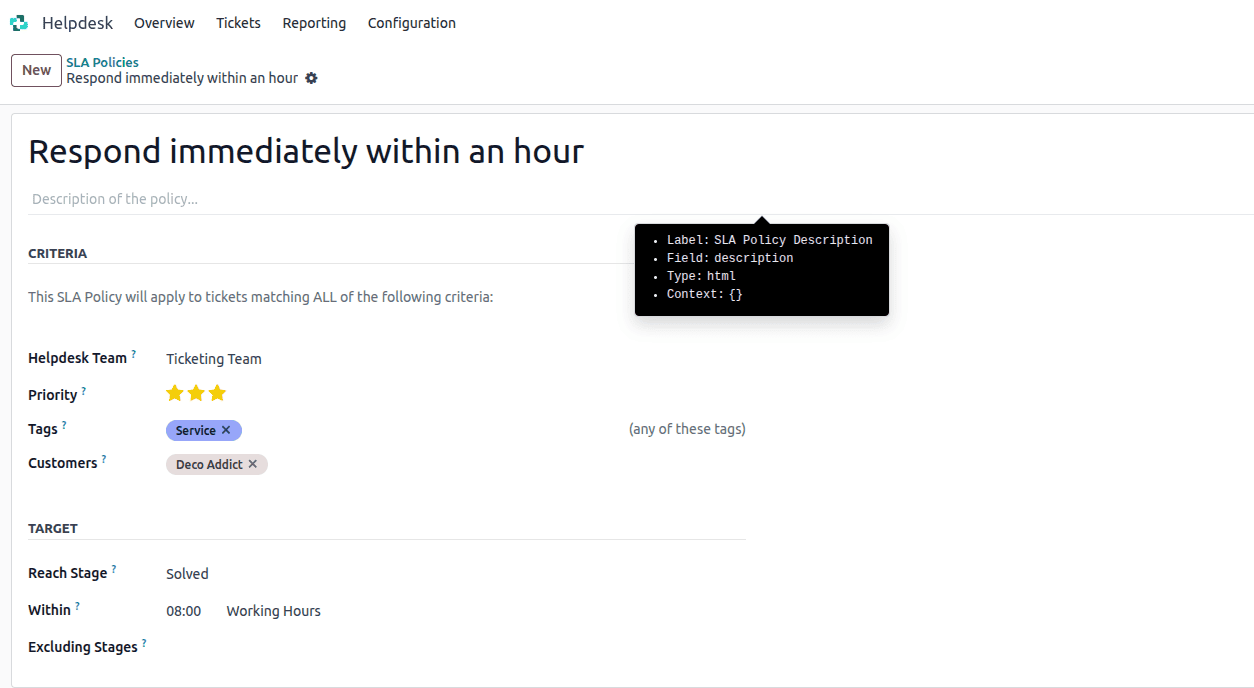
To track SLA Success Rate, you first need to set up SLA policies in Odoo 18.
- Access the Helpdesk Module: Navigate to the Helpdesk app in your Odoo 18 environment.
- Define Criteria: Specify the conditions for the SLA, such as:
- Helpdesk Team: Assign the policy to a specific team (e.g., VIP Support).
- Priority: Set priority levels (e.g., Urgent, marked with three stars).
- Tags: Apply tags like “Repair” or “Emergency” to categorize tickets.
- Customers: Limit the policy to specific clients or companies.
- Set Targets: Choose a Reach Stage (e.g., Solved or In Progress) and define the time limit (e.g., 8 hours for resolution). You can also exclude certain stages from the deadline calculation.
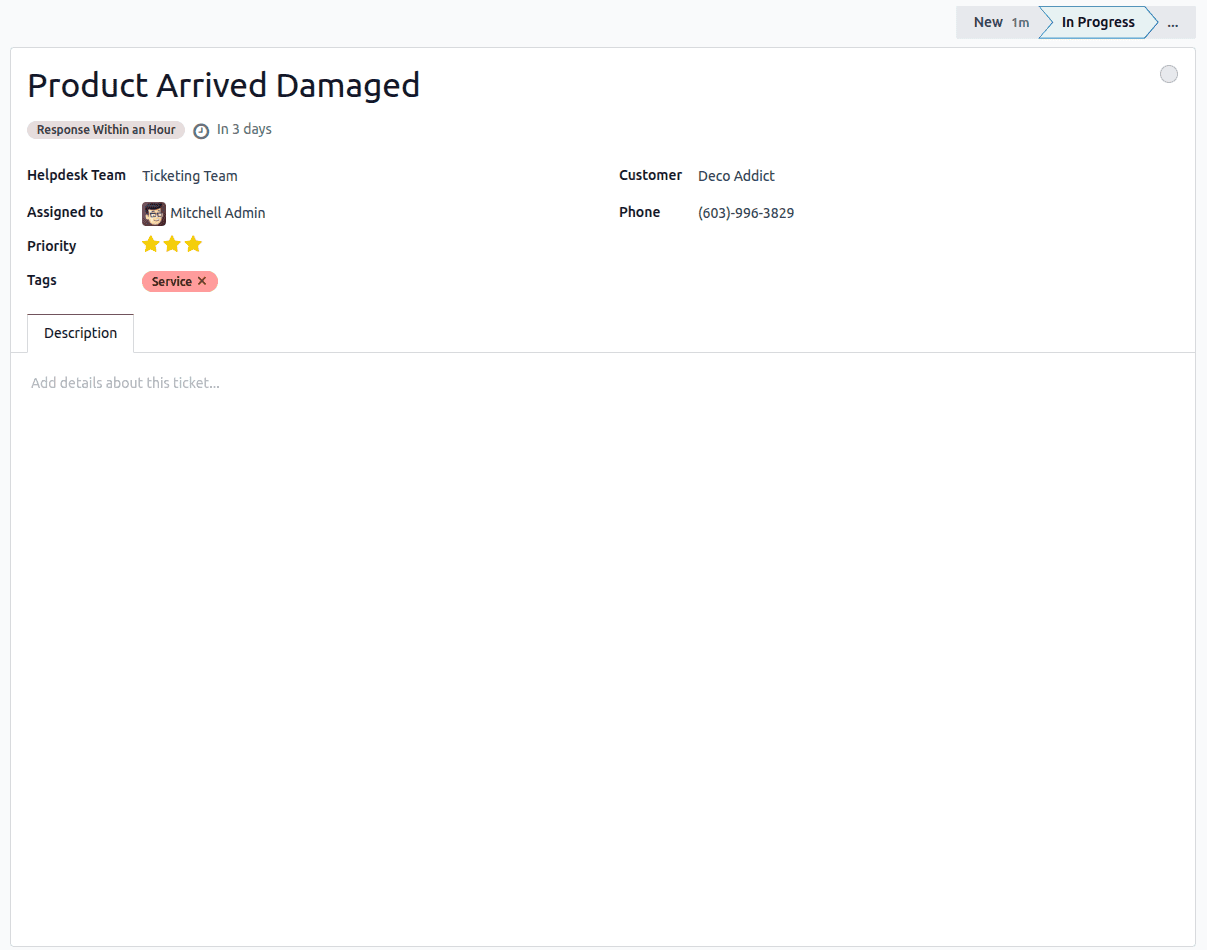
Once configured, Odoo automatically applies SLA policies to matching tickets, calculates deadlines based on working hours, and tracks whether the ticket meets the deadline. A green SLA tag indicates success, while a red tag signals a failure.
Monitoring SLA Success Rate
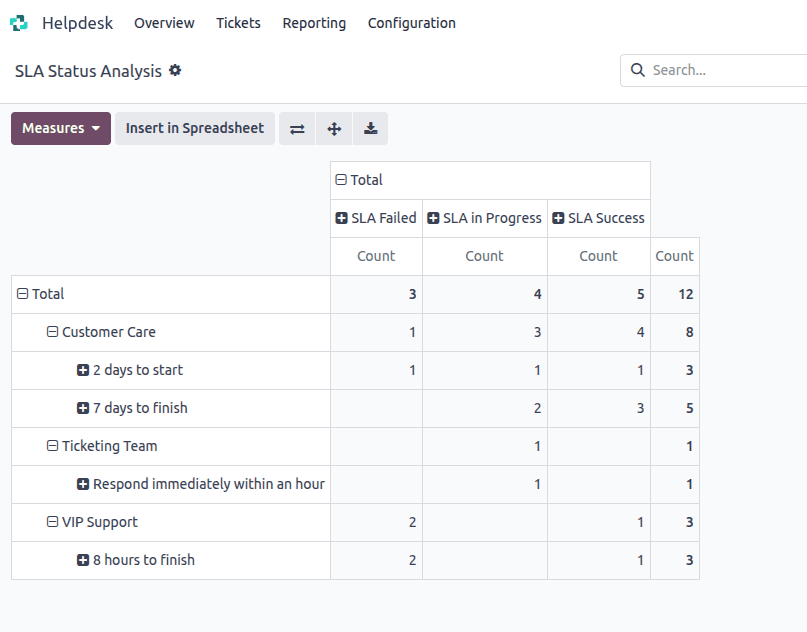
To analyze your SLA Success Rate, use the SLA Status Analysis report:
- Navigate to Helpdesk app > Reporting > SLA Status Analysis.
- The default pivot view shows the number of SLAs that are successful, in progress, or failed, grouped by team.
- Use the Measures dropdown to select Number of SLA Failed or Count to calculate the success rate (e.g., Success Rate = (Total Tickets - Failed Tickets) / Total Tickets * 100).
For example, if your team handles 100 tickets and 90 meet their SLA deadlines, your SLA Success Rate is 90%. Regularly monitoring this metric helps identify patterns, such as frequent breaches during peak hours, allowing you to allocate resources effectively.
Understanding Average Rating in Odoo 18
What is the average rating?
The Average Rating is a metric that quantifies customer satisfaction based on feedback provided after ticket resolution. In Odoo 18, customers can rate their support experience on a scale of 1 (Dissatisfied) to 5 (Satisfied), often accompanied by comments. This metric provides direct insight into the quality of service and helps identify areas for improvement.
Configuring Customer Ratings
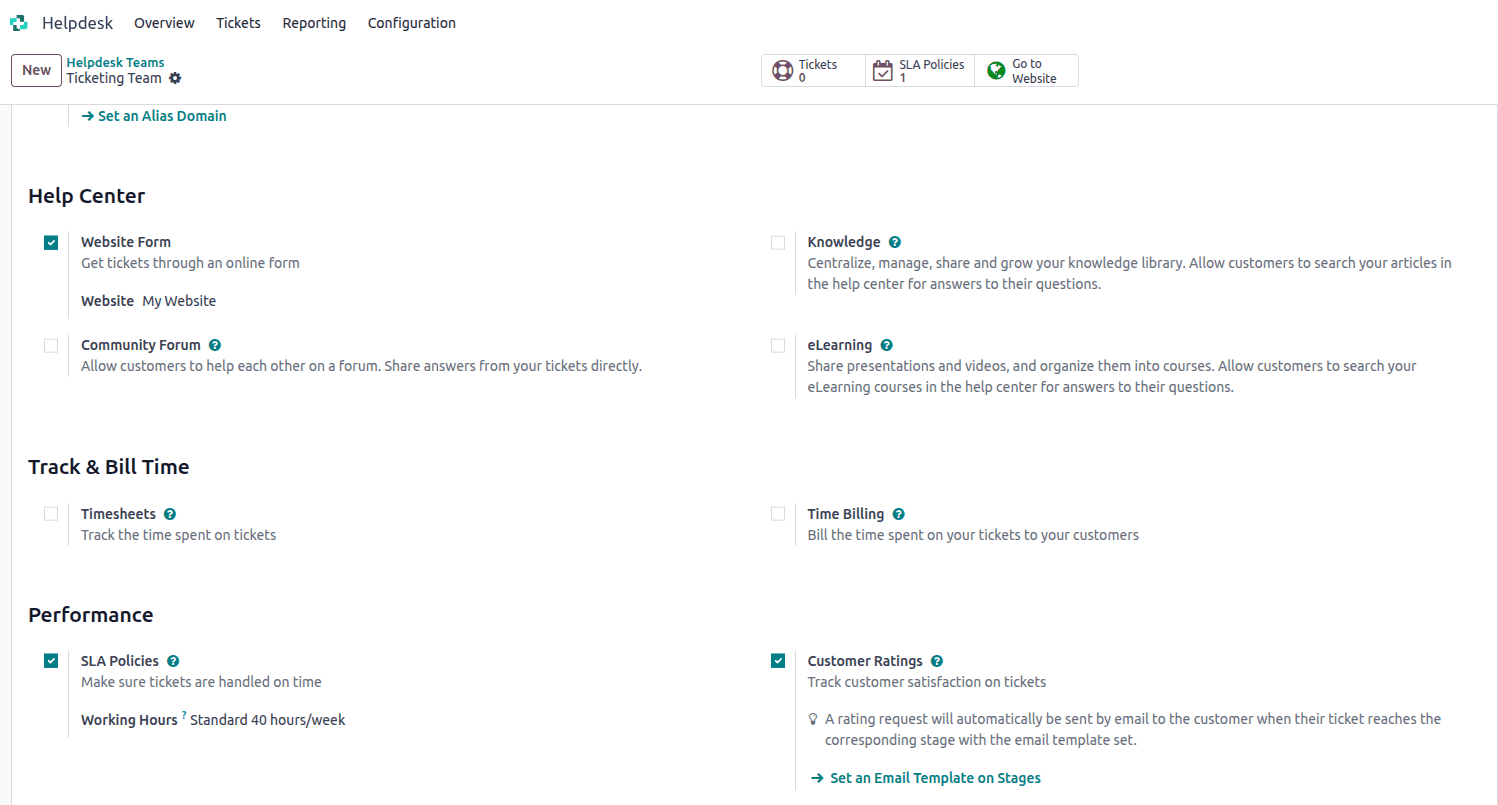
- Enable Ratings: Navigate to Helpdesk app > Configuration > Helpdesk Teams. Click on a team from the list to open the settings page. Scroll to the Performance section, and tick the Customer Ratings checkbox.
- Create Feedback Templates: Design concise and engaging email templates to request feedback after ticket closure.
Analyzing Average Rating
To review customer feedback:
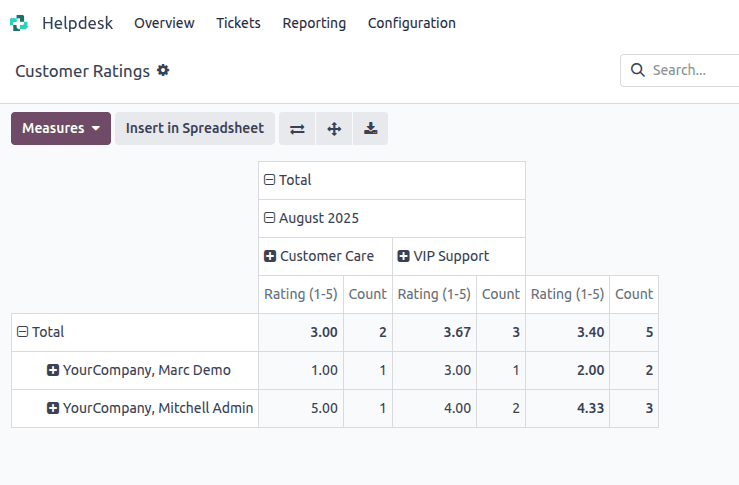
- Navigate to Helpdesk app > Reporting > Customer Ratings.
- The Kanban view displays individual ratings and comments, with links to the original tickets.
- Use the pivot or graph view to calculate the Average Rating by selecting the Rating (/5) measure.
- Filter by team, priority, or date range to identify trends, such as consistently low ratings for specific issues.
In Odoo 18, the Helpdesk module offers robust features for tracking and improving both SLA success rates and average customer ratings. By setting up clear SLA policies, enabling customer feedback, reviewing performance through comprehensive reports, and acting on the insights gained, businesses can boost operational efficiency and enhance customer satisfaction. These tools make it easier to deliver consistent, high-quality support.
You can find detailed guides in the official Odoo documentation, but if you need more clarification on implementation, don't hesitate to reach out to our team. We’re here to help you navigate the latest Odoo updates with ease.
To read more about How to configure the SLA Policy in Odoo 18 Helpdesk, refer to our blog How to configure the SLA Policy in Odoo 18 Helpdesk.