Reporting
Every business relies on reports to evaluate operational performance and analyze workflow efficiency. A well-designed reporting system streamlines this process, transforming complex data into clear, actionable insights that empower informed decision-making, even under pressure. Reports play a crucial role in offering real-time visibility into an organization’s financial health, especially when it comes to managing internal accounting activities.
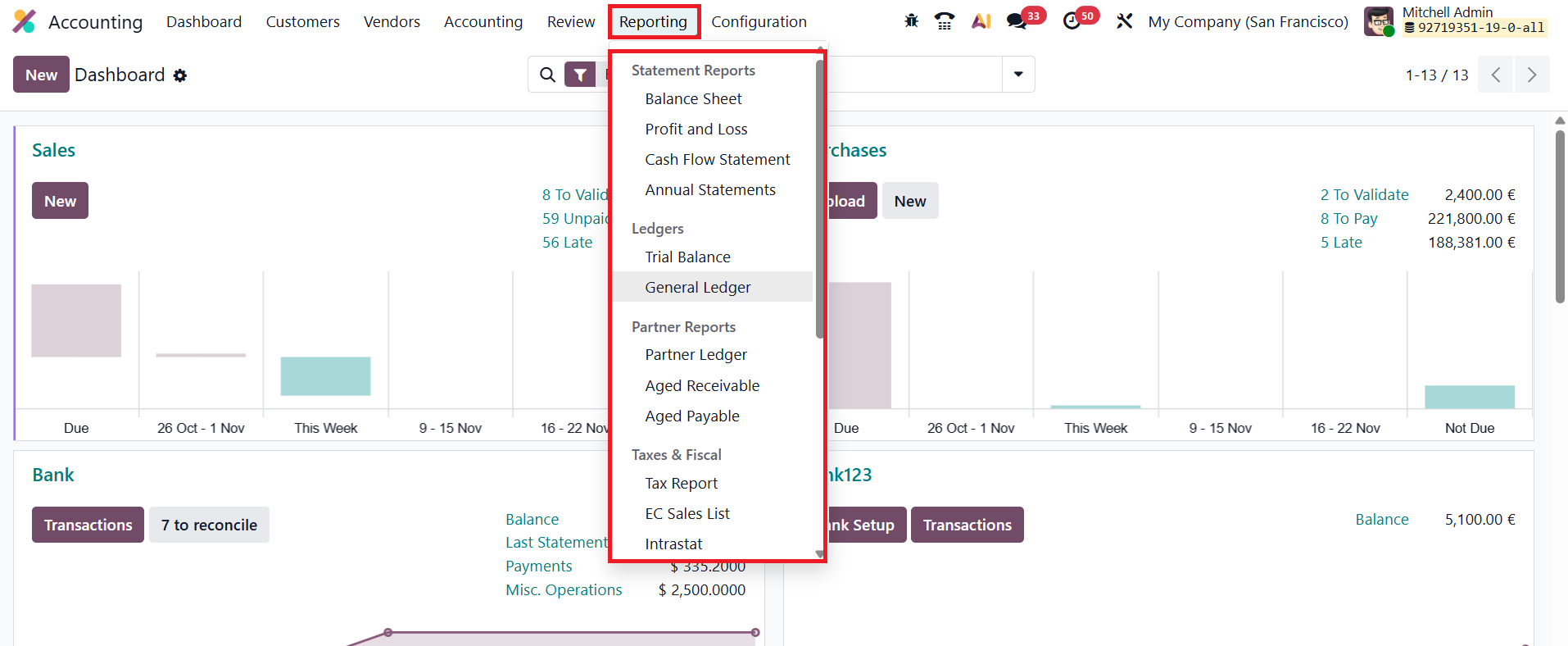
In this section, we will take a detailed look at the comprehensive reporting capabilities available in the Odoo 19 Accounting module, highlighting how these features support accurate analysis, compliance, and strategic financial planning.
1.1 Balance Sheet
The Balance Sheet report in Odoo 19 Accounting offers a clear and structured overview of a company’s assets, liabilities, and equity at any specific point in time, helping businesses assess their financial standing with accuracy. Users can easily generate a balance sheet for a particular date by selecting the desired period using the calendar icon on the interface. Odoo also includes a Comparison feature that enables you to evaluate financial changes across multiple timeframes, while the Journals filter allows you to narrow the report to a specific journal for focused analysis.
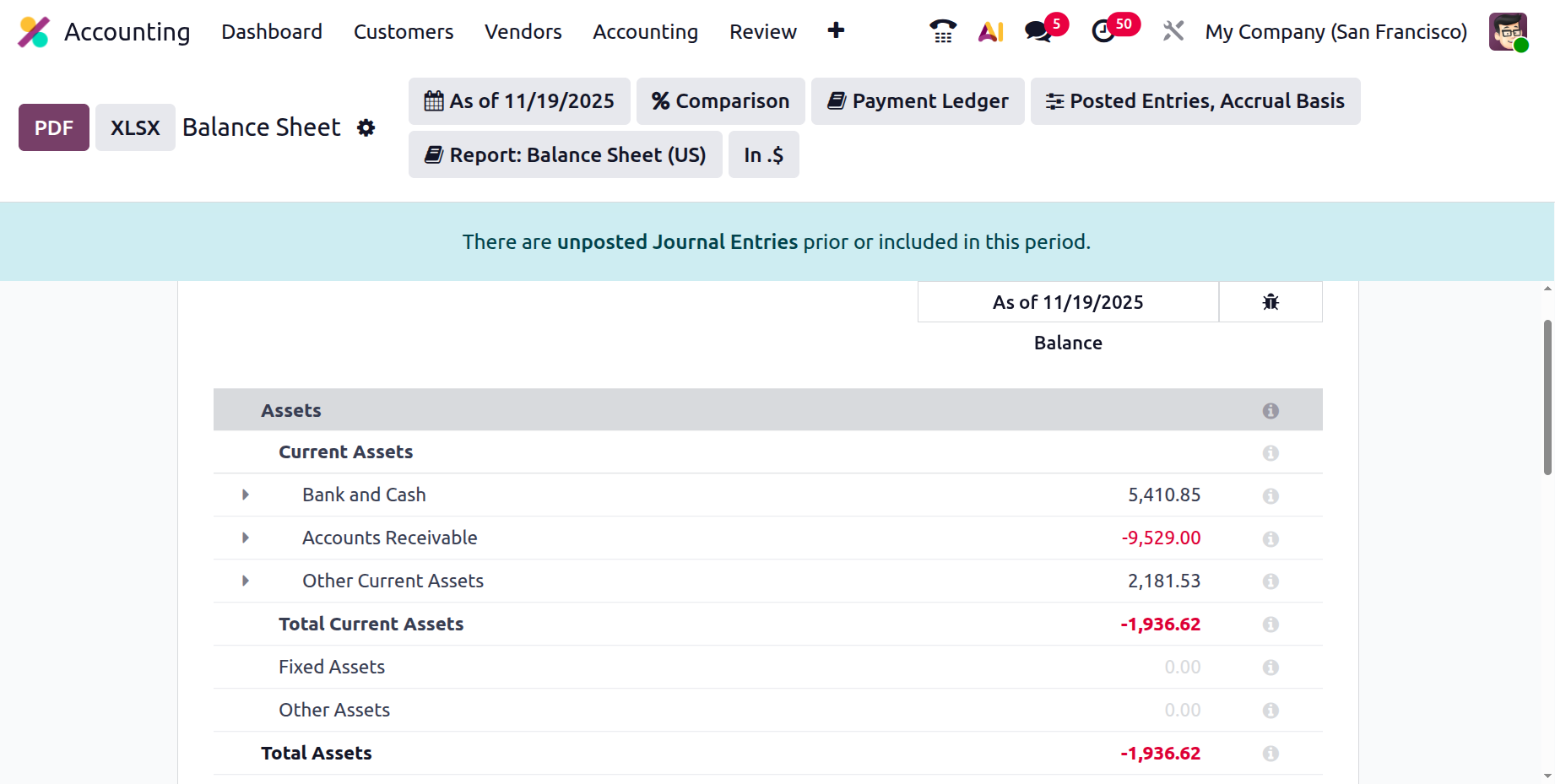
For deeper customization, advanced filtering options let you refine and organize financial data according to specific needs.
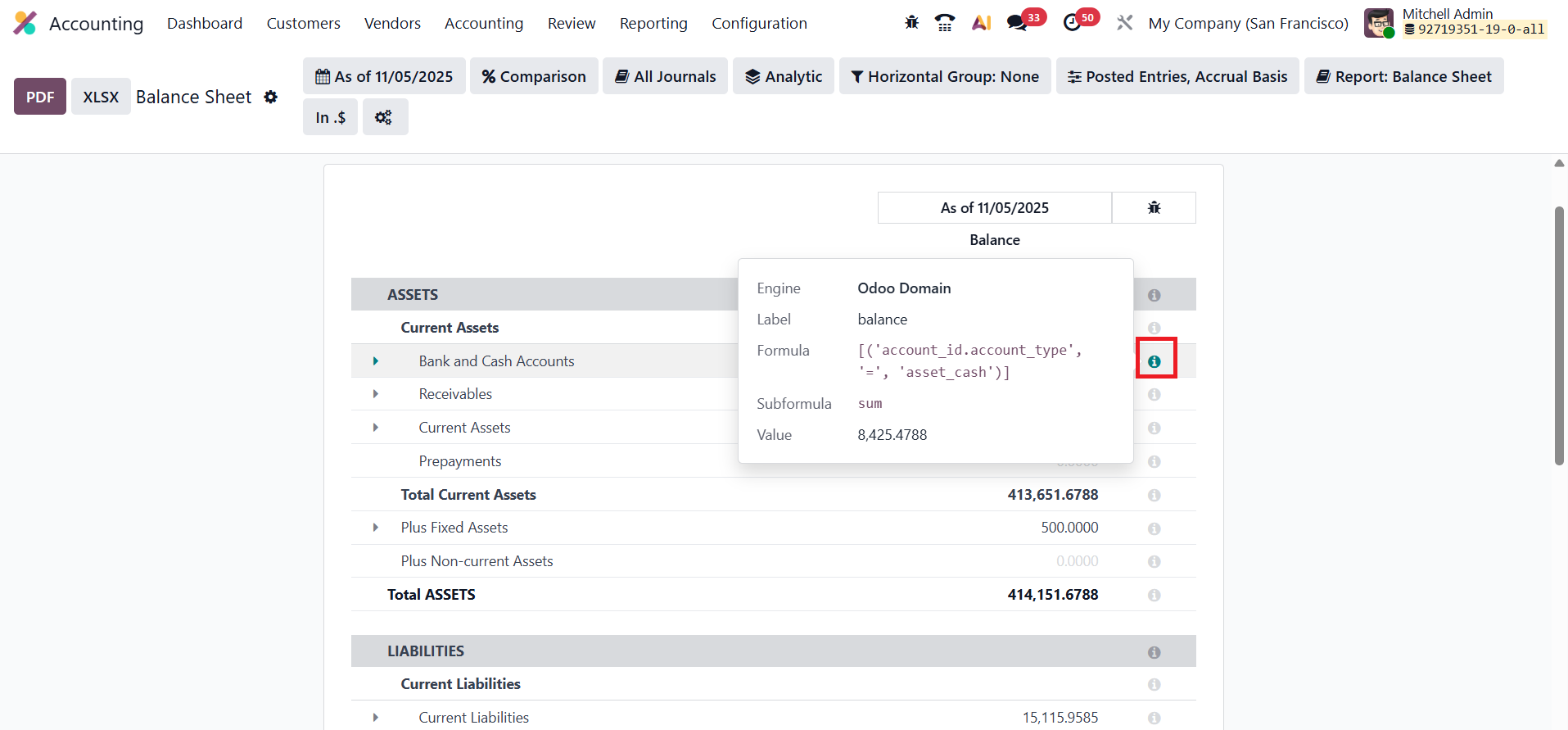
When developer mode is enabled, an informative ‘i’ icon appears beside each reporting line, revealing the underlying calculation formulas used in the report. To enhance data presentation and sharing, Odoo provides export options in both PDF and XLSX formats, making the balance sheet not only insightful but also highly adaptable for professional documentation and analysis.
1.2 Profit & Loss
The Profit & Loss report in Odoo 19 Accounting serves as a vital tool for evaluating a company’s financial performance over a defined period. It presents a detailed summary of revenues, expenses, profits, and losses, helping businesses assess their operational efficiency and profitability. By analyzing this report, organizations can identify key income sources, control expenditure, and make informed strategic decisions to enhance overall financial health.
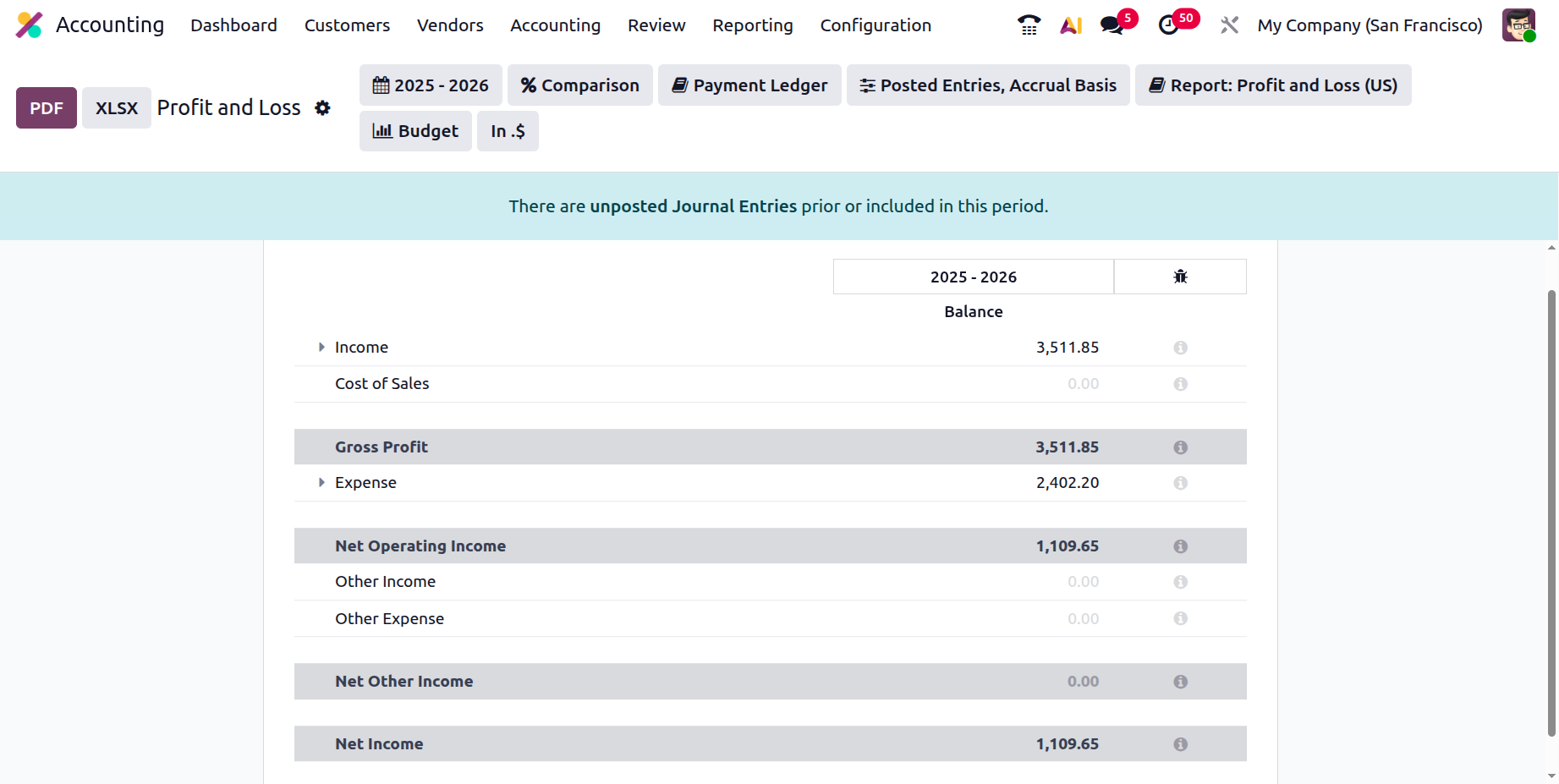
Unlike the Balance Sheet, the Profit & Loss report does not carry forward its ending balance to the next accounting period. Instead, each period is treated independently, providing a distinct snapshot of the company’s financial outcomes during that specific timeframe. This separation ensures accurate and period-specific evaluations of performance, supporting clearer comparisons between fiscal quarters or years.
11.3 Cash Flow Statement
The Cash Flow Statement in Odoo 19 Accounting offers a comprehensive breakdown of all cash inflows and outflows during a selected period, enabling users to evaluate the company’s liquidity, solvency, and financial stability. The report automatically compiles data based on the cash flow accounts configured within the system.
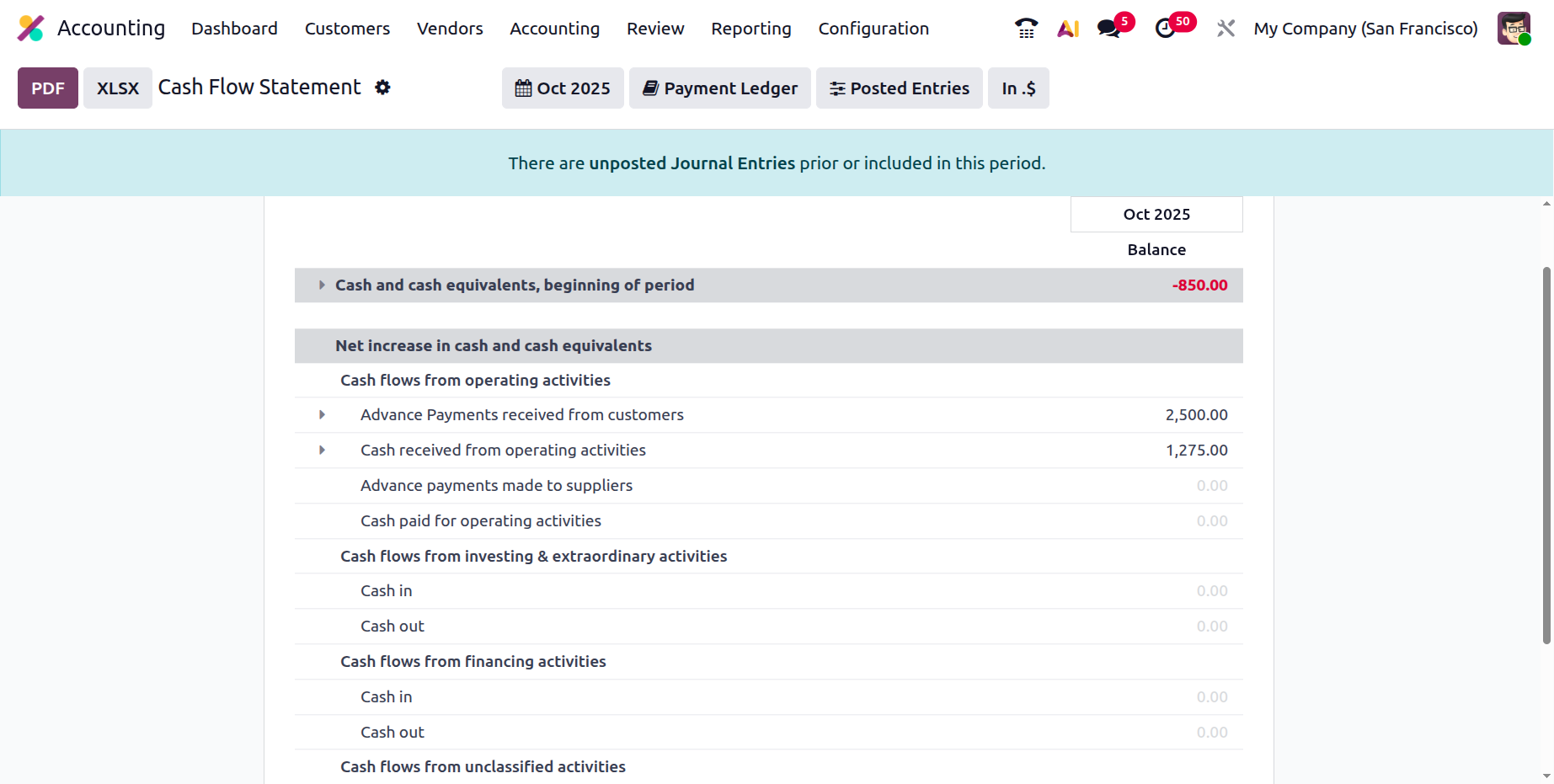
It is divided into three major categories:
- Operating Activities – reflects cash generated or spent in day-to-day business operations.
- Investing Activities –covers transactions related to the acquisition or sale of assets and investments.
- Financing Activities –tracks cash movements resulting from debt, equity, or dividend-related transactions.
By examining these segments, businesses can clearly understand how cash is generated, utilized, and retained within the organization. The report serves as a vital tool for monitoring cash management, identifying potential shortfalls, and ensuring sustainable financial planning.
1.4 Annual Statements
In Odoo 19 Accounting, annual financial statements such as the Balance Sheet and Profit and Loss Statement can be easily generated from the Reporting menu. Within this section, users can set specific parameters like the date range, financial year, and target journals to tailor the report according to their company’s requirements. Once the parameters are defined, Odoo instantly compiles the data and presents the results in a clear, structured format. You can then export the report in PDF or Excel (XLSX) format for sharing or auditing purposes.
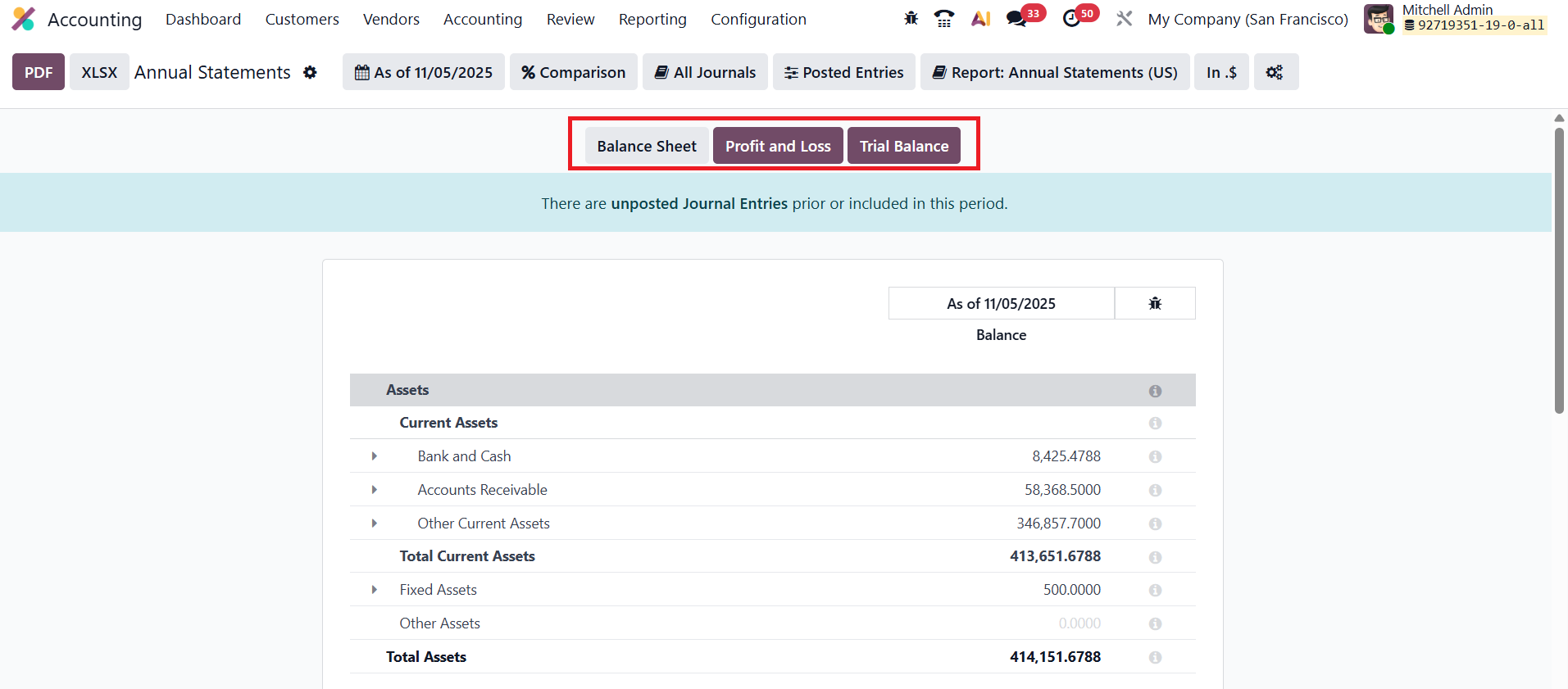
In addition to individual reports, Odoo also provides a default composite report option that consolidates multiple financial statements, such as the Balance Sheet, Profit and Loss, and Trial Balance, into a single, comprehensive document. This streamlined functionality simplifies year-end reporting and ensures that all essential financial summaries are accessible from one centralized place.
11.5 Trial Balance
The Trial Balance report in Odoo 19 Accounting serves as a foundational tool for verifying the accuracy of all financial transactions recorded within the system. It consolidates data from every journal entry, presenting a summarized view of debit and credit balances across all accounts.
Typically generated at the end of the financial year, this report is essential for auditing and reconciliation purposes, as it ensures that total debits and credits are balanced, an indication that the company’s accounts are accurately maintained.
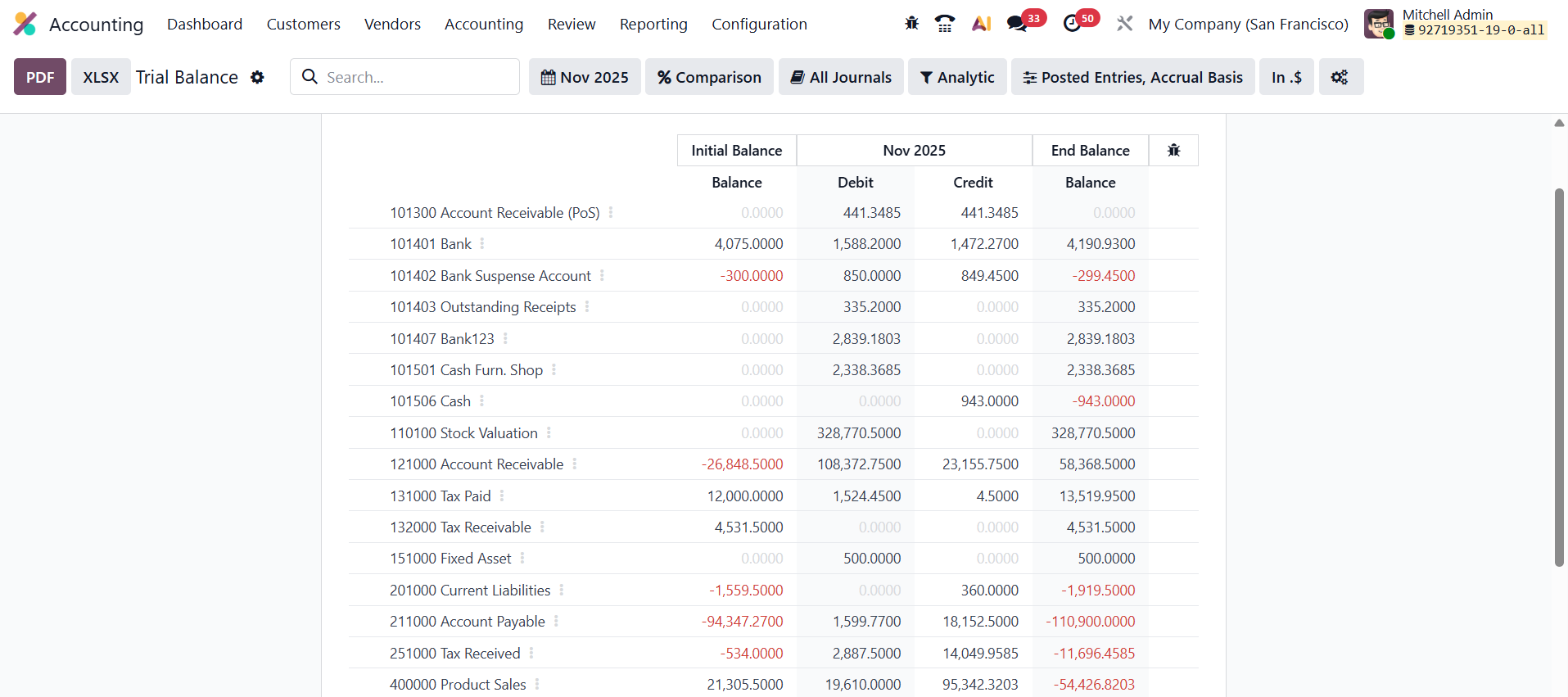
The report displays crucial details such as the opening balances, movements during the selected period (month or year), and the closing balances for each account. By reviewing this data, accountants can easily identify discrepancies, confirm ledger accuracy, and prepare for further financial reporting or external audits.
1.6 General Ledger
The General Ledger report in Odoo 19 Accounting offers a detailed and structured overview of all financial transactions recorded across every account within a specified time period. It serves as the primary reference point for analyzing the movement of funds and ensuring the accuracy of your company’s financial data.
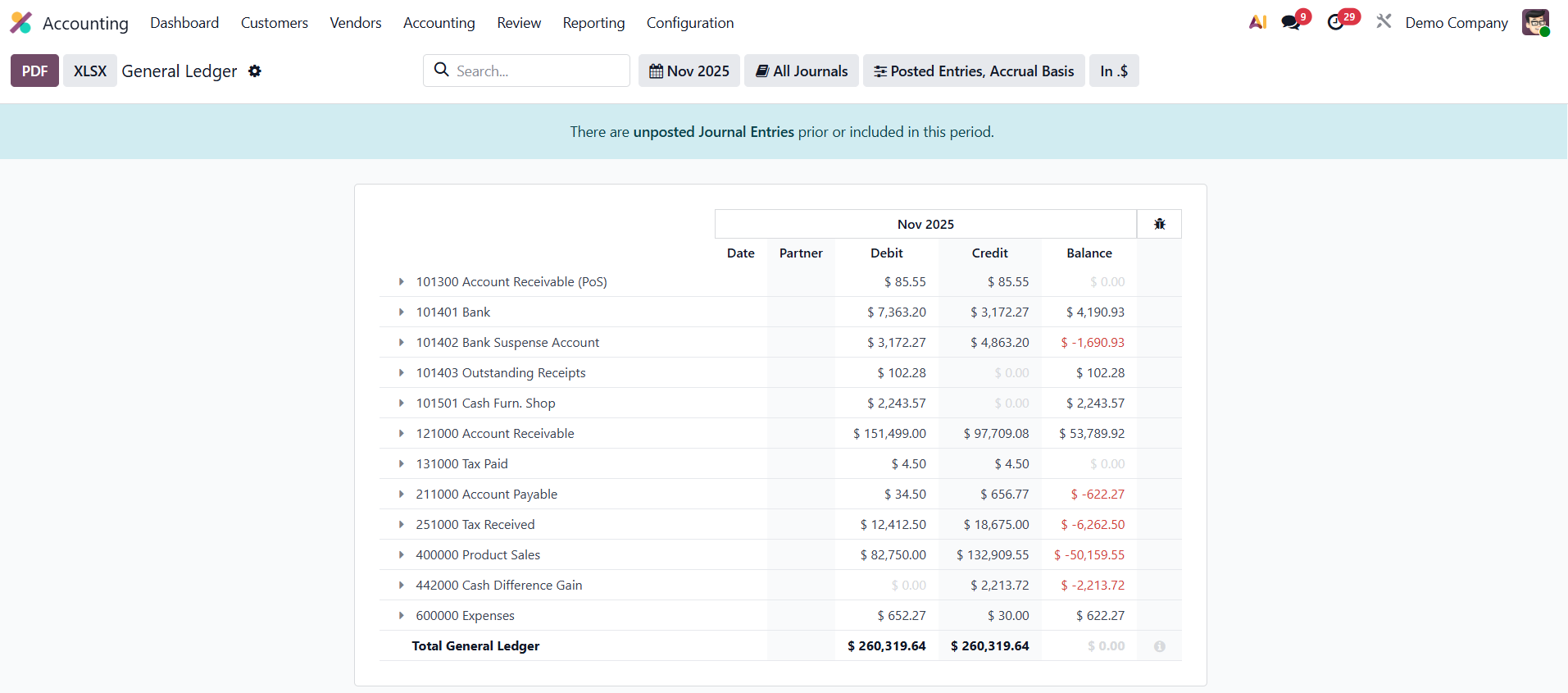
Each entry in the report includes essential details such as the Account Name, Date, Communication, Partner, Currency, Debit, Credit, and Running Balance, providing full transparency into every transaction.
By consolidating all journal entries, the General Ledger functions as a comprehensive audit trail, enabling accountants and managers to trace back any transaction to its source document. This report is invaluable for financial reviews, audits, and reconciliation, ensuring that all entries are properly categorized and aligned with accounting standards.
1.7 Partner Ledger
The Partner Ledger report in Odoo 19 Accounting provides a detailed and consolidated summary of all receivable and payable journal entries associated with each partner over a chosen time frame. It acts as a comprehensive record that helps businesses monitor outstanding balances, track payment histories, and reconcile partner accounts efficiently.
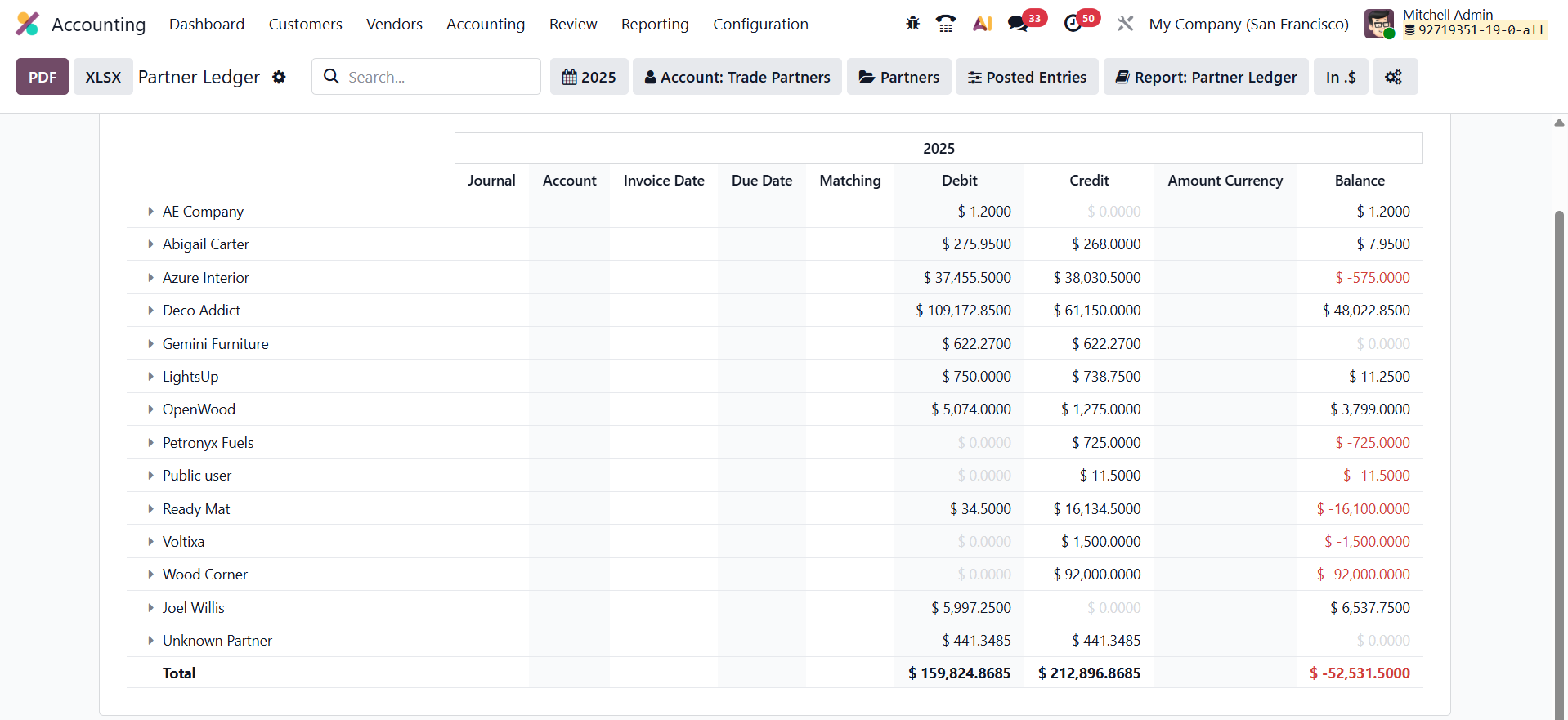
For each partner, the report displays crucial information such as the Journal, Account, Internal Reference, Due Date, Matching Number, Debit, Credit, Original Amount, Currency, and the Running Balance. This structured presentation enables quick identification of overdue invoices, pending payments, or credit notes. By analyzing the Partner Ledger, accountants can easily verify that partner accounts are in balance and ensure that all receivable and payable transactions are accurately recorded. The report can be filtered, compared, or exported for further analysis, making it an essential tool for managing partner-related financial operations and maintaining transparency in business relationships.
1.8 Aged Receivable
The Aged Receivable report in Odoo 19 Accounting, accessible under the Reporting menu, provides an instant snapshot of all unpaid customer invoices as of a specific cut-off date. This report helps you identify overdue amounts and monitor how long each invoice has remained outstanding.
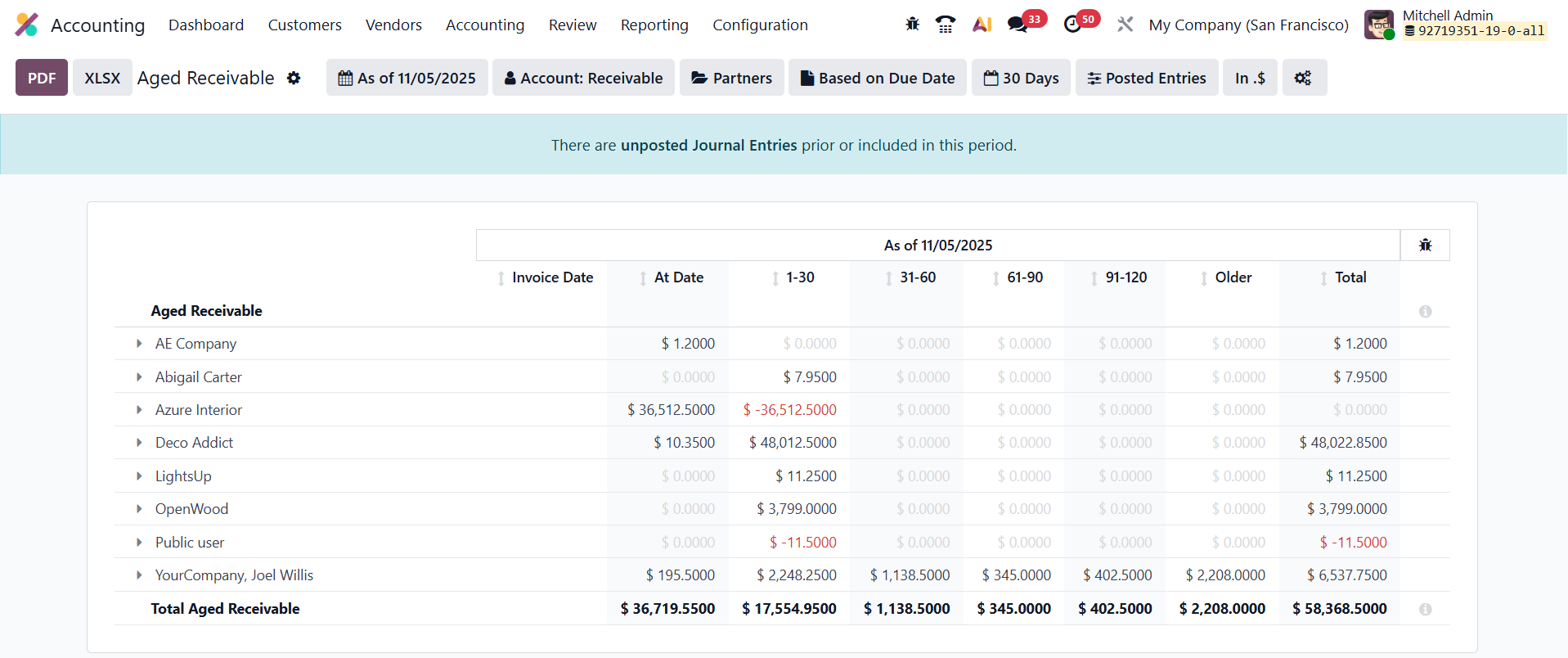
Odoo automatically organizes open invoices into aging buckets (such as 0–30 days, 31–60 days, 61–90 days, and so on) based on the payment terms you have configured. This structure allows you to quickly assess which customers have exceeded their payment deadlines and by how much, improving collection efficiency and cash-flow management.
When generating the report, Odoo offers several filtering options to refine your analysis. You can filter by Date (month, quarter, fiscal year, or custom range), Journal (e.g., customer invoices or vendor bills), or Partner (specific customers or vendors). Depending on the report type, additional filters such as Product Category, User, or Analytic Account can also be applied.
With these filtering and grouping tools, the Aged Receivable report provides a clear, actionable overview of pending customer payments, helping you prioritize follow-ups and maintain healthy financial control.
11.9 Aged Payable
The Aged Payable report in Odoo 19 Accounting functions similarly to the Aged Receivable report but focuses on your company’s outstanding supplier bills. It provides a detailed view of all unpaid vendor invoices that have passed their due dates as of a selected cut-off date, allowing you to monitor and manage your payables efficiently.
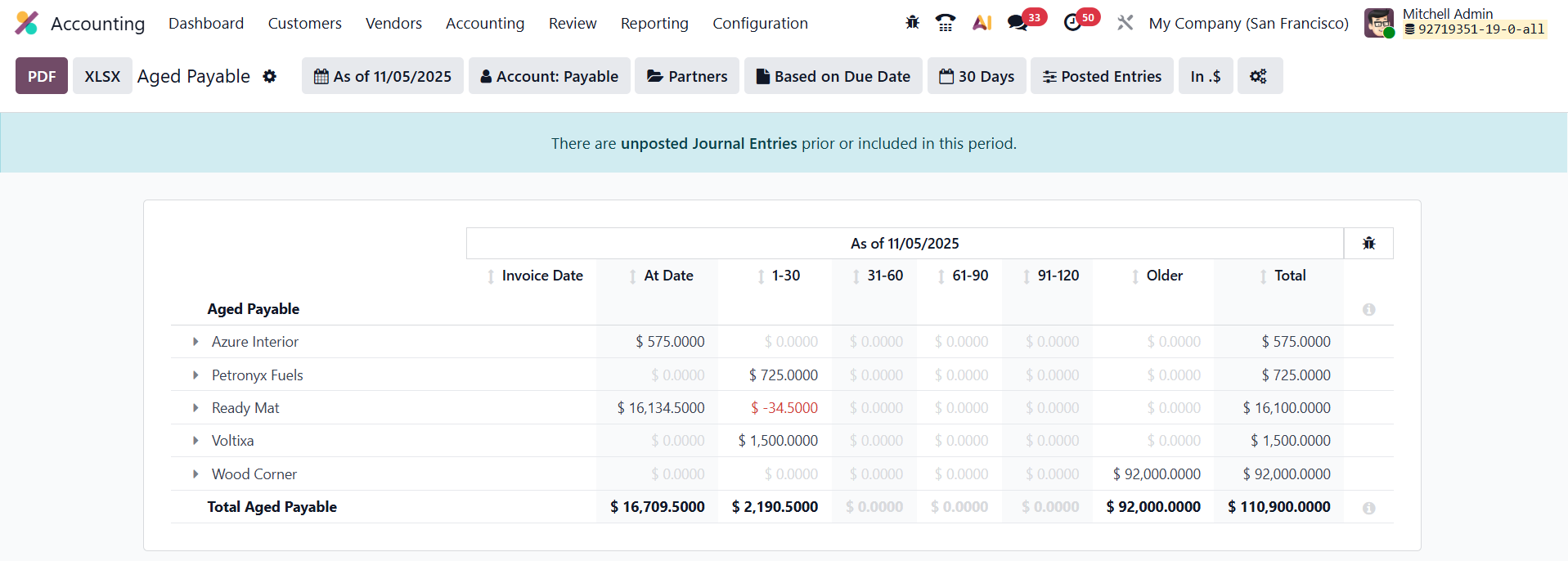
The report organizes these outstanding amounts into aging buckets (such as 0–30 days, 31–60 days, 61–90 days, etc.), making it easy to assess how long each bill has remained unpaid. This structure helps identify overdue obligations, evaluate payment patterns, and plan future cash outflows effectively. You can also refine the report using filters such as Date Range, Journal, or Vendor, and export the results to PDF or Excel formats for further analysis or auditing purposes.
1.10 Tax Return
In Odoo 19 Accounting, the Tax Report feature, accessible from the Reporting menu, enables users to generate detailed reports on both sales and purchase taxes for a defined period. This report provides a comprehensive summary of your company’s taxable transactions, helping ensure accuracy and compliance with local tax regulations. It displays the collected and paid tax amounts, categorized by tax type, making it easier to reconcile and validate tax data before submission.
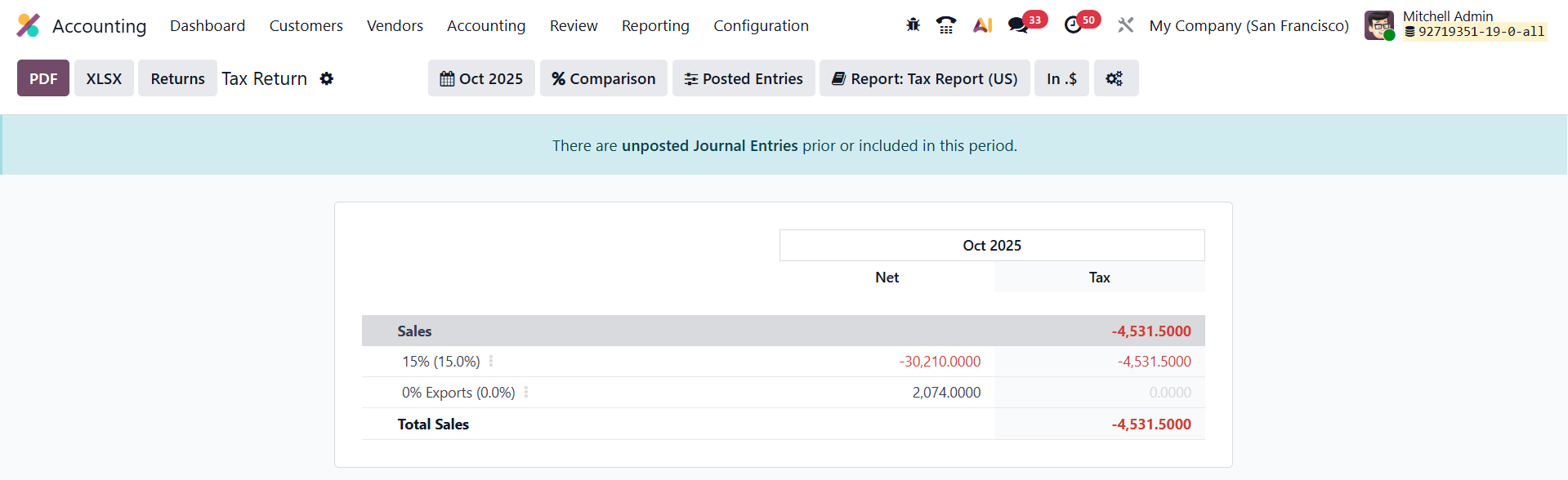
Odoo 19 also includes a Returns option, which allows you to finalize and submit the return tax for the selected period directly from the report interface. This automation simplifies the process of filing tax returns, reduces manual errors, and ensures timely submission of your company’s tax obligations.
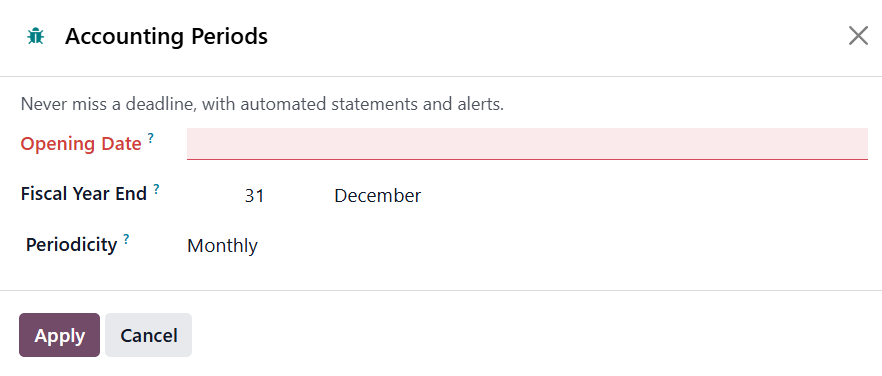
Once the tax return entry is posted, Odoo automatically updates the Tax Lock Date, preventing any further modifications to transactions within that completed period and safeguarding the integrity of submitted tax data.
1.11 EC Sales List
In Odoo 19 Accounting, the EC Sales List (ECSL) report serves as a vital compliance tool for VAT-registered businesses operating within the European Union. It tracks the sale and transfer of goods and services to other VAT-registered companies located in EU member states, helping ensure accurate cross-border tax reporting.
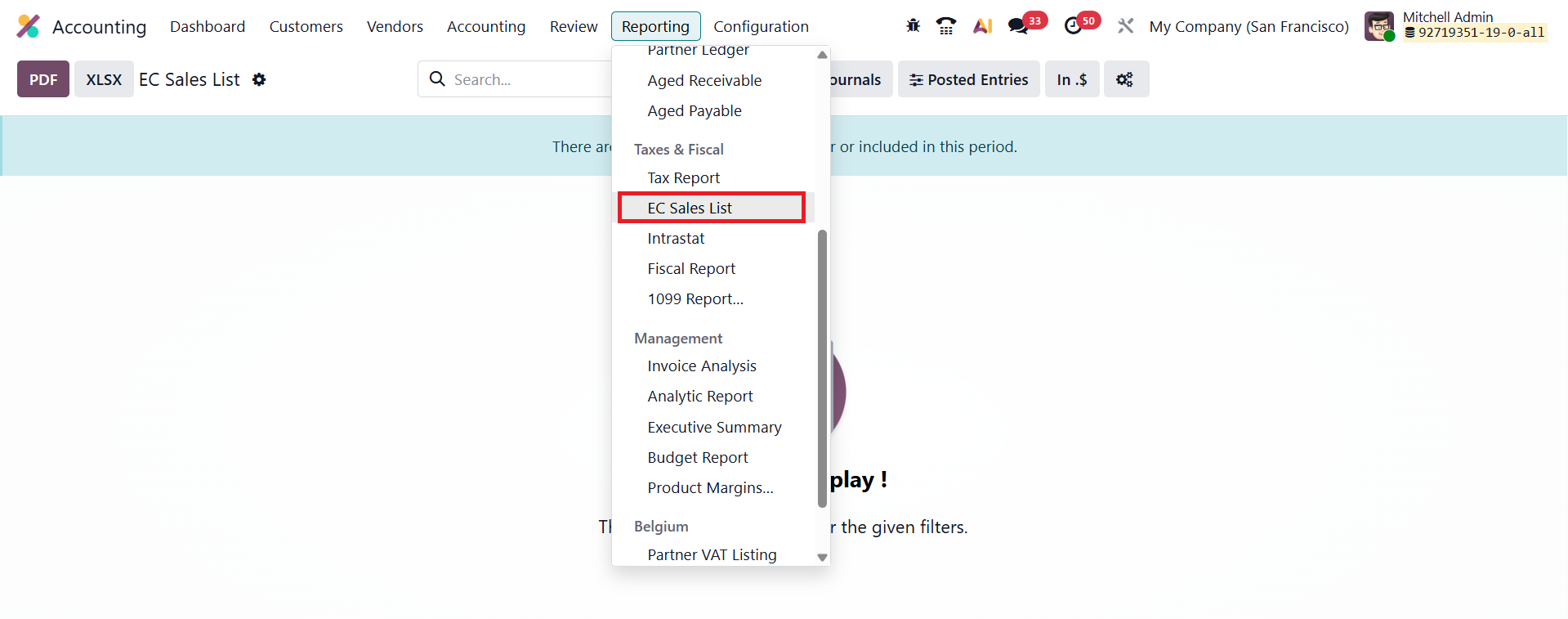
Accessible from the Reporting menu in the Accounting module, the ECSL provides a detailed summary of all intra-EU transactions, including partner VAT numbers and total sales amounts for the selected period. This streamlined report enables companies, particularly those in the UK and EU, to easily meet their HMRC and EU VAT declaration requirements, maintaining full transparency and compliance in international trade operations.
1.12 Intrastat Report
In Odoo 19 Accounting, the Intrastat Report provides a detailed record of the movement of goods between EU member states, ensuring businesses meet the European Union’s trade statistics and reporting requirements.
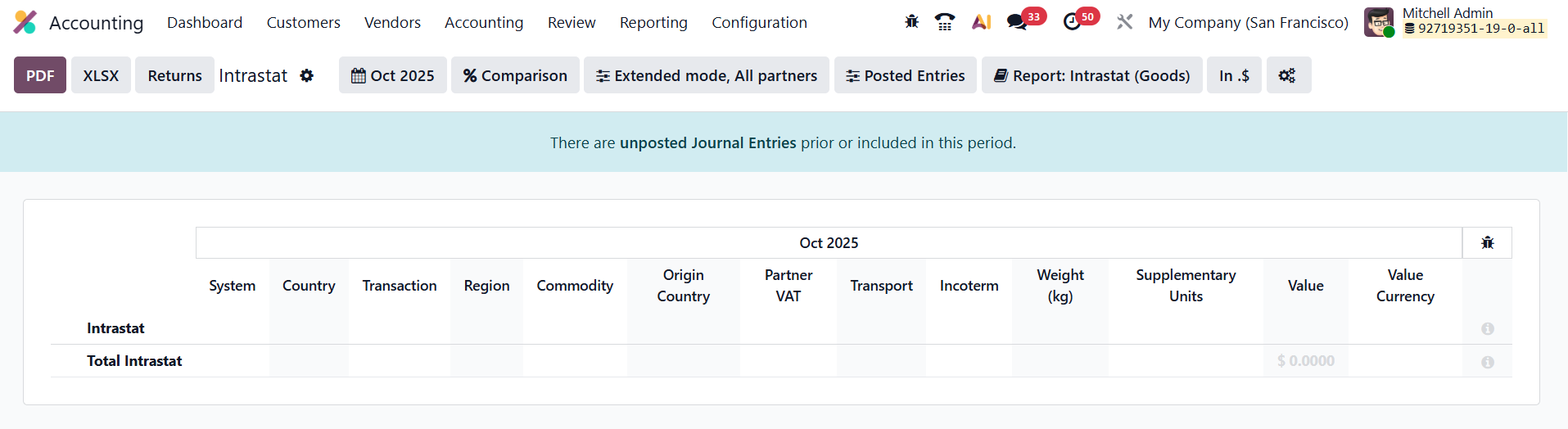
You can access this report by navigating to Reporting ▸ Intrastat Report in the Accounting module. The report compiles all relevant information, such as product details, quantities, and values of goods traded, based on your recorded transactions. This makes it easier for companies engaged in intra-EU trade to generate accurate, compliant Intrastat declarations and submit them to the appropriate statistical authorities.
1.13 Invoice Analysis
In Odoo 19 Accounting, the Invoice Analysis feature provides powerful insights into both sales and purchase performance through a fully interactive and customizable reporting interface. Accessible via Reporting › Invoice Analysis, this tool allows users to select a specific accounting period and view data in dynamic graphs or an interactive pivot table, offering complete flexibility in how information is presented.
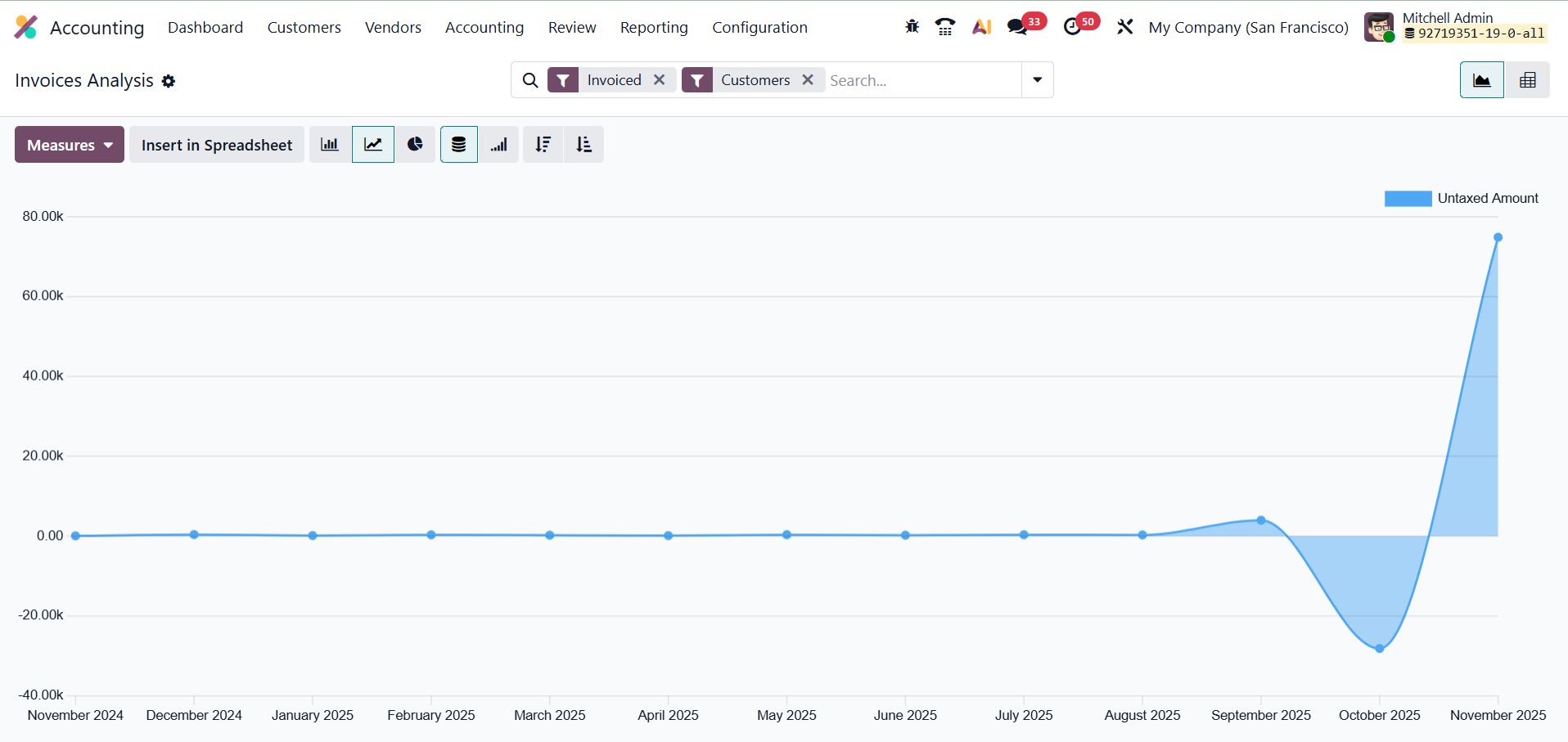
Key analytical measures include Average Price, Product Quantity, Total, Untaxed Total, and Count of transactions. Odoo also provides a range of built-in filters, such as My Invoice, To Invoice, Customer, Vendor, Invoice/Credit Note, Invoice Date, and Due Date, for instant dataset refinement. Additionally, the Customize panel lets users create filters and conditions, enabling deeper and more targeted invoice analysis to support informed financial decision-making.
1.14 Analytic Report
In Odoo 19 Accounting, the Analytical Accounting Report acts as a comprehensive tool for gaining deeper insights into your company’s financial performance.
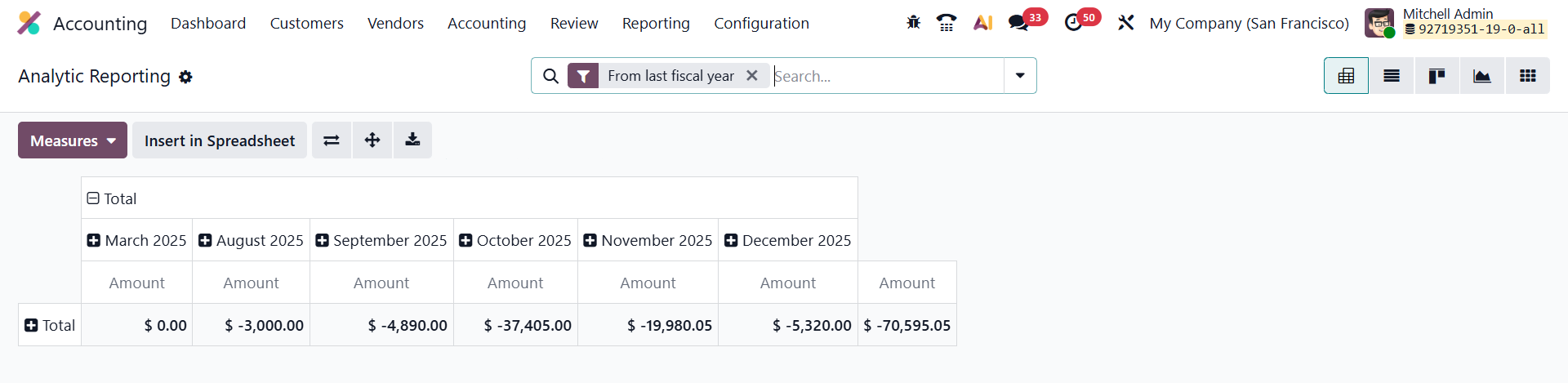
Utilizing analytic accounts and tags allows you to break down and analyze costs, revenues, and margins across different dimensions such as projects, departments, or business units. This flexible reporting structure helps you monitor profitability, track budget utilization, and evaluate the financial health of specific operations, ensuring precise and informed decision-making. This window shows Pivot, List, Kanban, Graph, and Grid views. Users can select appropriate views according to their requirements.
1.15 Executive Summary
In Odoo 19 Accounting, the Executive Summary report delivers a consolidated snapshot of your company’s financial health over a chosen period. Accessible from the Reporting menu, it brings together key insights from cash flow, profitability, and the balance sheet, offering a clear overview of overall business performance.
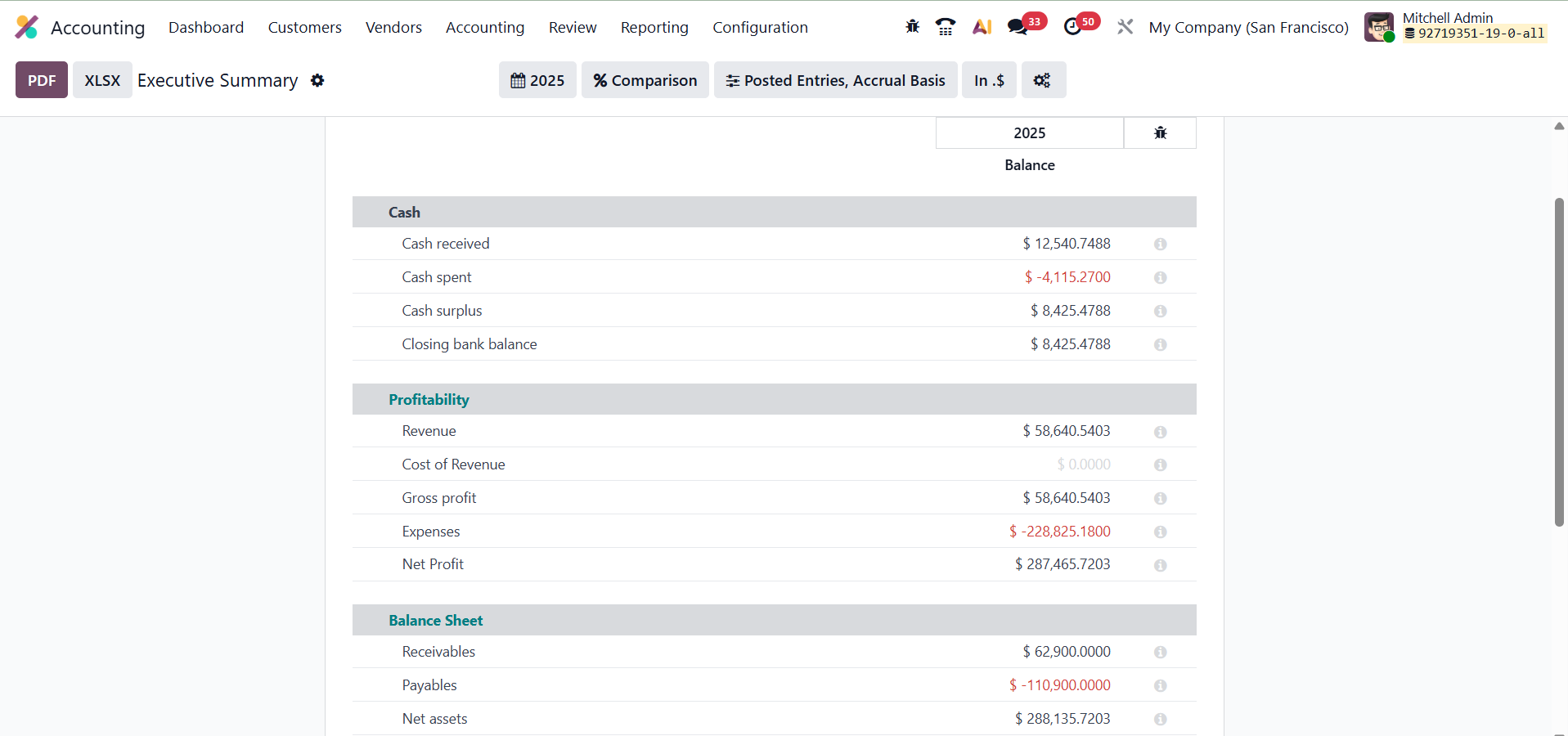
The Performance tab highlights crucial metrics such as Return on Investment (ROI), Gross Profit Margin, and Net Profit Margin, enabling you to evaluate operational efficiency and profitability at a glance.
Meanwhile, the Position tab provides a deeper understanding of financial stability through indicators like Average Debtor Days, Average Creditor Days, Short-Term Cash Forecast, and the Current Assets-to-Liabilities ratio. Together, these metrics help measure liquidity, working capital management, and the long-term financial resilience of your business.
1.16 Product Margin
In Odoo 19 Accounting, the Product Margin report provides a comprehensive view of your product-level profitability, allowing you to evaluate how each item contributes to overall business performance. Accessible from Reporting › Product Margin, this report enables you to set a specific date range and apply invoice state filters such as Paid, Open and Paid, or Draft, Open, and Paid to refine your analysis.
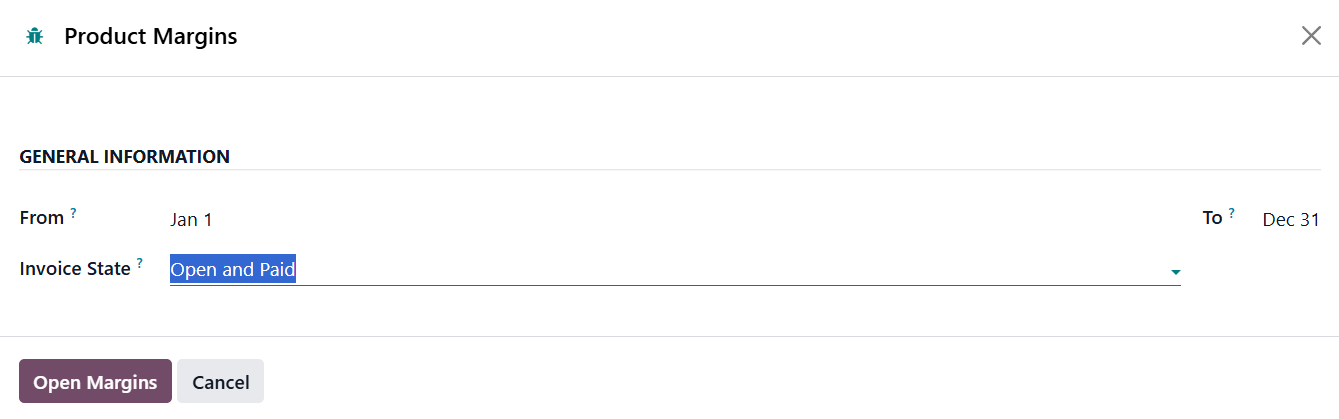
By selecting Open Margin, Odoo generates a detailed table displaying essential metrics, including product reference, average selling price, invoiced quantity, turnover, sales gap (the difference between turnover and cost), total cost, purchased quantity, total margin, expected margin, margin rate, and variance percentage from the expected margin.
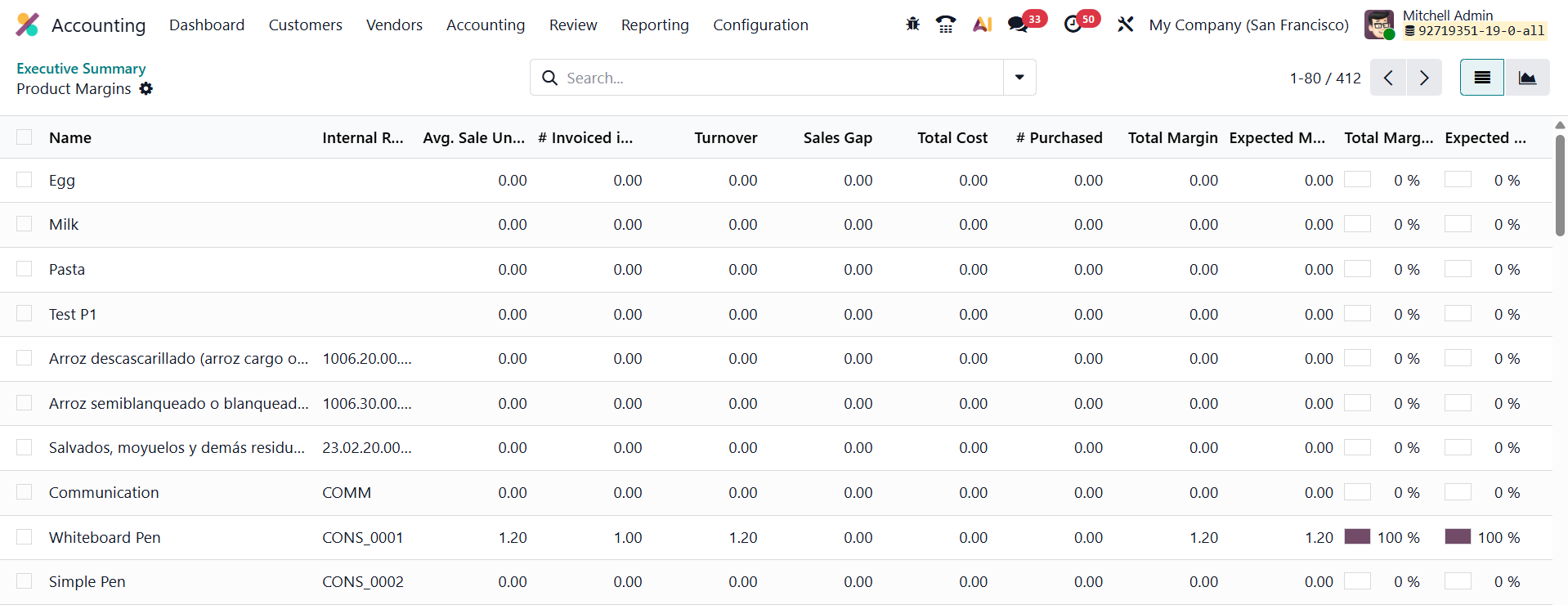
This insight-rich report helps businesses identify their most profitable products, monitor cost efficiency, and assess deviations between expected and actual performance, ultimately supporting more strategic pricing and purchasing decisions.
The Odoo 19 Accounting module stands out as a powerful, user-friendly, and intelligent financial management system designed to meet the diverse needs of modern businesses. With its advanced automation features, real-time reporting, seamless integrations, and enhanced usability, it not only simplifies day-to-day accounting tasks but also ensures accuracy, compliance, and transparency across all financial operations. From invoicing and reconciliation to audit reports and inventory valuation, Odoo 19 empowers users with the tools to make informed decisions efficiently. By combining flexibility, automation, and precision, Odoo 19 Accounting helps businesses streamline their workflows, save time, and maintain full control over their financial performance.