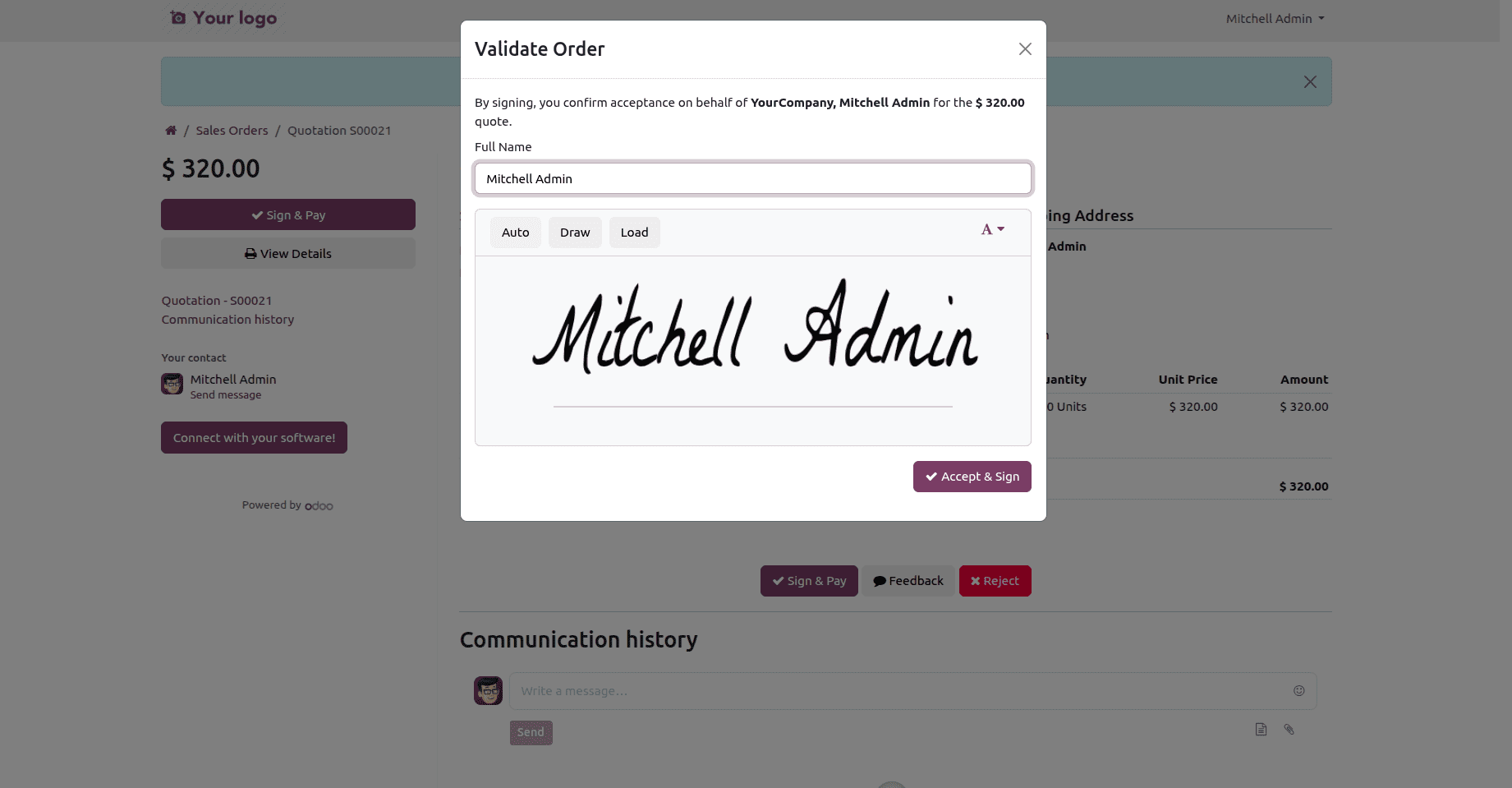
A Sign & Pay modal requesting the customer's name and signature appears when they accept a quote from the Odoo portal. Occasionally, you need to record a little extra information at the same time, such as the signer's email address and job title, which are included on the confirmed order.
This appears to be a five-minute task: simply add two <input> tags. It isn't. Data from the portal signature form, an OWL component, is sent to a controller via a certain RPC call. When an input is not plugged into that pipeline, it renders flawlessly and, upon submission, silently discards its value. Extra fields must be followed through each layer in order for them to truly stick.
How the signing flow works
Three pieces cooperate:
NameAndSignature (@web/core/signature/name_and_signature) - is a reusable widget that creates the signature pad and stores the "Full Name" input. It reads from and writes to a shared signature object.
SignatureForm (@portal/signature_form/signature_form) - is the portal wrapper that inserts the submit button, embeds NameAndSignature, and delivers { name, signature } to a route via RPC upon click.
The controller - portal_quote_accept in sale/controllers/portal.py handles the route /my/orders/<int:order_id>/accept for a sales order. The sale is marked with signed_by, signed_on, and signature in order.
The crucial realization is that NameAndSignature and SignatureForm have the same signature object; the form transmits its reactive state as a prop to the widget. Therefore, the form may read our additional inputs back at submit time without the need for additional plumbing if they write into that object.
Adding storage fields, adding inputs, capturing their values into the shared object, including them in the RPC, storing them in the controller, and displaying them on the backend creates a clear plan.
Step 1: Add the storage fields
The captured values must be placed adjacent to the normal signing fields.
Python code - sale_order.py:
from odoo import fields, models

class SaleOrder(models.Model):
    _inherit = 'sale.order'
    # Captured on the customer portal at signing time, next to the
    # standard signed_by / signed_on / signature fields.
    signed_email = fields.Char(string="Signed By Email")
    signed_designation = fields.Char(string="Signed By Designation")
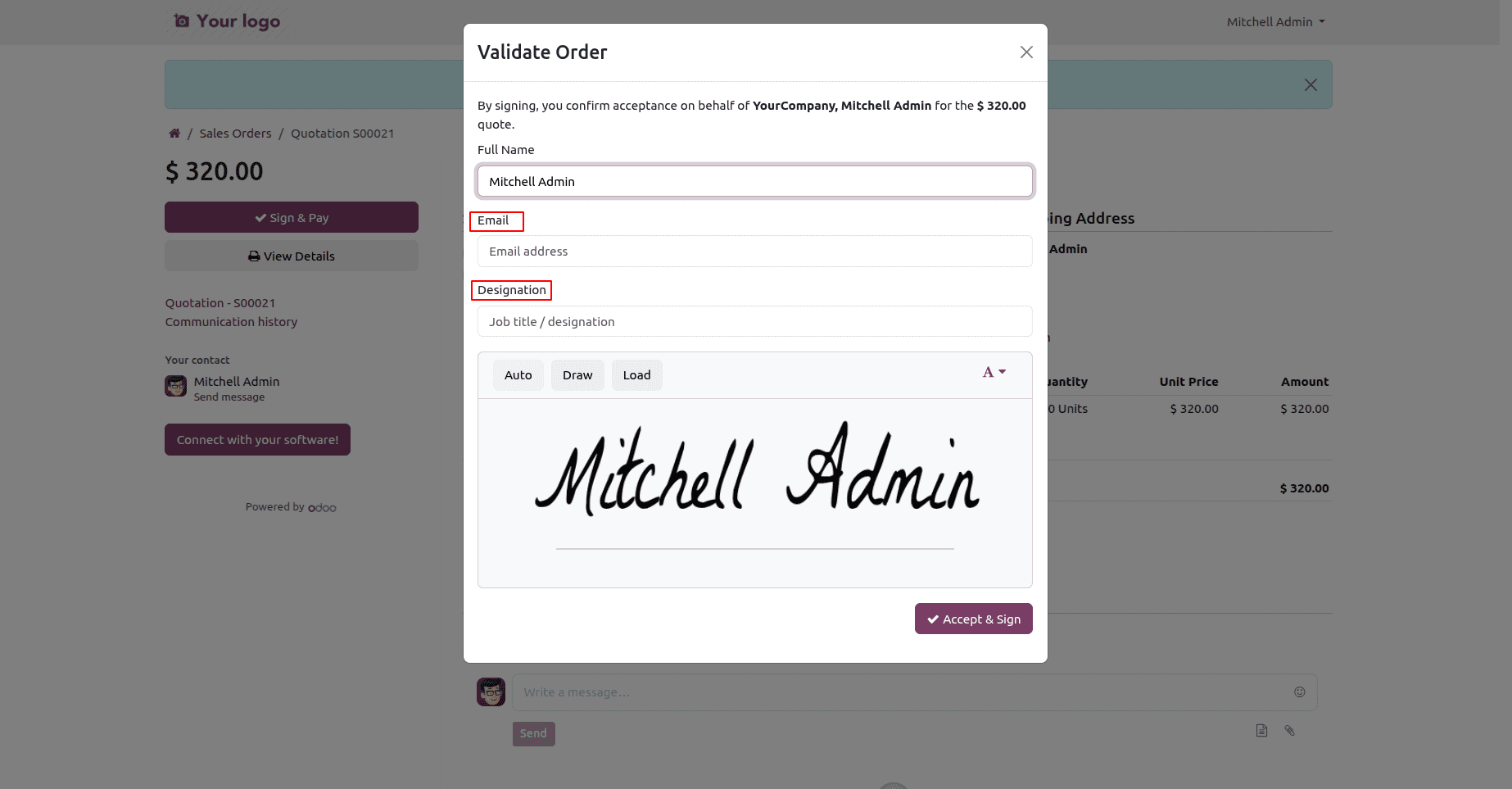
Step 2: Add the inputs to the signature widget template
Take over the OWL template online.NameAndSignature and add two inputs after the current group of names. They bind to props and invoke handler methods that we define signature.
Xml code - name_and_signature_extra.xml:
<?xml version="1.0" encoding="UTF-8"?>
<templates xml:space="preserve">
    <!--
        Extend the shared signature widget template to add two inputs.
        NOTE: extension mode is GLOBAL on the frontend - these inputs will
        appear in every NameAndSignature instance rendered on the portal
        (in practice, the Sale Order Sign & Pay modal).
    -->
    <t t-name="sale_portal_sign_extra.NameAndSignatureExtra"
       t-inherit="web.NameAndSignature"
       t-inherit-mode="extension">
        <xpath expr="//div[hasclass('o_web_sign_name_group')]" position="after">
            <div class="o_sps_email_group mt-2">
                <label class="col-form-label"
                       t-att-for="'o_sps_email_input_' + htmlId">Email</label>
                <input type="email" name="signer_email"
                       t-att-id="'o_sps_email_input_' + htmlId"
                       class="o_sps_email_input form-control"
                       t-on-input="onInputSignEmail"
                       t-att-value="props.signature.email"
                       placeholder="Email address"/>
            </div>
            <div class="o_sps_designation_group mt-2">
                <label class="col-form-label"
                       t-att-for="'o_sps_designation_input_' + htmlId">Designation</label>
                <input type="text" name="signer_designation"
                       t-att-id="'o_sps_designation_input_' + htmlId"
                       class="o_sps_designation_input form-control"
                       t-on-input="onInputSignDesignation"
                       t-att-value="props.signature.designation"
                       placeholder="Job title / designation"/>
            </div>
        </xpath>
    </t>
</templates>
Step 3: Capture the values into the shared object
Patch the NameAndSignature component to include onInputSignEmail and onInputSignDesignation, which are referenced in the template. Initialize the keys in setup so that the bindings have something to read on the first render.
JS code - name_and_signature_patch.js:
/** @odoo-module **/
import { patch } from "@web/core/utils/patch";
import { NameAndSignature } from "@web/core/signature/name_and_signature";
patch(NameAndSignature.prototype, {
    setup() {
        super.setup();
        // The `signature` prop is a shared (reactive) object. The parent
        // SignatureForm reads it back at submit time, so storing the extra
        // values here makes them available to the RPC payload.
        const sig = this.props.signature;
        if (sig.email === undefined) {
            sig.email = "";         }
        if (sig.designation === undefined) {
            sig.designation = "";
        }
    },
    onInputSignEmail(ev) {
        this.props.signature.email = ev.target.value;
    },
    onInputSignDesignation(ev) {
        this.props.signature.designation = ev.target.value;
    },
});
These data are now exposed to SignatureForm since props.signature is the same object that the parent form contains. Extra keys pass validation since the signature is typed as a normal object; therefore, there is no need to interact with the static properties of the component.
Step 4: Send the values in the RPC payload
People tend to overlook this stage. Since there isn't a smaller hook, we faithfully overwrite the method and add our two values when the parent form's onClickSubmit generates the payload inline as { name, signature } and initiates the RPC.
JS code - signature_form_patch.js:
/** @odoo-module **/
import { patch } from "@web/core/utils/patch";
import { rpc } from "@web/core/network/rpc";
import { redirect } from "@web/core/utils/urls";
import { addLoadingEffect } from "@web/core/utils/ui";
import { SignatureForm } from "@portal/signature_form/signature_form";
/**
 * Faithful override of the core onClickSubmit: same flow, but the two extra
 * values captured by the patched NameAndSignature widget are added to the
 * payload sent to the accept route. There is no smaller extension seam in
 * the core method, so the whole method is reimplemented.
 */
patch(SignatureForm.prototype, {
    async onClickSubmit() {
        const button = document.querySelector(".o_portal_sign_submit");
        const icon = button.removeChild(button.firstChild);
        const restoreBtnLoading = addLoadingEffect(button);
        const name = this.signature.name;
        const signature = this.signature.getSignatureImage().split(",")[1];
        const signed_email = this.signature.email || "";
        const signed_designation = this.signature.designation || "";
        const data = await rpc(this.props.callUrl, {
            name,
            signature,
            signed_email,
            signed_designation,
        });
        if (data.force_refresh) {
            restoreBtnLoading();
            button.prepend(icon);
            if (data.redirect_url) {
                redirect(data.redirect_url);
            } else {
                window.location.reload();
            }
            // do not resolve if we reload the page
            return new Promise(() => {});
        }
        this.state.error = data.error || false;
        this.state.success = !data.error && {
            message: data.message,
            redirectUrl: data.redirect_url,
            redirectMessage: data.redirect_message,
        };
    },
});
Keep an eye on it during point releases because this reimplements a fundamental method; if Odoo modifies onClickSubmit, synchronize your copy.
Step 5: Persist the values in the controller
Our additional keys are sent as keyword arguments to the accept route. Instead of copying Odoo's full method - which verifies the order, produces the PDF, posts to chatter, and more - call super() to execute all of that without making any changes, and then, assuming signing was successful, write our two fields.
Python code - portal.py:
# -*- coding: utf-8 -*-
from odoo.http import request, route
from odoo.exceptions import AccessError, MissingError
from odoo.addons.sale.controllers.portal import CustomerPortal

class CustomerPortalSignExtra(CustomerPortal):
    @route(
        ['/my/orders/<int:order_id>/accept'],
        type='jsonrpc', auth="public", website=True,
    )
    def portal_quote_accept(
        self, order_id, access_token=None, name=None, signature=None,
        signed_email=None, signed_designation=None, **kw
    ):
        # Run Odoo's standard signing logic (writes signature/signed_by,
        # confirms the order, posts the PDF, etc.).
        res = super().portal_quote_accept(
            order_id,
            access_token=access_token,
            name=name,
            signature=signature,
        )
        # Only persist the extra fields if signing actually succeeded.
        if isinstance(res, dict) and not res.get('error'):
            token = access_token or request.httprequest.args.get('access_token')
            try:
                order_sudo = self._document_check_access(
                    'sale.order', order_id, access_token=token,
                )
            except (AccessError, MissingError):
                return res
            order_sudo.write({
                'signed_email': signed_email or False,
                'signed_designation': signed_designation or False,
            })
            request.env.cr.flush()
        return res
Step 6: Show the fields in the backend
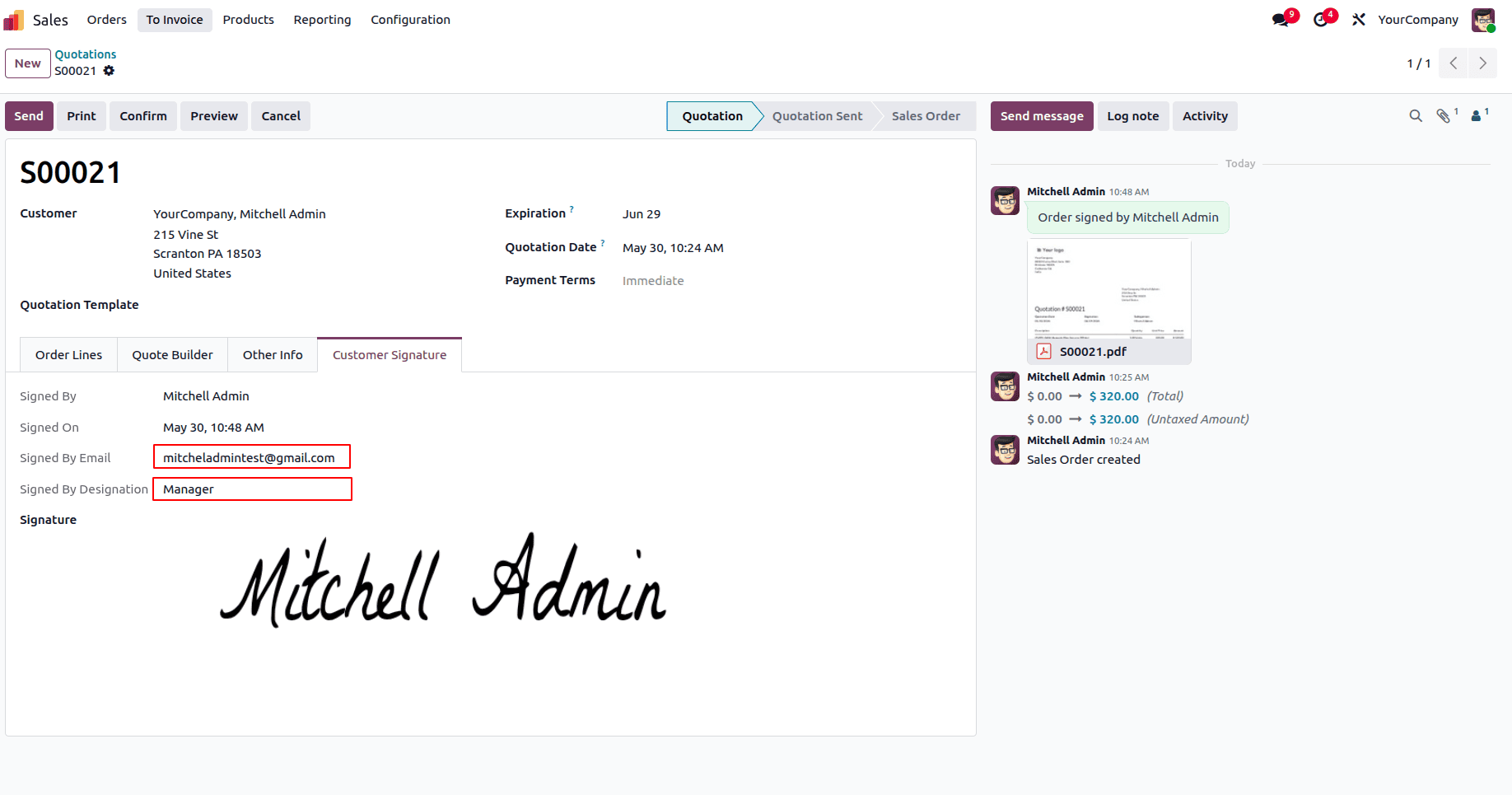
Stored data nobody can see isn't much use. Inherit the sales order form and surface the fields as read-only (they're captured on the portal, not edited internally).
Xml code - sale_order_views.xml:
<?xml version="1.0" encoding="utf-8"?>
<odoo>
    <record id="view_order_form_sign_extra" model="ir.ui.view">
        <field name="name">sale.order.form.sign.extra</field>
        <field name="model">sale.order</field>
        <field name="inherit_id" ref="sale.view_order_form"/>
        <field name="arch" type="xml">
            <!-- xpath extra fields after signed_on signature details field -->
            <field name="signed_on" position="after">
                <field name="signed_email" readonly="1"
                       invisible="not signed_email"/>
                <field name="signed_designation" readonly="1"
                       invisible="not signed_designation"/>
            </field>
        </field>
    </record>
</odoo>
Sign Wizard Without Customisation:
Sign Wizard With Customisation: Email & Designation Added
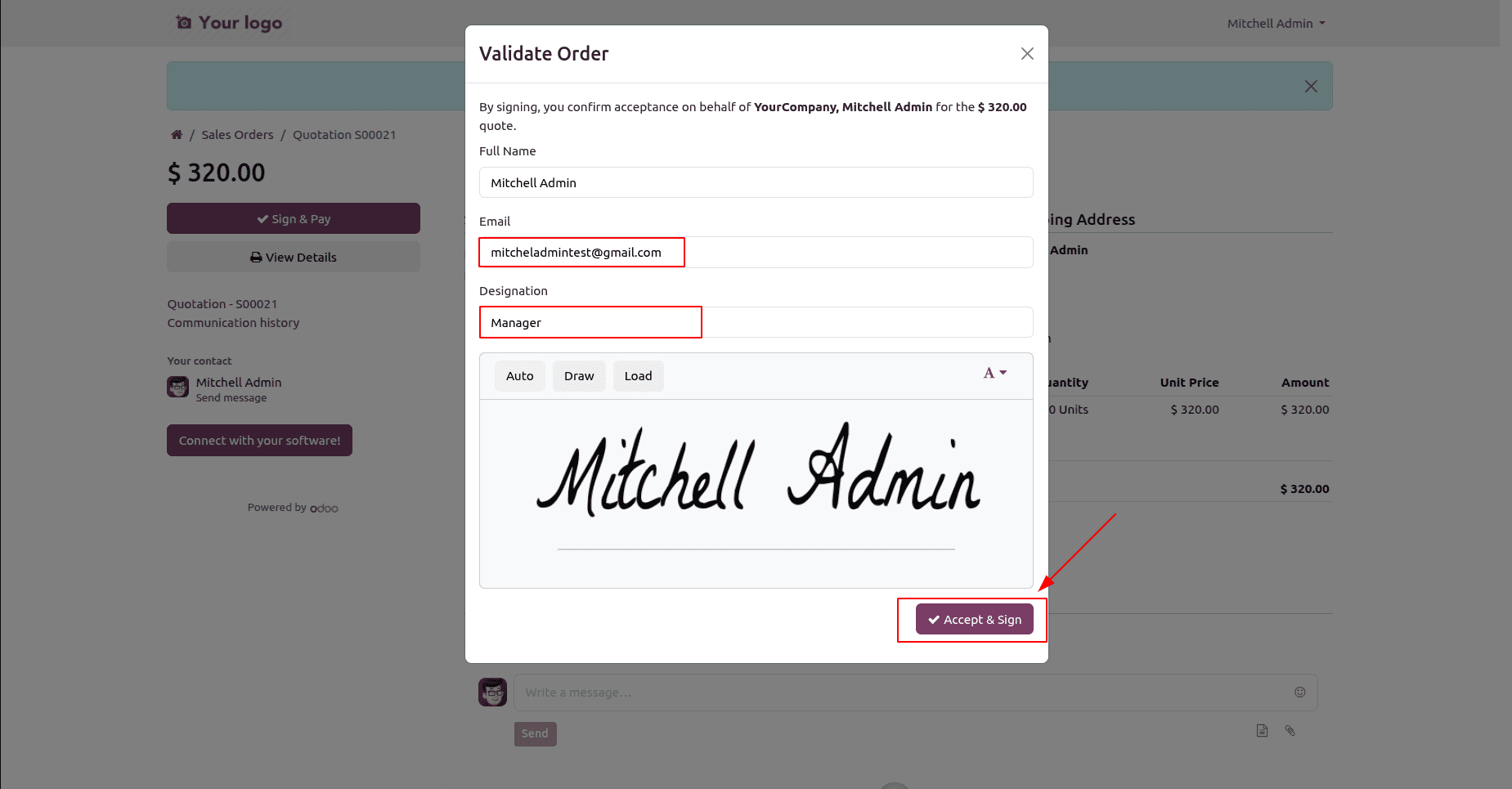
Sale Order Backend Form View with Additional Signature Details:
This is larger than it appears because the portal signature form is not a static page but rather a tiny data pipeline. Before a value input in the widget reaches the database, it must be recorded in the shared signature object, sent via the submit RPC, and stored by the controller. Extending it is simple once you realize those interconnected levels; the same structure holds true for whatever additional information you require at the time of signing, such as a phone number, a PO reference, or a terms tick.
To read more about An Overview of Odoo 19 Sign Module, refer to our blog An Overview of Odoo 19 Sign Module.