25. Chart of Accounts
In Odoo 18 Accounting, the Chart of Accounts is a structured list of
accounts used to record and categorize financial transactions.
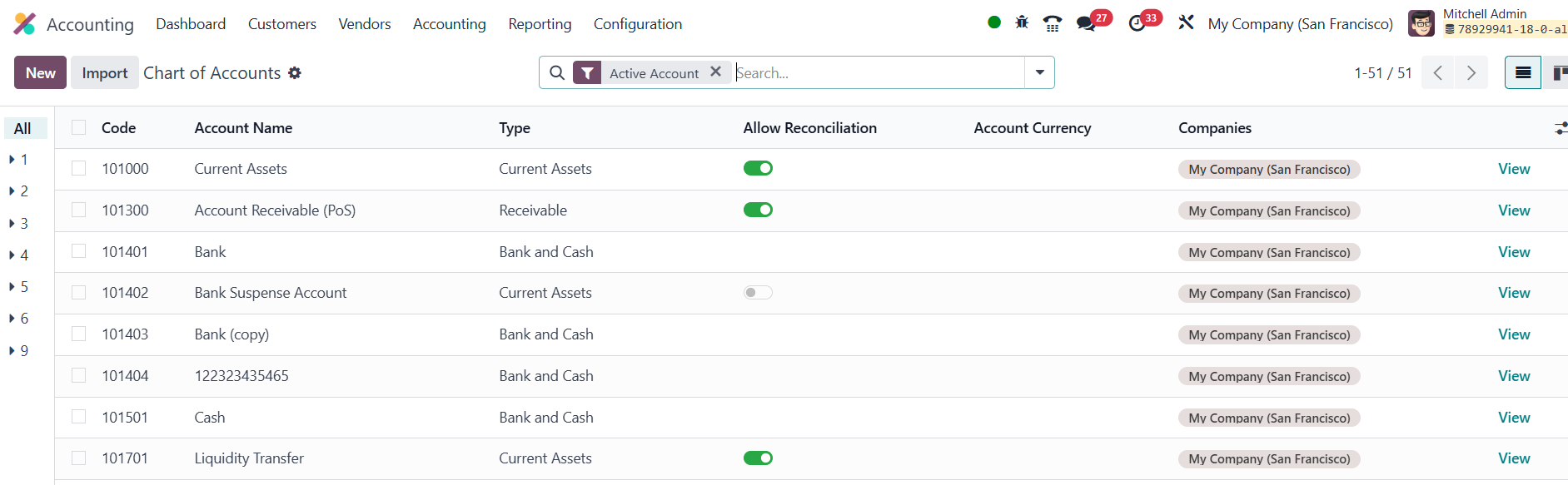
Opened from Accounting → Configuration → Chart of Accounts, it
appears as a fluid grid that lists each account’s code, name, type,
working currency, and owning company. The Type field is especially
powerful because it tells Odoo where the account belongs on
statutory reports, which fiscal‑year closing rules to trigger, and
whether the account supports reconciliation for matching invoices
with payments.
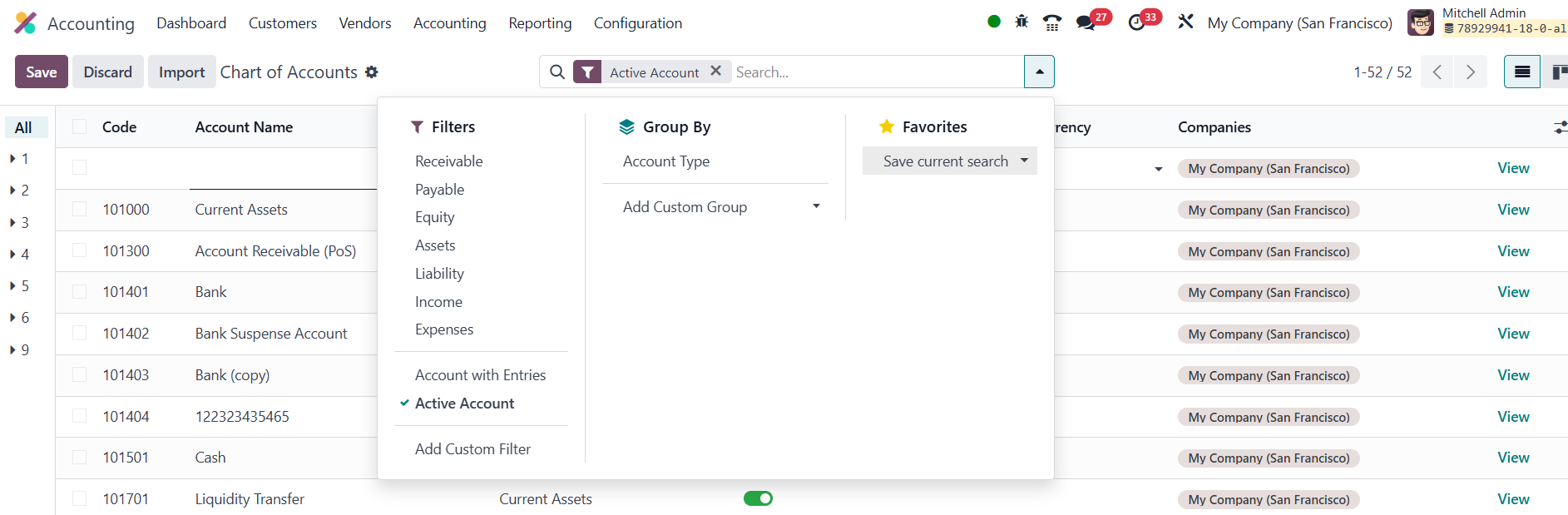
Built‑in one‑click filters; such as Receivable, Payable, Equity,
Assets, Liabilities, Income, and Expenses, let you zero in on
specific subsets, while custom filters and groupings give you
endless ways to slice the data without ever exporting to a
spreadsheet.
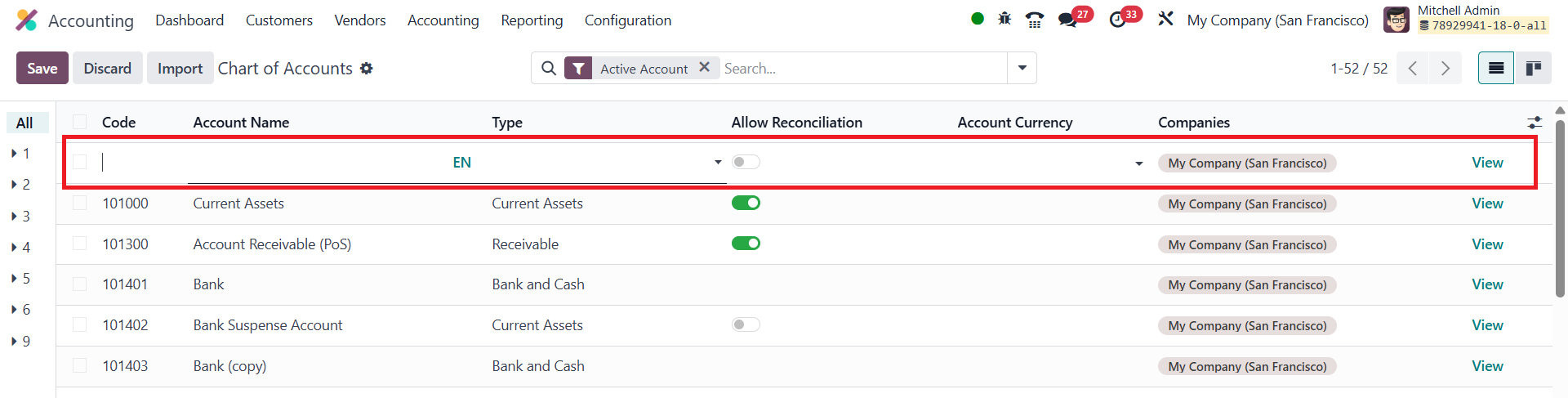
Creating a new account is as simple as clicking New; a blank row
appears in the list so you can key in the code, name, type,
currency, and reconciliation flag on the spot, with real‑time
validation to prevent duplicates. If you need deeper settings; you
can hit View to open the full form and fine‑tune every parameter.
The Account Code serves as a unique identifier for each account,
helping users quickly locate and reference specific accounts in
financial reports and transactions. The Account Name provides a
descriptive label for the account, making it easier to understand
its role in the company’s finances. The Account Type indicates the
nature of the account; whether it is an asset, liability, income, or
expense account, which determines how it behaves in financial
statements. Additionally, Tags can be applied to categorize accounts
for easier filtering and more detailed financial reporting, enabling
businesses to group and analyze accounts based on custom
classifications or operational needs.
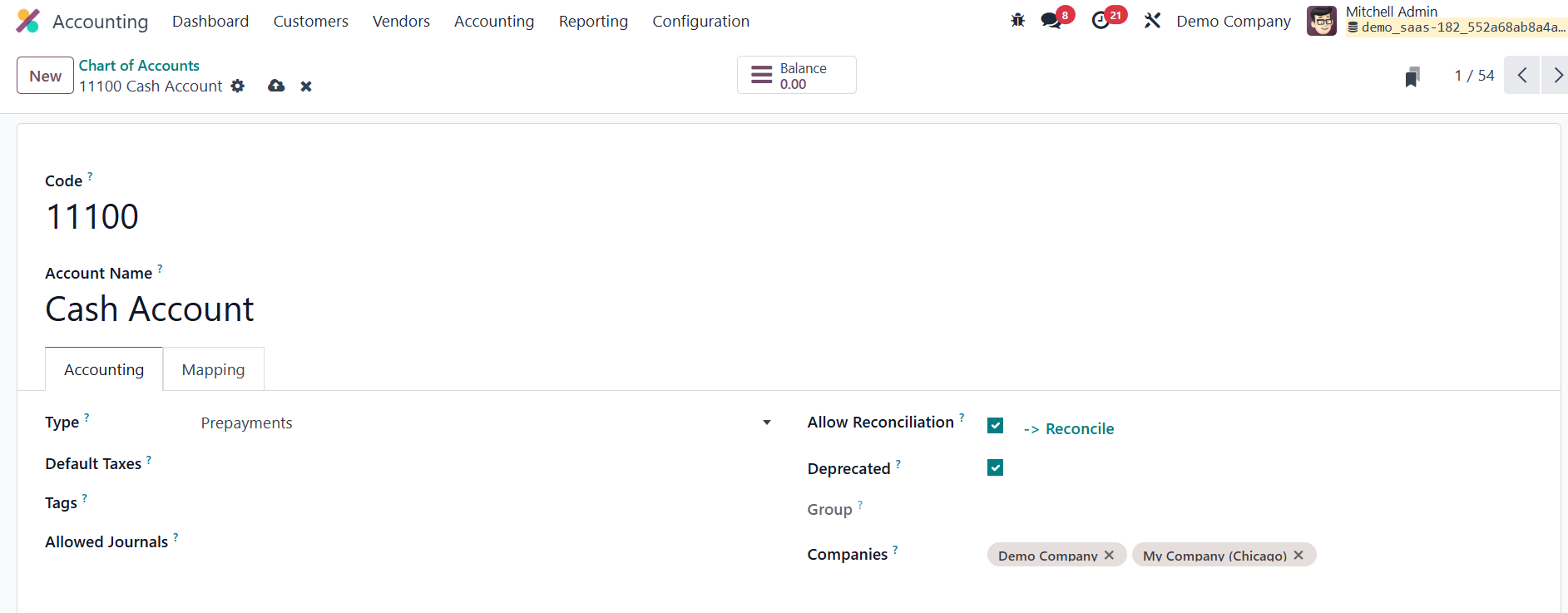
In the form view of the Chart of Accounts in Odoo 18, the Default
Taxes field allows users to specify default tax rates that should
automatically apply when the account is used in transactions. The
Allowed Journals field defines which journals can post entries to
the selected account. Once an account has been used in a
transaction, it cannot be deleted to preserve the integrity of past
financial records. However, if the account is no longer needed for
future use, it can be made inactive by checking the Deprecated
option in the account’s settings. The Shared Accounts feature in
Odoo 18 enables the creation of a single account that can be
utilized across multiple companies, making it particularly
beneficial in a multi-company setup.
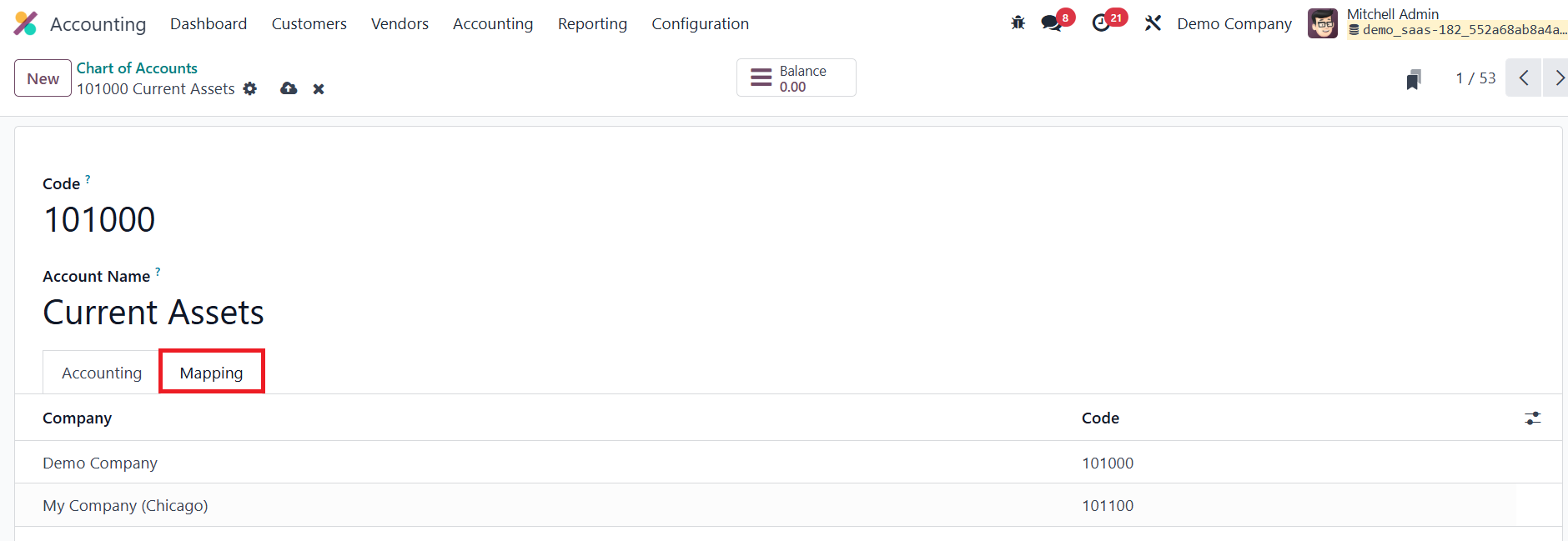
In Odoo 18, the mapping feature within the Chart of Accounts is
designed to align and link individual accounts across multiple
companies or subsidiaries. This functionality is especially useful
in a multi-company environment, where different companies may use
distinct account structures but still need to consolidate or
coordinate financial reporting.
Clicking the Balance button reveals the account’s current debit,
credit, and net totals.
25.1 Default Accounts
In Odoo 18 Accounting, the Default Accounts section lets you
pre‑define which ledgers and journals the system should use when it
automatically books specialised entries. Doing this once ensures
every subsequent transaction lands in the right place without an
accountant having to pick accounts manually.
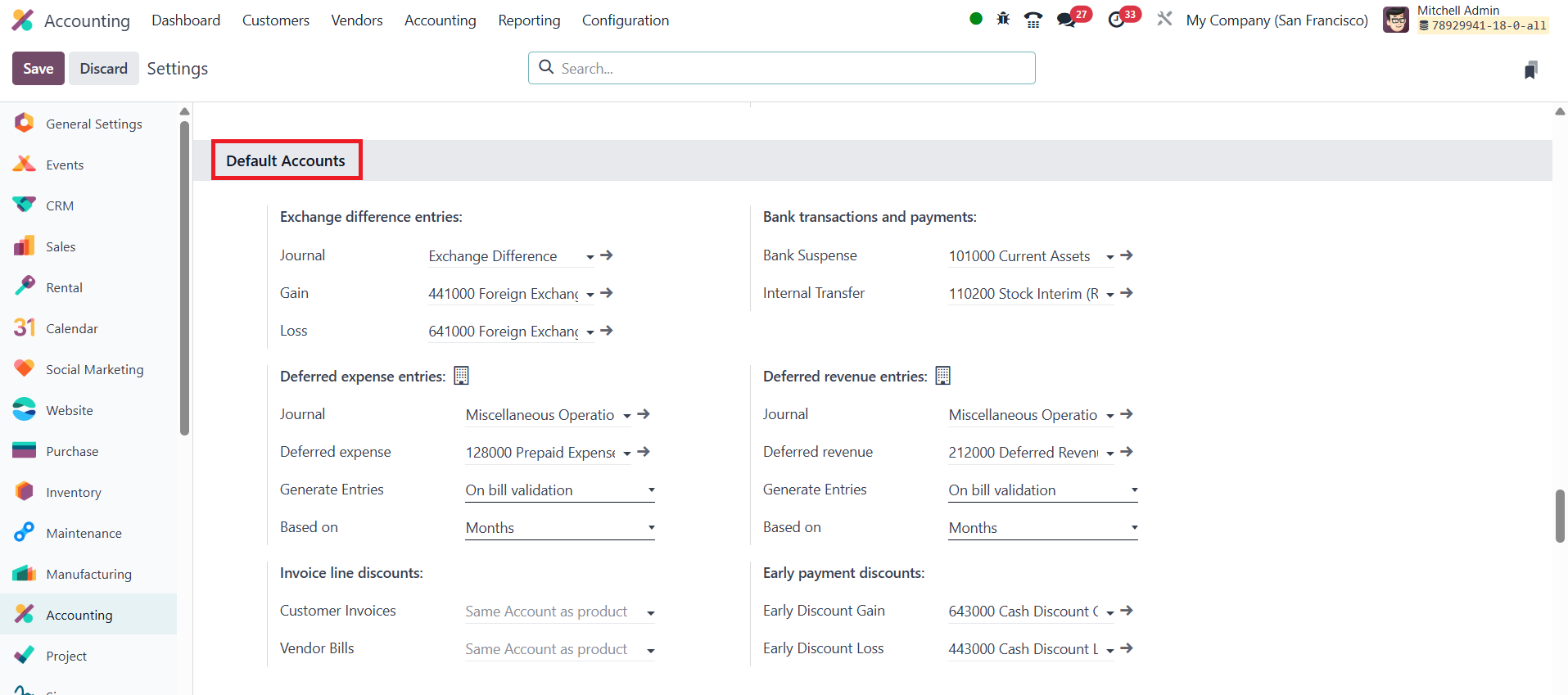
Exchange‑difference entries deal with currency revaluations that
arise when you settle a foreign‑currency invoice or run a period‑end
remeasurement. Here you tell Odoo which journal should host those
automatic movements and which two profit‑and‑loss accounts will
capture a gain or a loss. For Deferred expense entries, you define
how prepaid costs are capitalised and later amortised. The journal
you specify is where every recognition entry will be posted month
after month. The Deferred Expense account, usually a current‑asset
sub‑ledger, temporarily stores the full prepayment. In
Generate Entries you set whether those amortisation moves should
appear immediately in Draft, be Posted right away, or be created
later manually. Finally, Based on lets you choose the anchor date
for the schedule: either the vendor bill’s invoice date or explicit
service start/end dates.
When you give line‑level price reductions, the Invoice line discounts
mapping decides which contra account absorbs them. One account
handles discounts you grant on Customer Invoices, and another
offsets discounts you receive on Vendor Bills. Under Bank
transactions and payments, two clearing accounts keep cash‑book
activity orderly. Bank Suspense account is the default interim
ledger used when imported statement lines haven’t yet been matched
to invoices, bills, or miscellaneous entries. Odoo allows you to
manage internal money transfers, requiring a minimum of two bank or
cash accounts. Internal transfer accounts are necessary to
facilitate the transfer process. Additionally, you can configure a
default internal transfer account in this section for ease of use.
Deferred revenue entries mirror deferred expenses but for unearned
income such as multi‑period service contracts. You choose a journal
for monthly recognitions, a Deferred Revenue liability account to
hold the initial credit, set the Generate Entries timing, and decide
whether the schedule should reference the invoice date or explicit
service dates.
Finally, Early‑payment discounts handle the financial impact of
settling invoices before the due date. When you pay a supplier early
and earn a price break, the discount portion is booked to the
Early Discount Gain account. Conversely, when your customer pays
early and you forgot part of your revenue, the system posts that
concession to Early Discount Loss. Because these defaults are in
place, each early‑payment event is recognised instantly and
consistently without additional clicking.
Setting these default accounts once aligns every automated posting
with your chart of accounts, keeps suspense and clearing ledgers
tidy, and gives management and statutory reports a clean,
reconcilable audit trail.