11. Journals
In Odoo 18 Accounting, accurately recording every financial
transaction is vital for maintaining transparency, ensuring
compliance, and generating reliable reports. This is done through
the use of accounting journals, which are structured logs of
transactions categorized and recorded by date. These journals serve
as the foundational elements of the double-entry accounting system
and help businesses monitor cash flow, revenue, expenses, and other
financial activities. In Odoo 18, you can create and configure
various types of journals including Sales Journal, Purchase Journal,
Bank Journal, Cash Journal, and Miscellaneous Journal, each catering
to specific types of business transactions such as customer
invoices, vendor bills, bank reconciliations, and ad hoc entries.
To access and manage journals in Odoo 18, navigate to the
Configuration menu within the Accounting module and select the
Journals option.
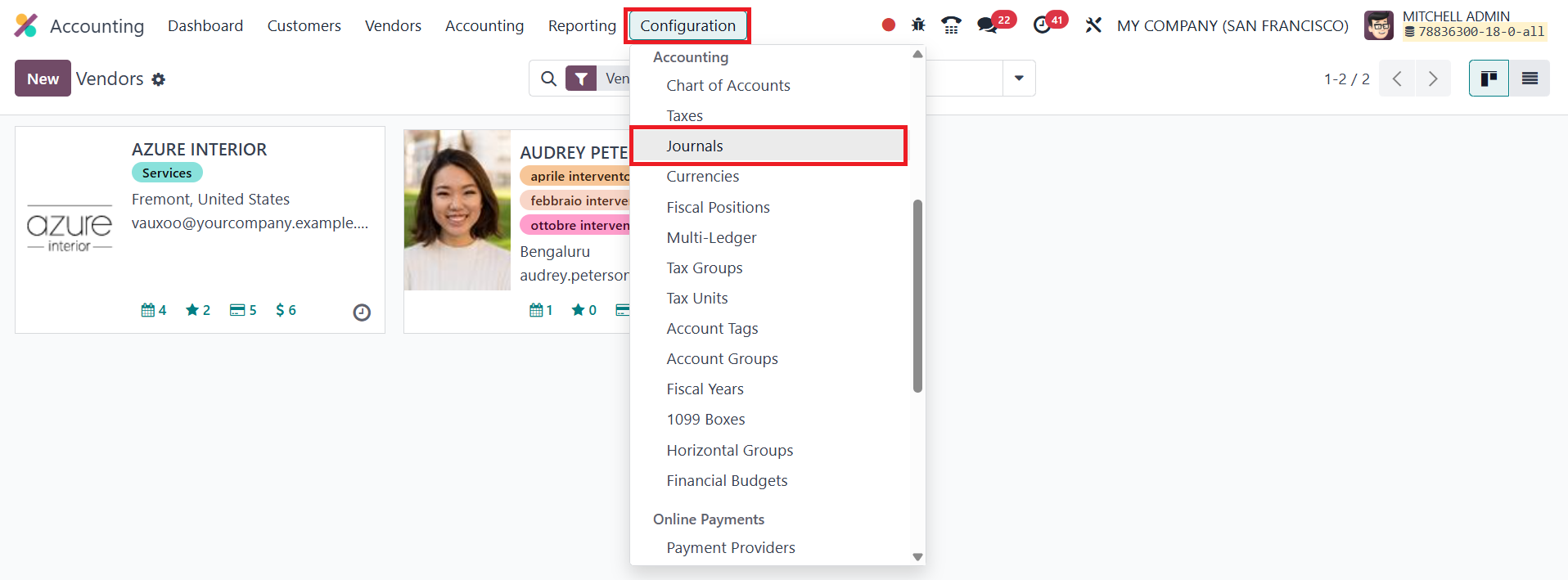
This section presents a comprehensive overview of all the journals
that have been configured in the system.
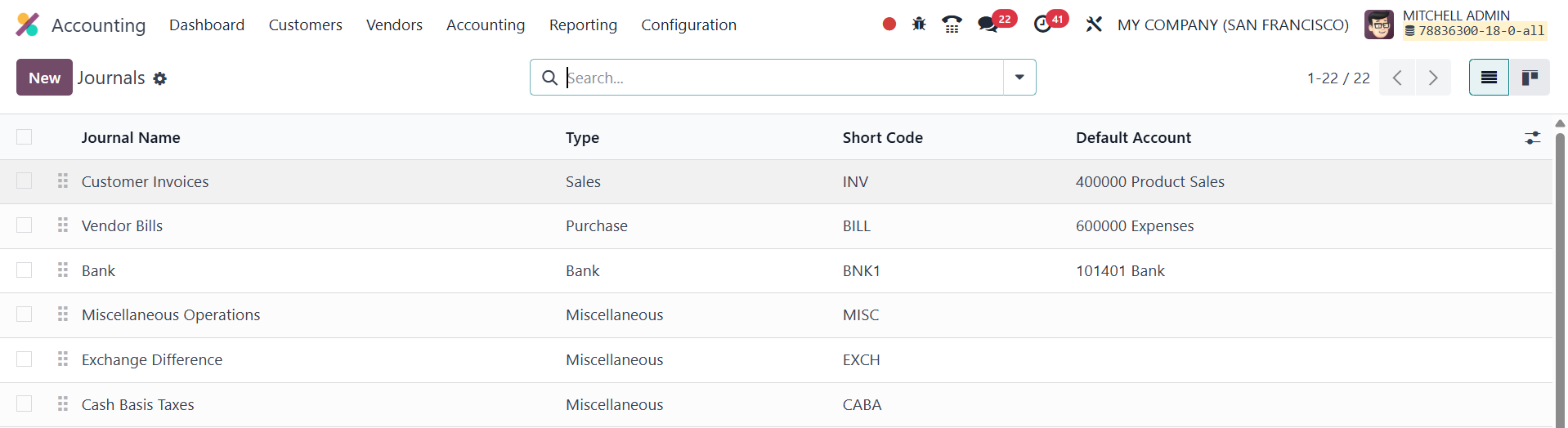
The list view includes key details such as Journal Name, Type (Sales,
Purchase, etc.), Short Code, and the Default Account associated with
each journal. To create a new journal, click the New button.
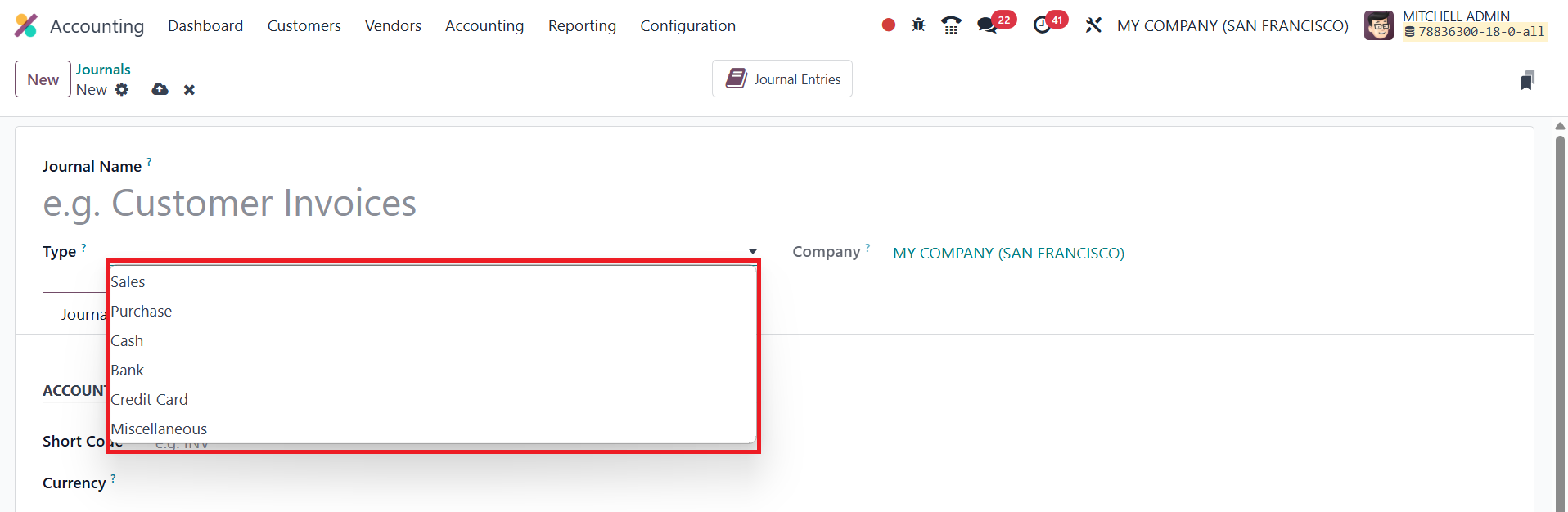
This opens a configuration form where you begin by entering a Journal
Name; for example, “Online Sales” or “Local Purchases.” The Company
field will automatically populate with your current company,
ensuring that the journal is correctly assigned within a
multi-company environment if applicable. The next critical step is
to define the Journal Type, which determines the behavior and
purpose of the journal. In Odoo 18, the available journal types are:
- Sales Journal: Used to record customer invoices and
revenue.
- Purchase Journal: Used for entering vendor bills and
tracking company expenses.
- Cash Journal: Designed for managing cash transactions
such as petty cash expenses or cash payments.
- Bank Journal: Used for bank-related entries including
deposits, withdrawals, and bank statement reconciliations.
- Credit Card Journal: Used to manage and record
transactions made via company credit cards, helping businesses
maintain better oversight of credit-based expenditures.
- Miscellaneous Journal: Reserved for entries that don’t
fit into the above categories, such as adjustments,
depreciation, or opening balances.
The journal type you choose influences the subsequent configuration
options.
11.1 Sales
In Odoo 18 Accounting, configuring a Sales Journal allows you to
accurately record entries for customer invoices. When creating a
journal, selecting the Sales journal type opens up specific fields
under both the Journal Entries and Advanced Settings tabs, enabling
precise control and customization.
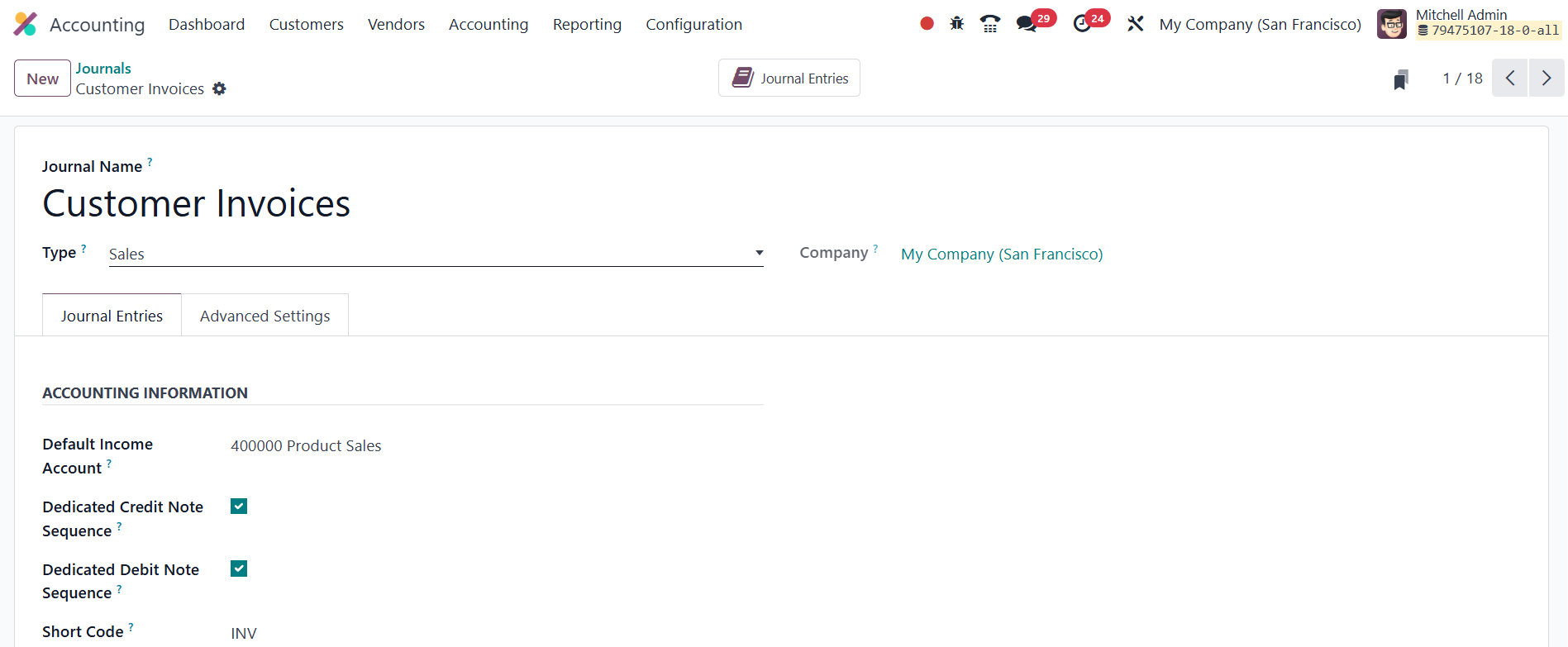
Within the Journal Entries tab, you can assign a Default Income
Account which will be used for transactions recorded in this
journal. If you prefer to maintain separate sequences for invoices
and credit notes, you can enable the Dedicated Credit Note Sequence
option. This ensures that credit notes issued under this journal
follow a unique numbering pattern, making tracking easier.
Similarly, if you prefer to maintain separate sequences for invoices
and debit notes, you can enable the Dedicated Debit Note Sequence
option. The shorter name used to display can be specified in the
Short Code field.
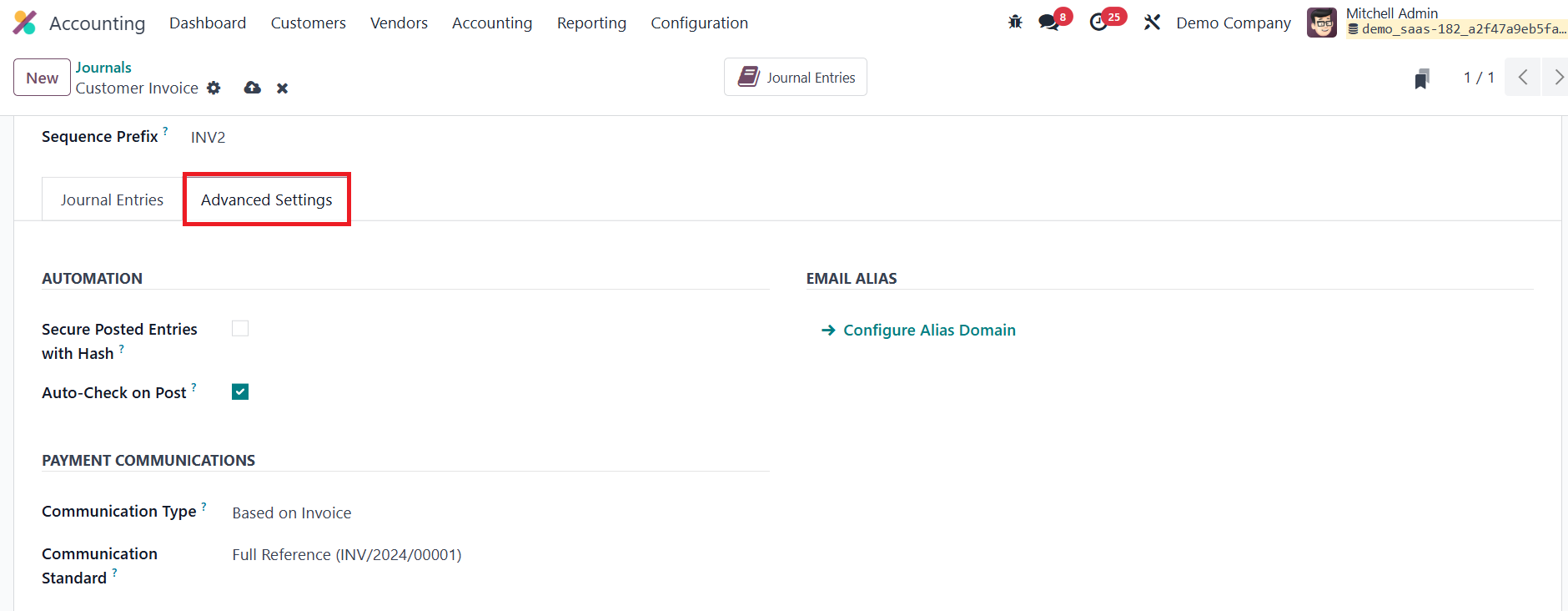
Moving to the Advanced Settings tab, you have the option to restrict
journal usage by specifying Allowed Accounts. If this field is left
blank, all accounts will be accessible. Enabling Secure Posted
Entries with Hash ensures that once a journal entry is posted, it
receives a secure hash and becomes immutable, promoting data
integrity and compliance with auditing standards.
In the Communication Type section, you can define how the reference
communication appears on the customer’s invoice. This helps
customers identify which invoice they’re paying for. Options include
Based on Invoice, or Based on Customer. Furthermore, under
Communication Standard, you can select reference models, with Odoo’s
internal reference being the default. If you wish to automate
invoice creation via emails, you can specify the Email Servers for
integration.
11.2 Purchase
In Odoo 18 Accounting, you can create a Purchase Journal to
efficiently manage and track entries related to vendor bills and
company expenses. To do this, select Purchase as the Journal Type
when configuring a new journal. Much like the Sales Journal, the
Journal Entries and Advanced Settings tabs become available for
customization, although the default configurations are tailored for
purchase-related transactions.
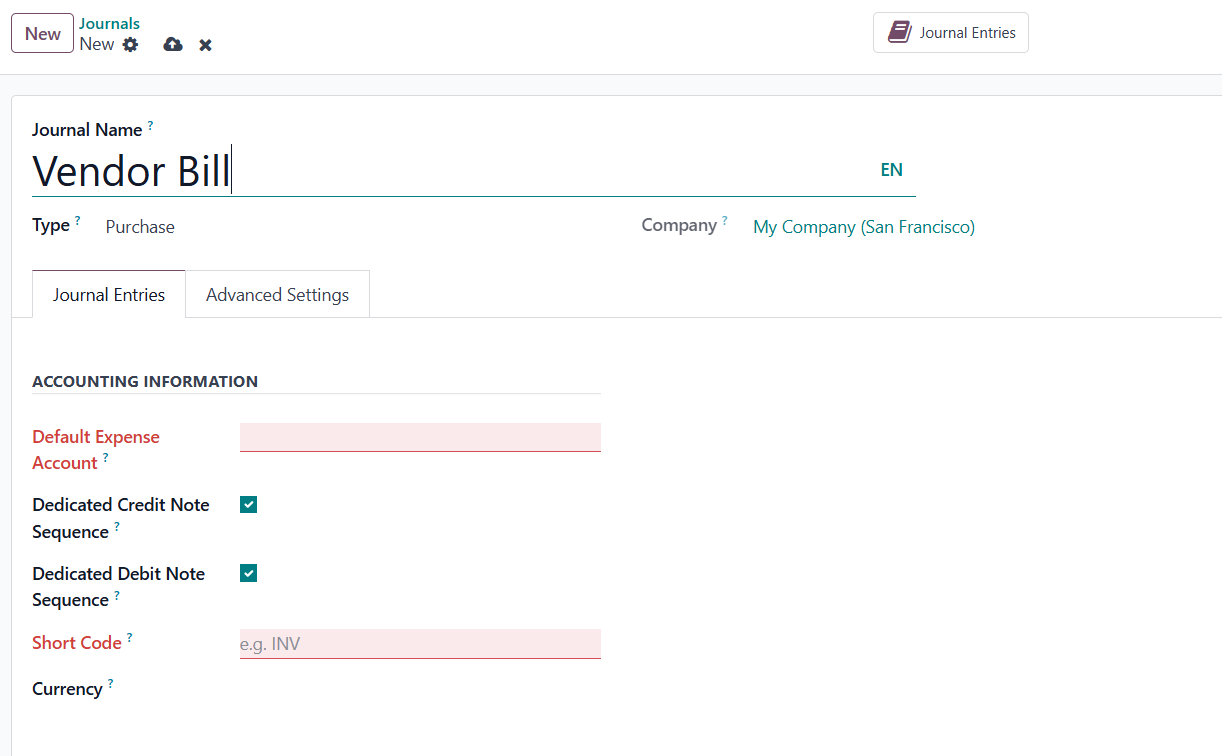
Within the Journal Entries tab, the key field to configure is the
Default Expense Account. This account will automatically be used for
expense entries recorded through this journal, ensuring that costs
are accurately categorized and consistently documented in your
financial records.
You can also assign a Short Code to easily identify this journal in
accounting operations. Additionally, you may set a specific Currency
for the journal, which is especially useful if you handle purchases
in multiple currencies.
In the Advanced Settings tab, you have the option to restrict access
by listing the Allowed Accounts. If you leave this field blank, the
journal will allow posting to all accounts. Enabling the Secure
Posted Entries with Hash option helps maintain the integrity of
posted records by making them immutable once finalized, which is
crucial for compliance and auditing purposes.
These settings ensure that the Purchase Journal in Odoo 18 is
equipped to handle vendor bill processing efficiently while
maintaining accuracy, control, and compliance in your accounting
system.
11.3 Cash
In Odoo 18 Accounting, the Cash Journal is designed to handle
accounting entries related to manual cash transactions, such as
petty cash expenses or cash collections. When configuring a Cash
Journal, you will find several dedicated tabs that allow for
detailed customization of journal behavior.
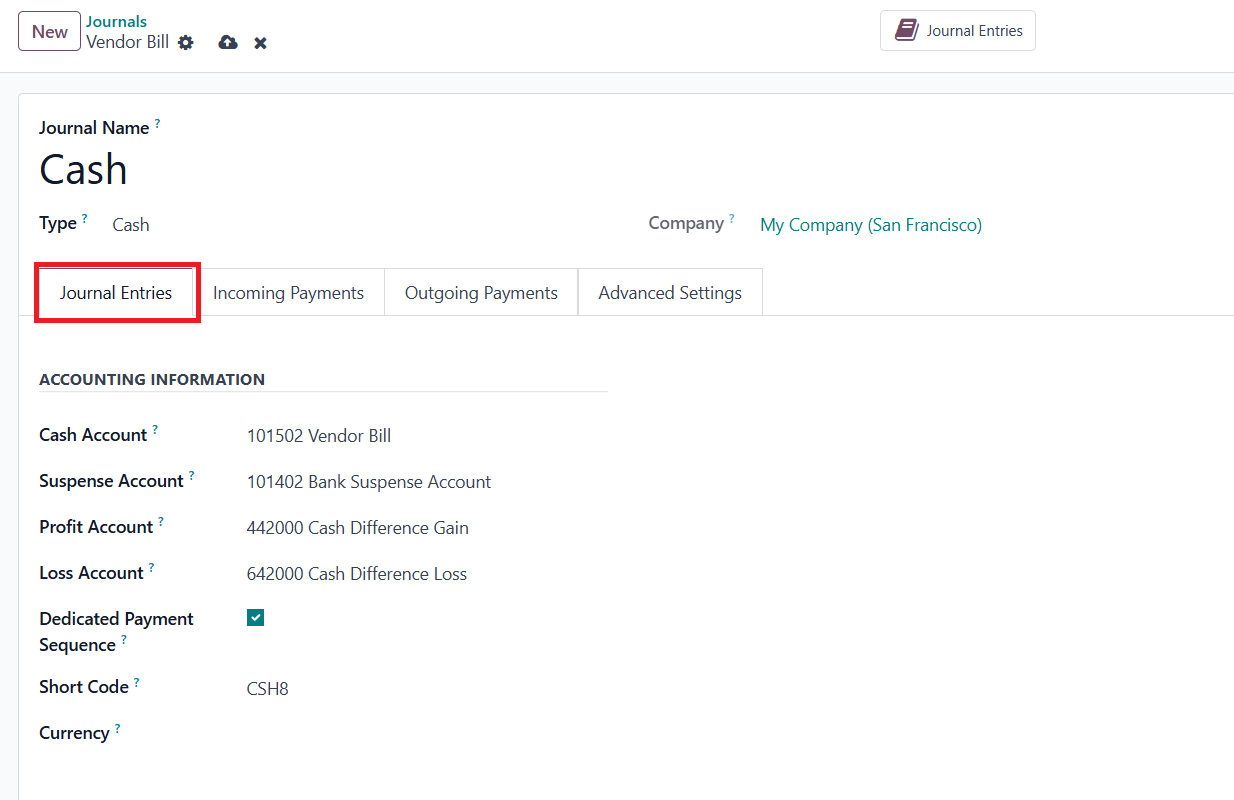
Under the Journal Entries tab, you can assign a specific Cash Account
that will be used to track all cash-related transactions.
Additionally, a Suspense Account can be configured. This account
temporarily holds amounts from cash transactions or bank statements
until proper reconciliation is completed. If there's a discrepancy
between the expected and actual cash register balances, the system
will automatically post the difference to the Profit Account or Loss
Account, as appropriate. To maintain a clear audit trail, you can
enable the Dedicated Payment Sequence feature, which ensures that
payments and cash transactions recorded through this journal follow
a distinct numbering sequence.
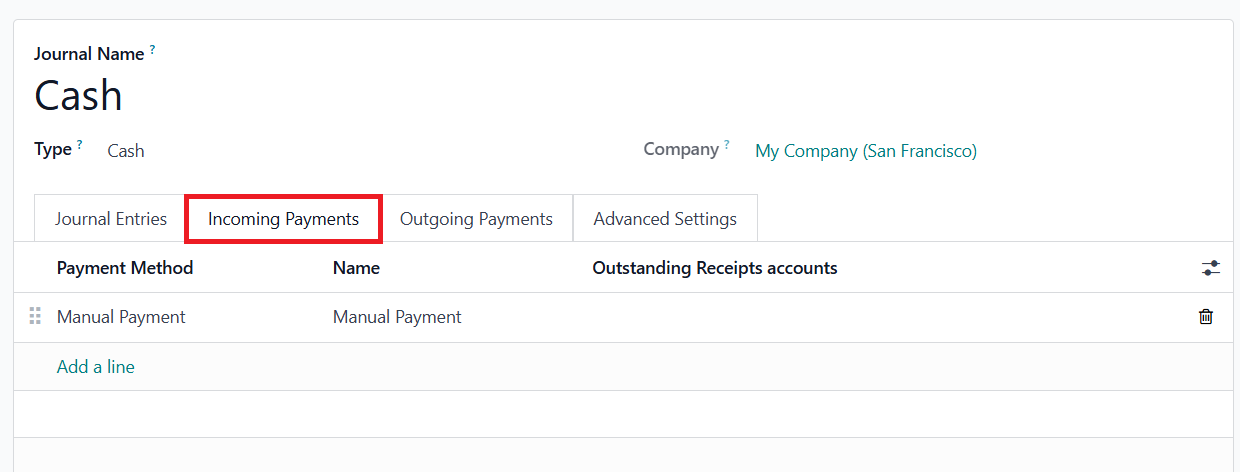
The Incoming Payments tab allows you to define the names and methods
for receiving cash payments, while the Outgoing Payments tab lets
you specify the methods used for recording outgoing cash flows.
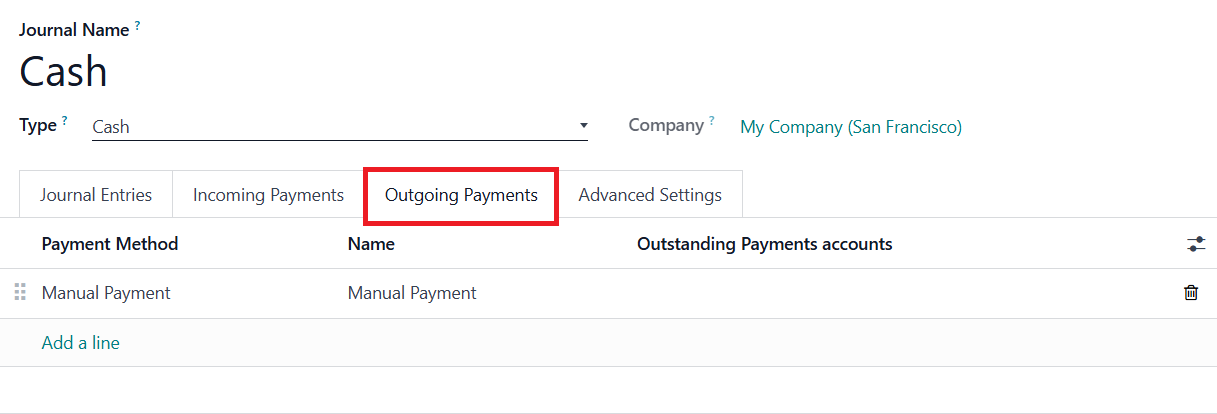
These customizable options help streamline the management of both
incoming and outgoing cash transactions. Finally, the Advanced
Settings tab provides an option to restrict access by specifying
Allowed Accounts. If no accounts are defined here, the system will
permit entries to all accounts.
11.4 Bank
In Odoo 18 Accounting, the Bank Journal is utilized for managing and
recording all bank-related transactions, such as deposits,
withdrawals, and statement reconciliations. To configure this
journal, you should select Bank as the Journal Type during creation.
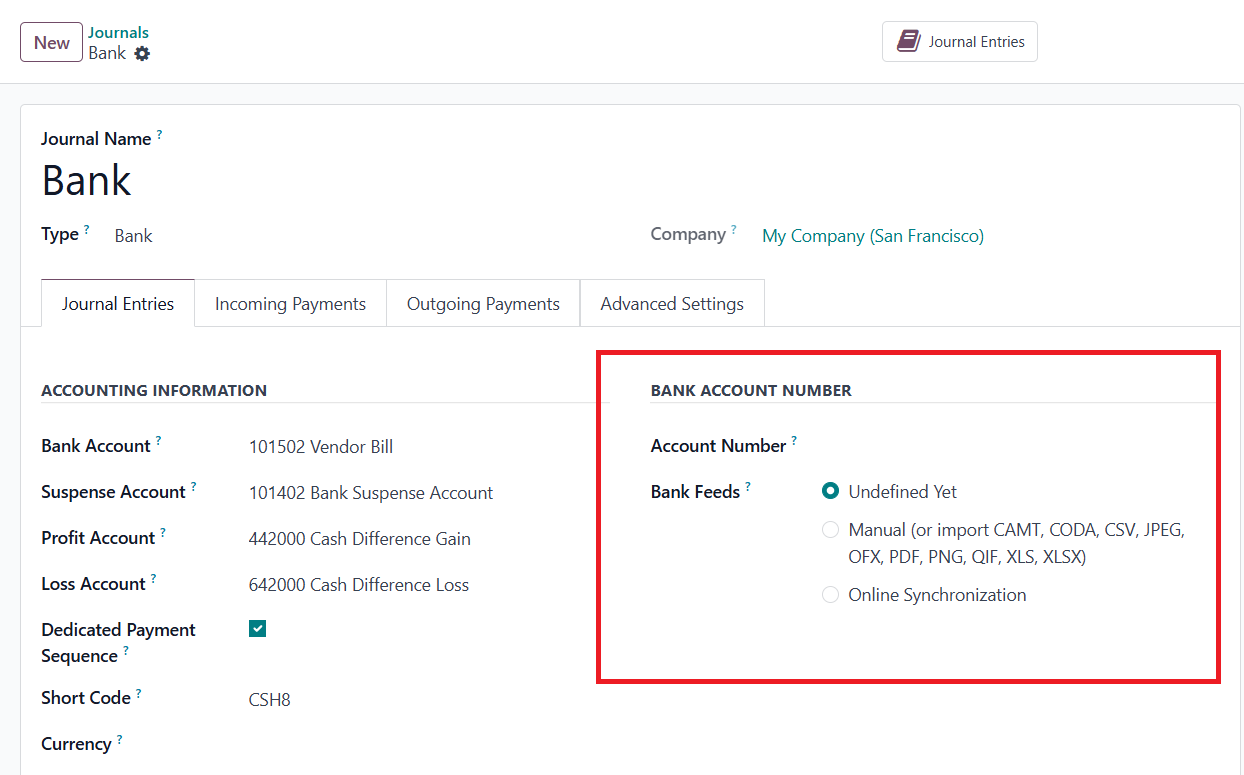
You will be prompted to input details such as the Account Number and
the linked Bank Account. These fields ensure that your bank
transactions are accurately associated with the correct financial
accounts. In the Bank Feeds section, you can decide how bank
statements are to be handled. Odoo offers flexible options such as
manual import of bank statements or automated synchronization with
your bank via supported integrations. If you're not ready to define
this setting during setup, you can select Undefined Yet as a
placeholder.
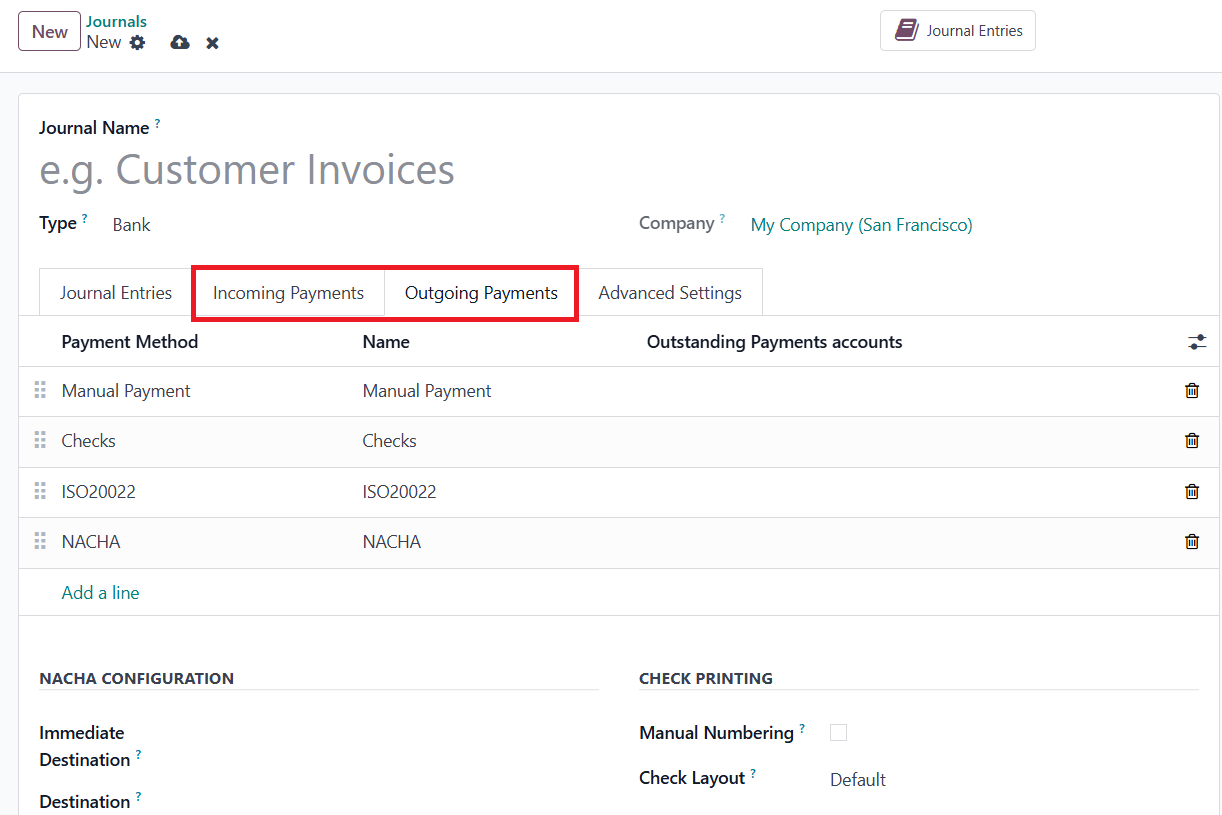
Odoo 18 also provides dedicated tabs for configuring both Incoming
Payments and Outgoing Payments, allowing you to specify the payment
methods used for each. Based on the methods you select, such as
SEPA, check, or manual, you will be presented with additional
configuration options relevant to that method, ensuring seamless
processing of bank payments and receipts.
11. 5 Credit Card
In Odoo 18 Accounting, a new Credit Card journal type has been
introduced to manage business-related credit card transactions
efficiently. When setting up a Credit Card journal, you can
designate it as the Journal Type: Credit Card, which will tailor the
journal's configuration fields accordingly.
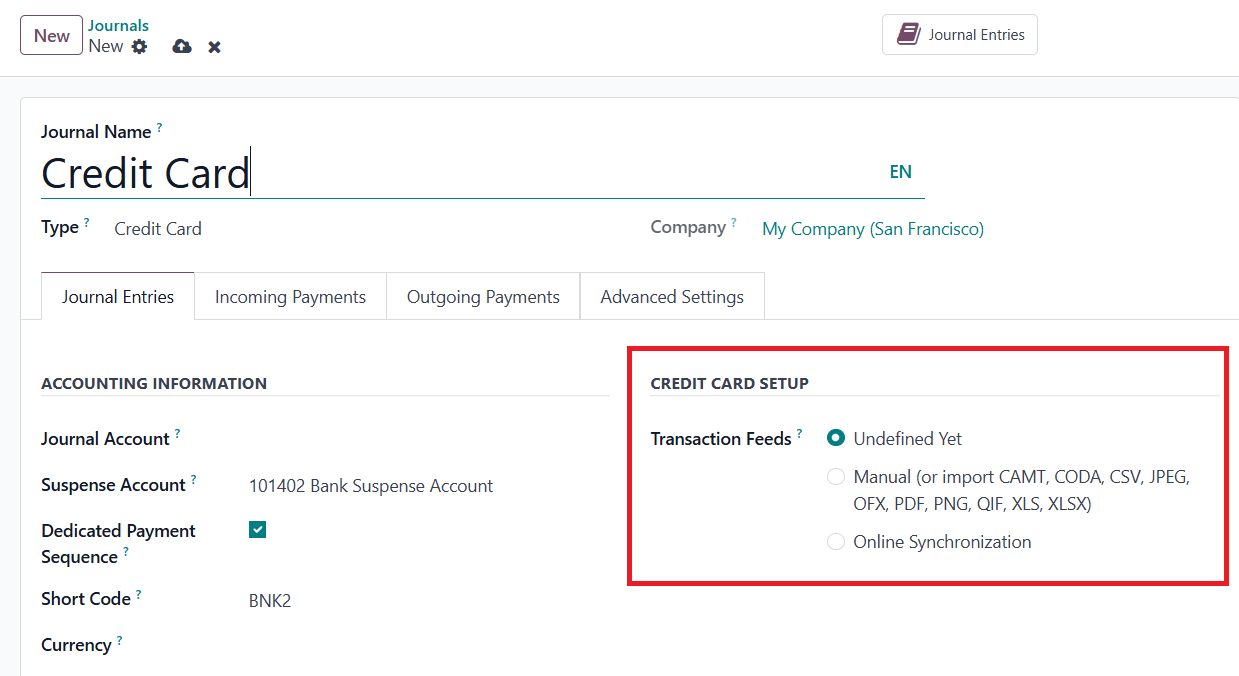
One of the notable additions in this setup is the Credit Card Setup
section, where you decide how transaction feeds are managed. Under
the Transaction Feeds field, you can choose from various options:
Undefined Yet, Manual (or import), which supports multiple file
formats like CAMT, CODA, CSV, JPEG, OFX, PDF, PNG, QIF, XLS, and
XLSX, or Online Synchronization for automatic fetching of credit
card transactions from your financial institution.
11.6 Miscellaneous
In Odoo 18 Accounting, the Miscellaneous Journal is designed to
accommodate all accounting entries that do not fit neatly into
predefined categories such as sales, purchases, bank, cash, or
credit card transactions. This journal is typically used for
adjustments, opening balances, depreciation entries, and other ad
hoc financial operations.
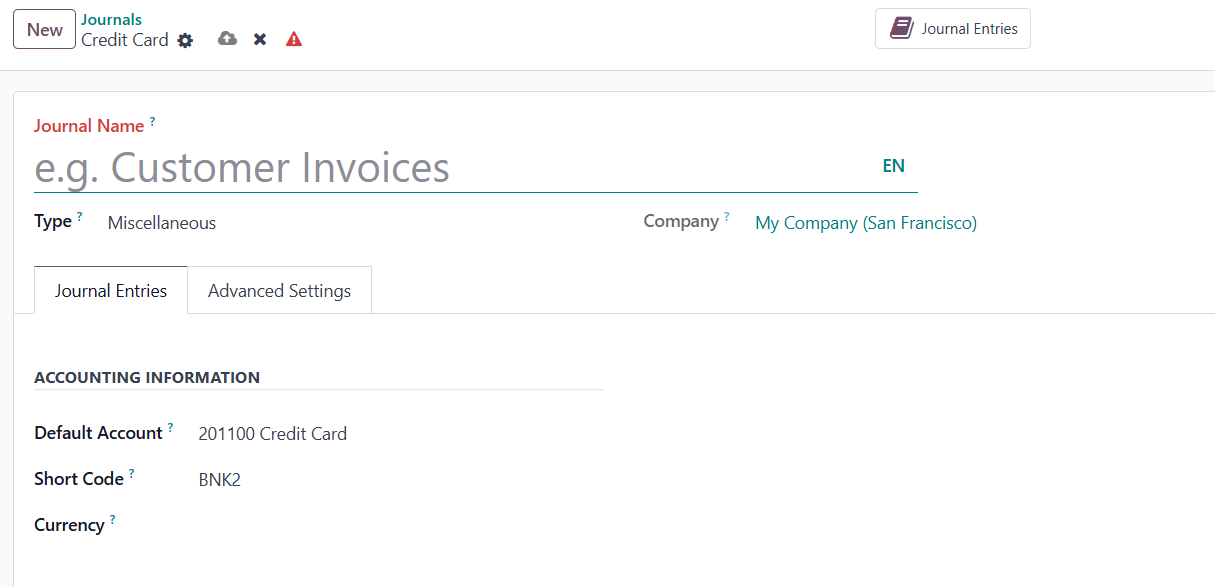
When configuring a Miscellaneous Journal, you can specify the
necessary accounting and advanced settings just like in other
journal types. Once the journal is created and saved, Odoo will
automatically store it in the system. You can view all the entries
recorded in this journal by clicking the Journal Entries smart
button, which provides a comprehensive list of all the transactions
associated with it. This ensures transparency and facilitates
accurate financial reporting for non-standard accounting activities.