The Discuss module in Odoo 18 Enterprise Edition is a powerful
communication hub designed to unify internal messaging, system
notifications, and project updates across the organization. It
enhances team collaboration by eliminating the need to switch
between multiple applications, offering a seamless communication
experience directly within the Odoo environment. Fully integrated
with all other Odoo modules, Discuss ensures that users stay
informed and connected to ongoing activities in real time. It serves
as a centralized digital workspace, enabling users to create
structured channels, exchange private messages, share documents, and
manage notifications efficiently.
Upon accessing the Discuss module, users are welcomed by the primary
mailbox interface. The left panel provides easy access to essential
folders such as Inbox, Starred, and History, offering a streamlined
navigation experience.
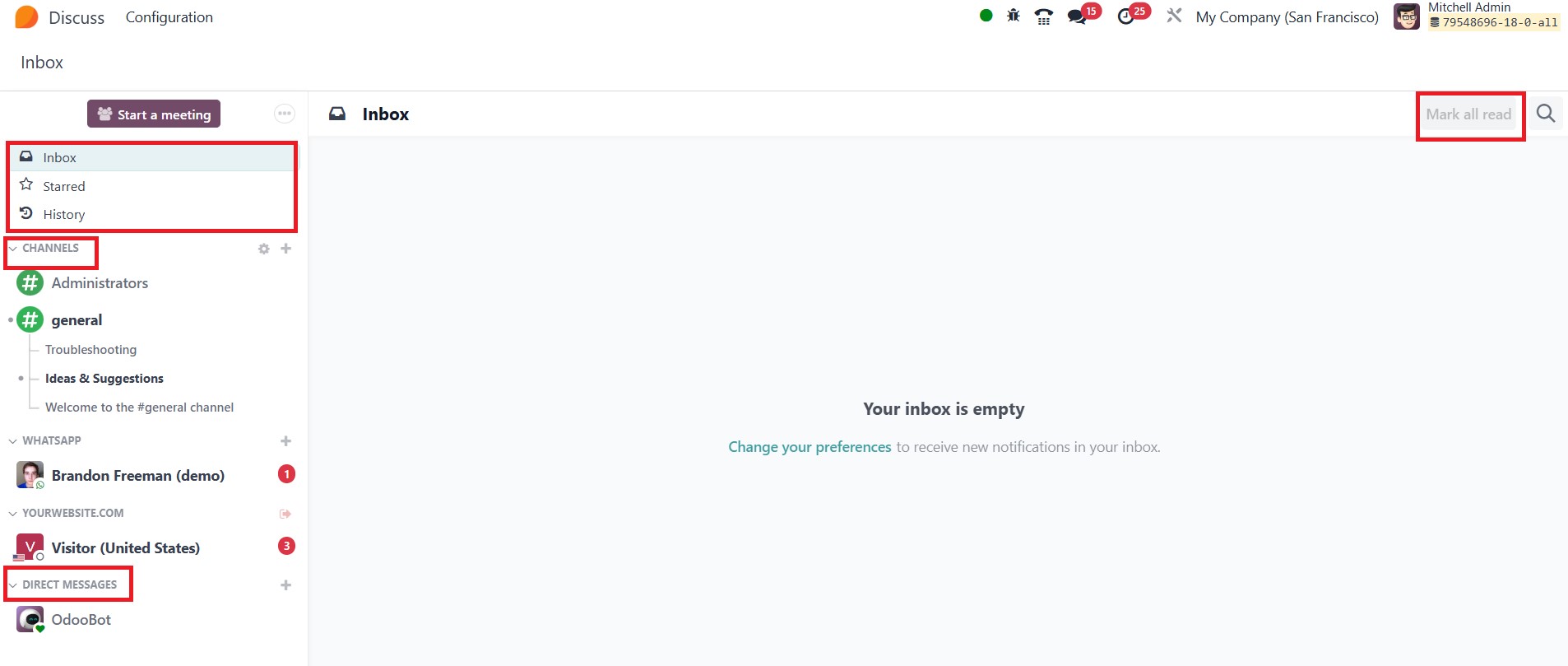
In the Discuss module, the Inbox is where all new messages are
displayed, allowing users to efficiently manage incoming
communications. For quick access to important conversations, users
can mark messages in the Starred section. The History section
provides a comprehensive log of past exchanges, making it easy to
revisit and review previous discussions. To help manage
notifications effectively, a Mark All Read button is conveniently
located at the top right of the interface. Users will find organized
sections for Channels and Direct Messages, supporting seamless
communication through both private one-on-one messaging and
collaborative group discussions within specific channels.