3. Reporting Menu
Odoo 18 offers an advanced ‘Applicant Analysis,’ ‘Source Analysis,’
‘Velocity Analysis,’ and ‘Team Performance' tools in the Reporting
section. This feature presents comprehensive metrics to help HR
teams evaluate hiring effectiveness.
3.1 Applicant Analysis
The ‘Applicant Analysis’ reporting window in Odoo 18's Recruitment
module analyzes applicant data to provide insightful information
about the hiring process. This analysis helps HR teams to assess
hiring performance and make well-informed choices.
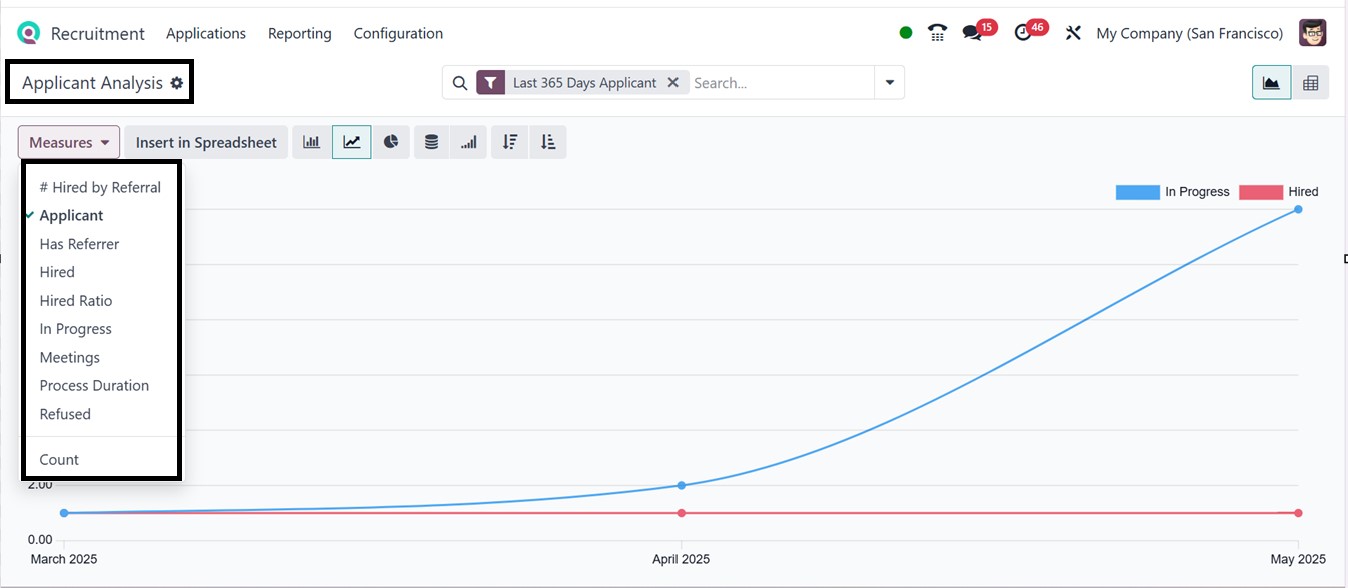
Using the ‘Measures’ button, you can change the reporting structure
based on Applicant, Has Referrer, Hired, Hired Ratio, In Progress,
Meetings, Process Duration, Refuse, and Count, as depicted in the
screenshot below.
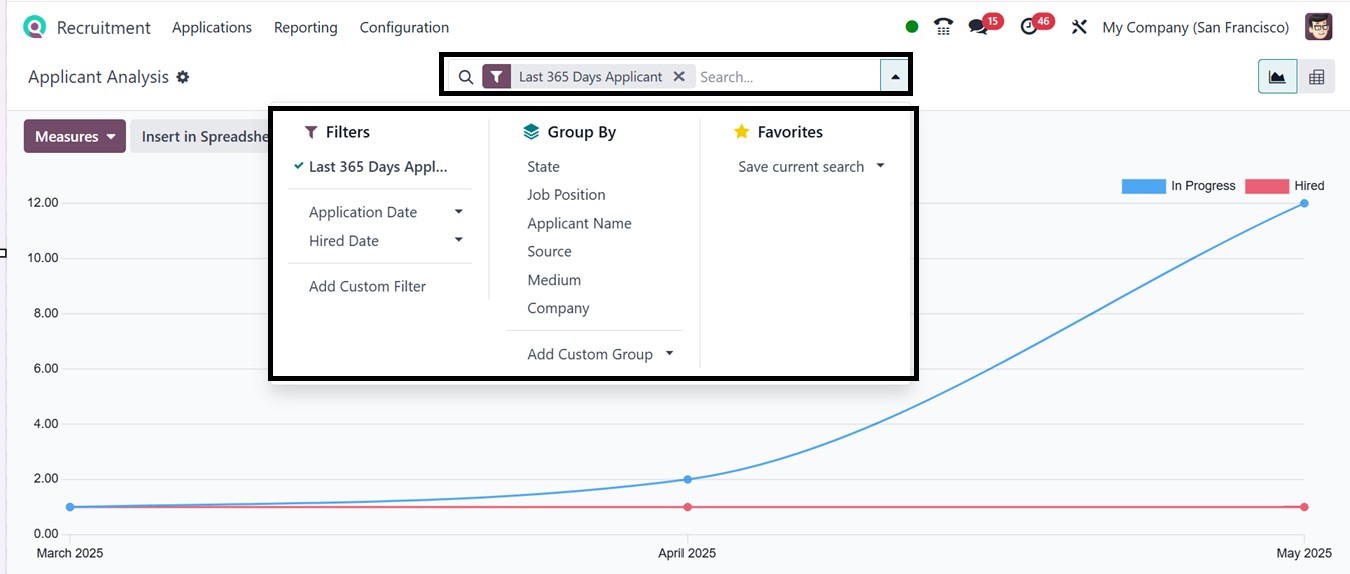
You can sort or filter results using the ‘Filters’ option provided in
the search bar area by various criteria such as Last 365 Days
Applications, Application Date, Hired Date, and you can utilize the
‘Add Custom Filter’ option to create customized filters as per the
requirement.
The ‘Group By’ option can be used to create certain data groups
according to the application State, Job Position, Applicant Name,
Source, Medium, and Company. You can create custom groups using the
‘Add Custom Group’ button and save current searches using the
‘Favorites’ option, as depicted in the screenshot below.
Apart from the graphical views, you can also view the analysis in
pivot tables. Here, the important data are tracked in the report,
including the number of Applicants and stage conversion rates, as
shown below.
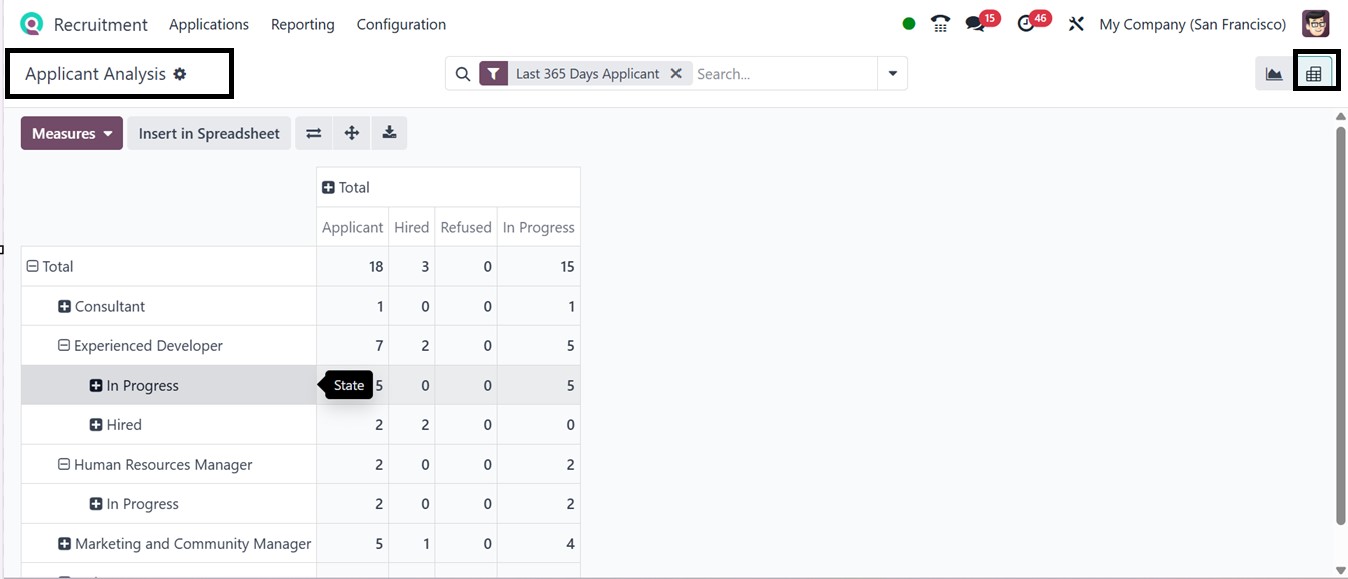
This Pivot view offers real-time updates and options to expand the
pivot axis, Flip Axis, Download, and Insert in Spreadsheet options
for additional research and analysis crucial for locating
bottlenecks, evaluating recruiting channels, and improving hiring
practices.
3.2 Source Analysis
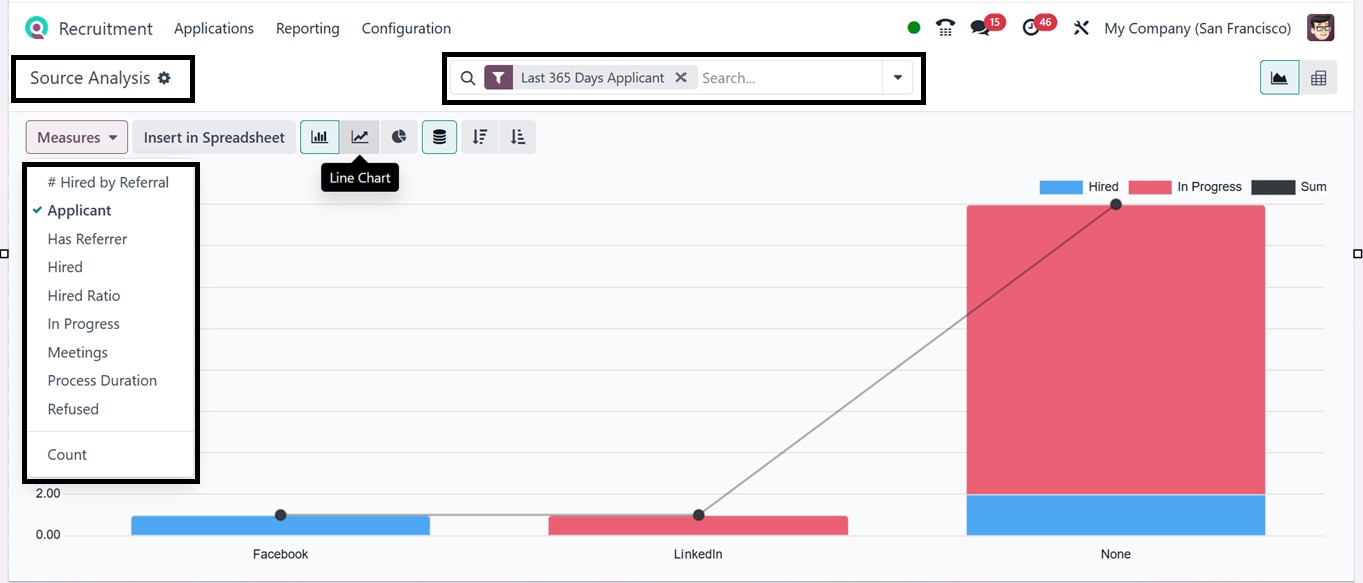
The ‘Source Analysis’ report in Odoo 18's recruiting module is a
useful tool for understanding where candidates come from and which
recruiting sources are most successful. By examining this data, HR
departments may enhance their strategy for attracting higher-quality
individuals and increasing applicant volume. This Source Analysis
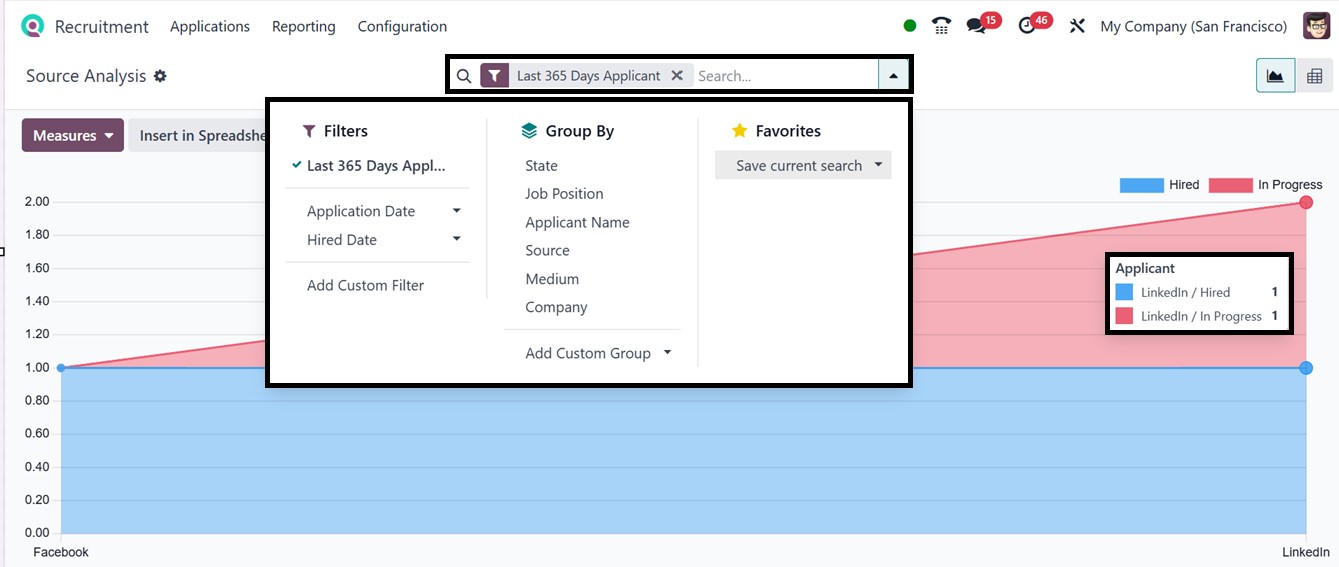
window provides data from the last 365 days in a default graph view.
The graph depicts the number of applications organized by different
sources, such as Facebook, LinkedIn, and any other options if
available.
You can apply Filters, Grouping, and Favorites filter options to
customize the reports according to your requirements. You can switch
between Pivot and multiple Graph views, including bar, pie, or line
charts, to visualize trends.
The "Measures" dropdown lets you analyze specific metrics such as
total applications, Has Referrer, Hired, Hired Ratio, In Progress
etc. These tools enable strategic decision-making and enhance the
overall efficiency of the recruitment process.
The pivot table layout of the Source Analysis report can be adjusted
to reveal which sources, such as job boards, social media, employee
recommendations, or the corporate website, generate the most hires.
By clicking the ‘Total (-)’ box above the columns and selecting
‘Source’ from the drop-down menu, the chart organizes data by
individual sources such as Facebook, search engines, or newsletters,
and displays counts for applications, hiring, and refusals.
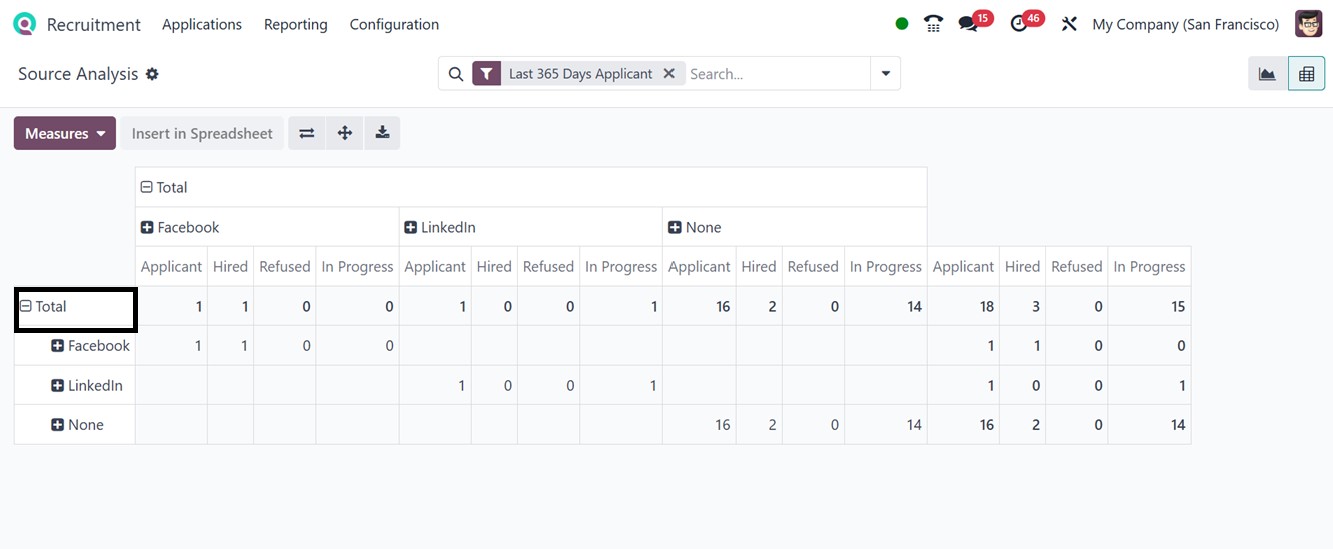
If the default arrangement makes it difficult to read specific
figures, selecting the ‘Flip axis’ icon will reorganize the display
so that sources show as rows and job positions as columns, with the
data further split down by stage for easy analysis.
3.3 Velocity Analysis
The Velocity Analysis report in Odoo 18's Recruitment module helps HR
teams measure how quickly applicants move through each stage of the
hiring process. It tracks time spent in stages like Initial
Qualification, First Interview, Second Interview, and Contract
Proposal to calculate average time to hire and highlights job hiring
delays.
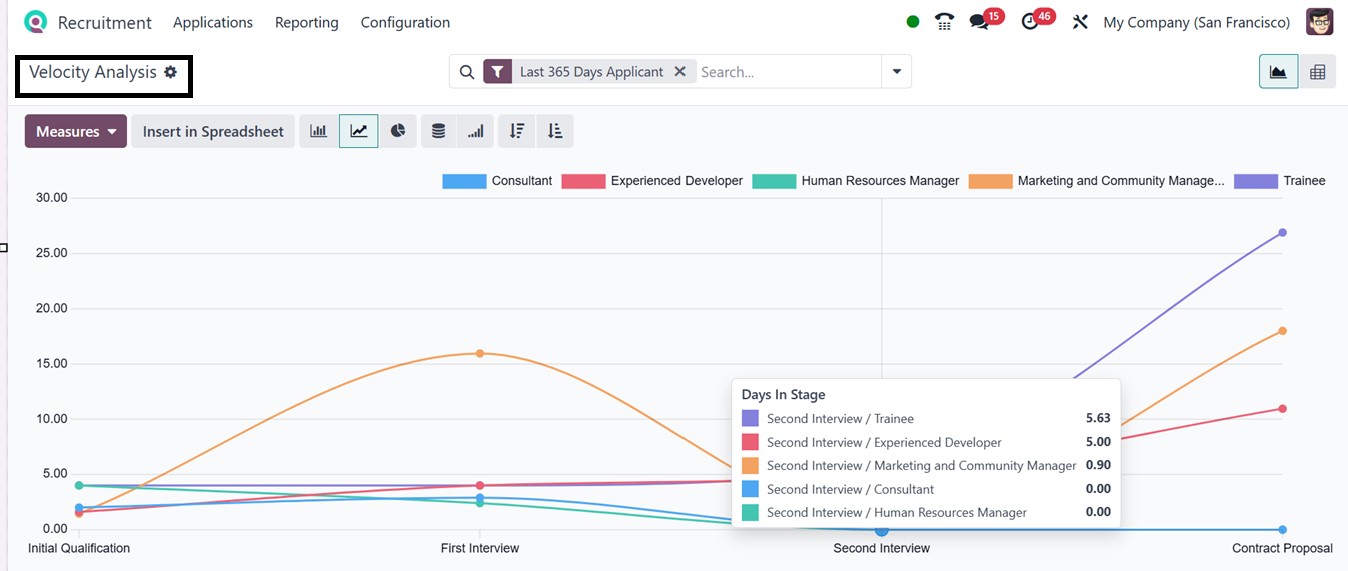
With multiple Graphical and Pivot views, this window offers clear
insights to streamline workflows and improve recruitment efficiency.
The ‘Measures’ section offers ‘Days in Stage’ and ‘Count’ parameters
to change the reporting measures.
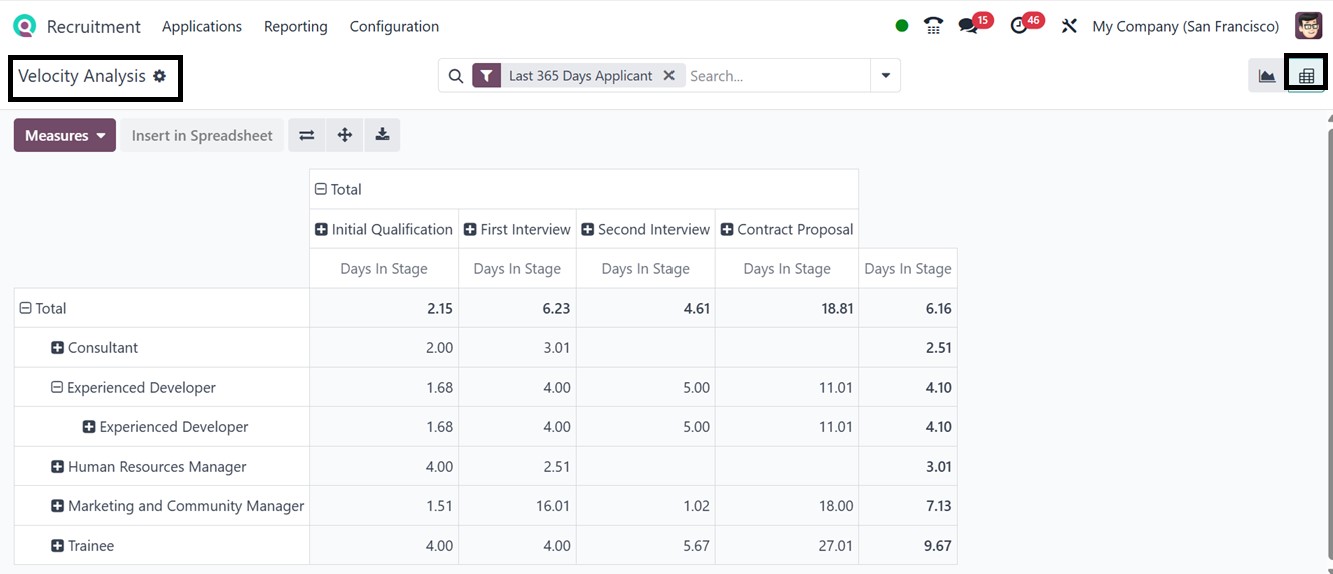
Like the other reporting windows, you can utilize the Filters, Group
By, and Favorites options to filter and sort the required data as
well as customize unique filter operations as per the requirements.
3.4 Team Performance
The ‘Team Performance’ reporting window in Odoo 18's Recruitment
module provides vital information about recruiters and recruiting
teams' performance, displays crucial Measures such as applicant
management, successful hiring, average time to hire, and conversion
rates by recruiter or department.
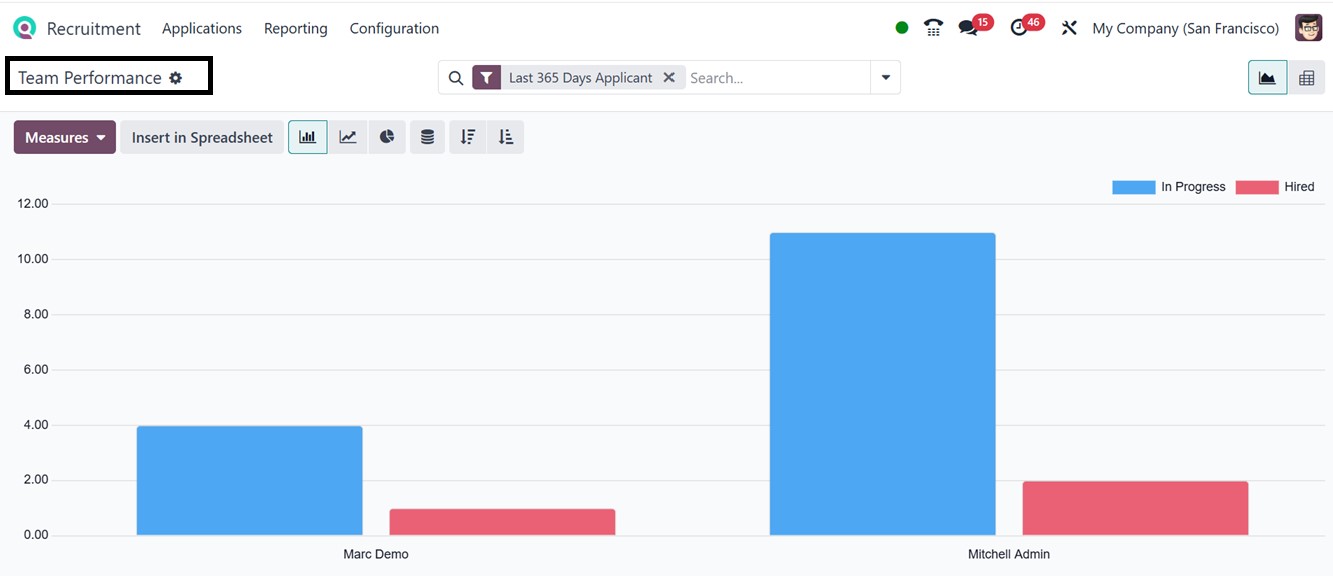
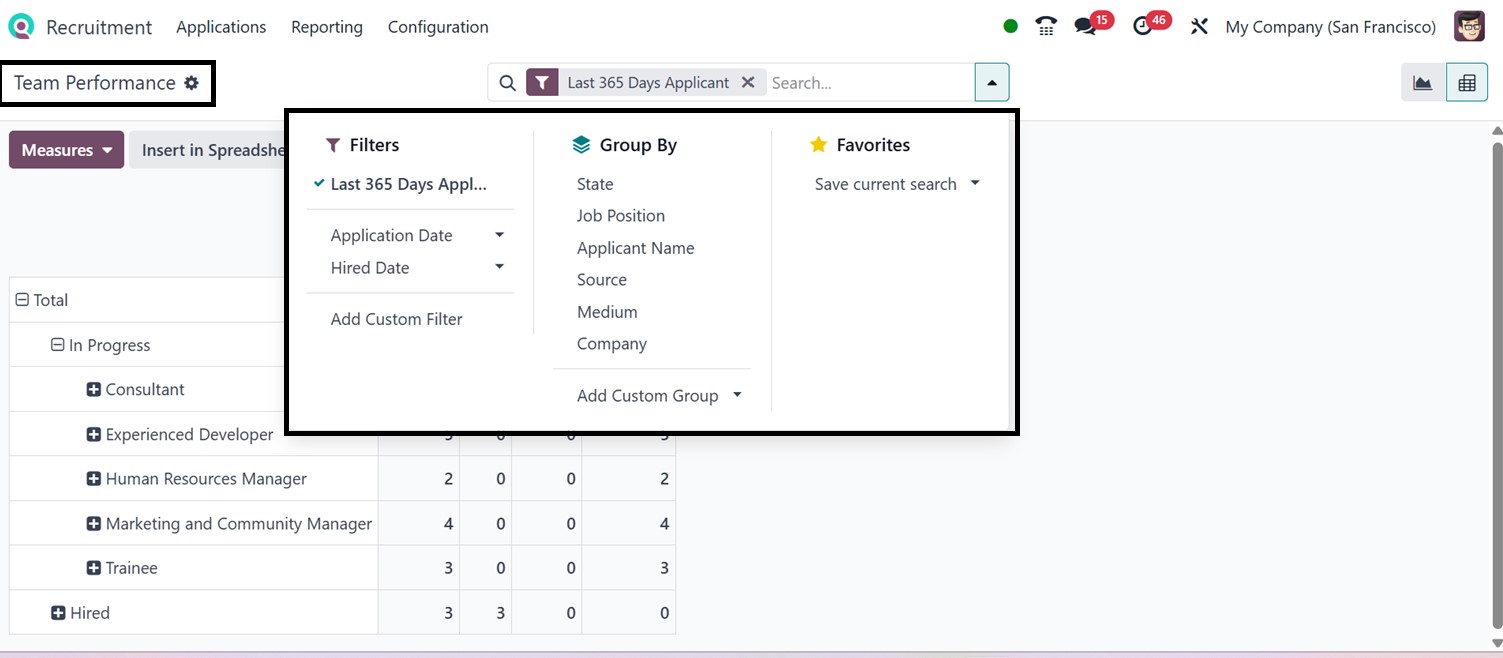
The report offers both Graphical and Pivot table views, with the
ability to categorize and filter data by Application Date and Hired
Date. Using the Group By filter options, including State, Job
Position, Applicant Name, Source, Medium, and Company options, this
window helps to identify high performers, balance workloads, and
improve overall recruiting efficiency.
Overall, the Odoo 18 Recruitment module is a comprehensive solution
for managing the entire hiring process, from job postings to
interviews and offboarding. It offers features like automated
workflows, customizable reporting, resume management, and
integration with other HR tools, enhancing collaboration among
hiring teams. This module is suitable for small businesses and large
enterprises to attract top talent and build a strong workforce.